Hybrid Mode#
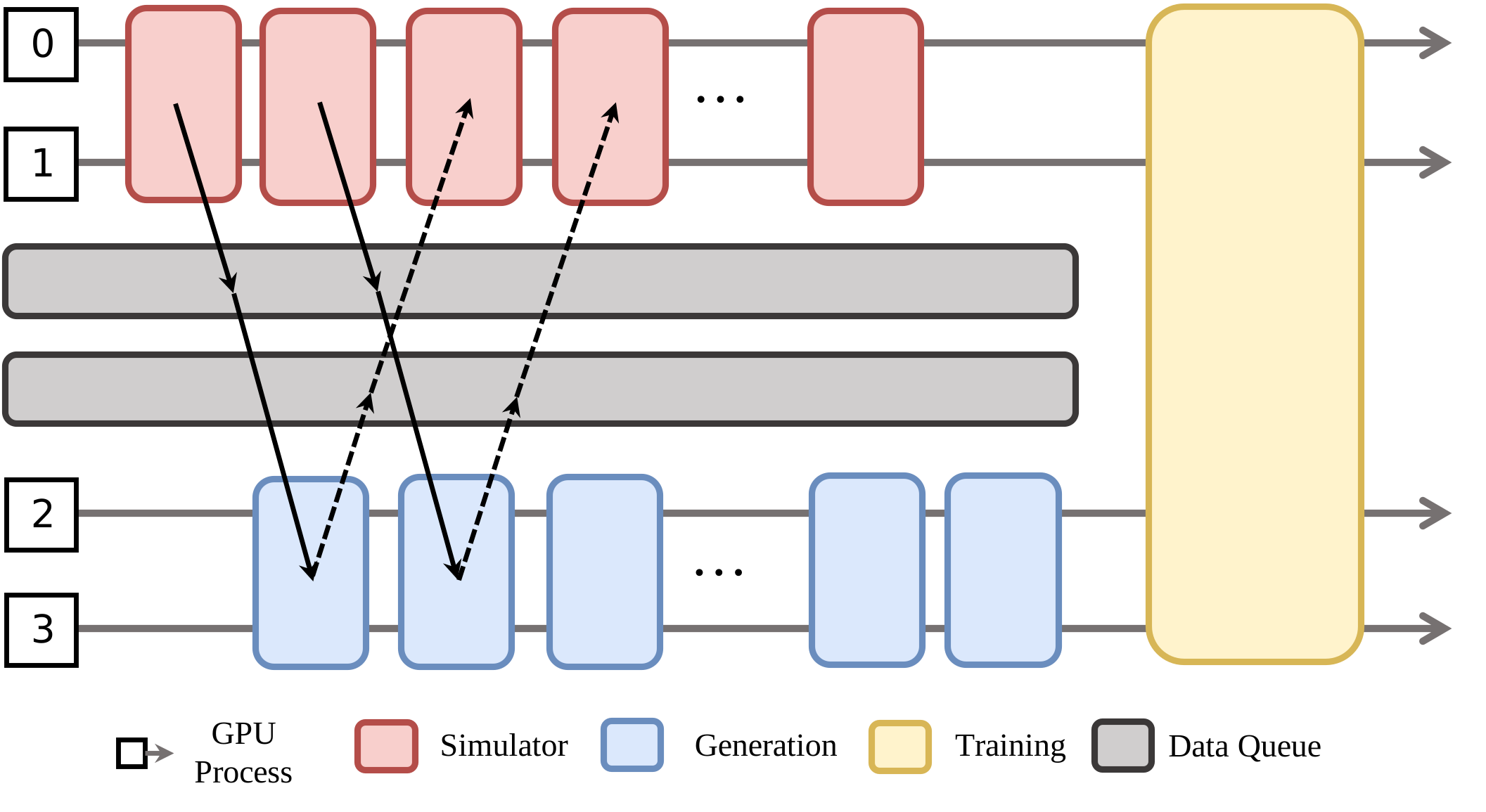
RLinf further augments the collocated mode and disaggregated mode, by introducing hybrid mode: some tasks share the same set of GPUs and some tasks use separate GPUs.
The above figure shows a concrete placement and execution example for an embodied RL training. Simulation workers are placed on GPU 0-1, generation workers are placed on GPU 2-3. Two data queues decouple producer and consumer rates, helping to smooth the pipeline, balance the load, and virtually eliminate performance bottlenecks.After the rollout stage (i.e., simulation+generation), Inference workers are placed and executed on GPU 0-3, and training workers are also on GPU 0-3 afterward. You can see that hybrid mode combines collocated mode and disaggregated mode. The communication utilities (Elastic Communication) in RLinf facilitate such flexible placement and execution mode.
Example configuration
The configuration style of hybrid mode is consistent to collocated/disaggregated mode as shown below. env (i.e., simulator workers) is placed on GPU 0-3, rollout (i.e., generation workers) is placed on GPU 4-7. They run with pipelining. actor (i.e., training workers) are placed on GPU 0-7. When the rollout stage is finished, env and rollout are offloaded to CPU memory, actor is loaded into GPU memory.
cluster:
  num_nodes: 1
  component_placement:
    actor: 0-7
    env: 0-3
    rollout: 4-7
In most cases, env, rollout, and actor should enable offloading as below to avoid OOM error.
env:
  enable_offload: True
rollout:
  enable_offload: True
actor:
  enable_offload: True
Refer to YAML Configuration for compete configuration.
ComponentPlacement programming
Different from collocated and disaggregated modes, hybrid mode uses HybridComponentPlacement, which has less constraints on worker placement.
from rlinf.utils.placement import HybridComponentPlacement

component_placement = HybridComponentPlacement(cfg, cluster)
# Create actor worker group
actor_placement = component_placement.get_strategy("actor")
actor_group = FSDPActor.create_group(cfg).launch(
     cluster, name=cfg.actor.group_name, placement_strategy=actor_placement
 )
Refer to training embodied agent for complete code.