
Lingbot-VLA模型强化学习#
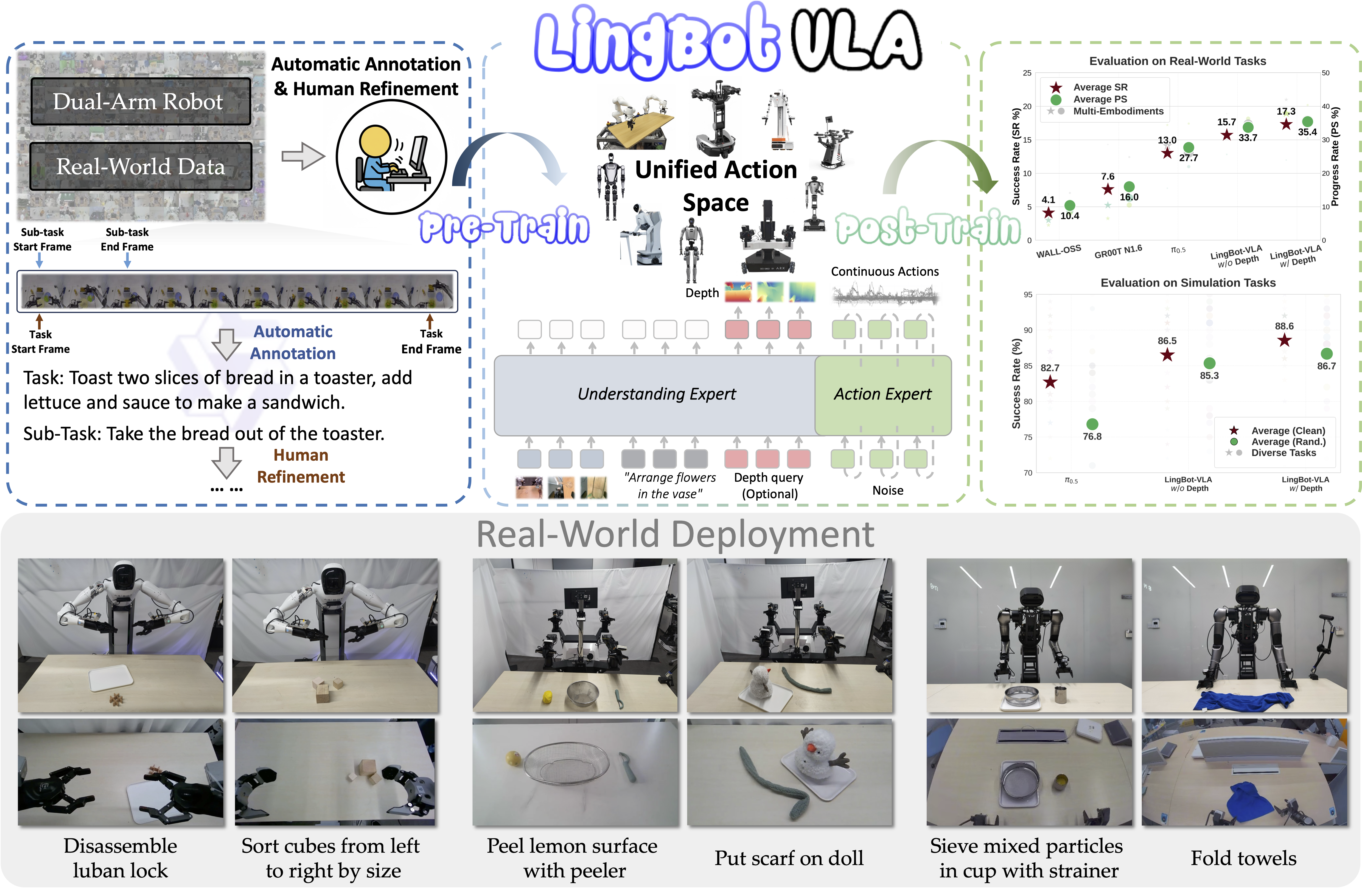
Lingbot-VLA 是一个基于 Qwen2.5-VL 的 视觉-语言-动作模型,以自回归方式生成连续动作块。RLinf 将其原生接入——嵌入 RLinf 的 Python 内存空间,实现零延迟的 Tensor 级交互——并支持在 RoboTwin 2.0 仿真器上进行全参数 SFT 与 GRPO 微调。
概览#
先 SFT、再用 GRPO 微调 Lingbot-VLA,完成 RoboTwin 2.0 双臂操作任务。
RoboTwin 2.0
SFT · GRPO
Click Bell · Place Shoe
1–2 节点 · 8–16 GPU
env/success_once。任务#
根据环境、任务族以及配置或权重工件选择对应的模型页面。
环境 |
任务 / 套件 |
配置 / 权重 |
重点 |
|---|---|---|---|
RoboTwin |
Click Bell |
|
在 RoboTwin 操作任务上使用 LingbotVLA 运行 GRPO。 |
RoboTwin |
Place Shoe |
|
在第二个 RoboTwin 任务变体上运行 GRPO。 |
观测与动作#
字段 |
说明 |
|---|---|
Observation |
LingbotVLA 所需的 RoboTwin 相机观测与机器人状态。 |
Action |
LingbotVLA 策略解码出的连续机器人动作。 |
Reward |
RoboTwin 任务成功信号或 shaped task reward。 |
Prompt |
RoboTwin episode 的自然语言任务指令。 |
安装#
为了实现高版本 Torch (2.8.0) 与 RLinf (Python 3.10) 的完美兼容,我们已将复杂的依赖隔离逻辑封装至安装脚本中。请按以下步骤构建混合环境。
1. 克隆 RLinf 仓库#
首先克隆 RLinf 仓库并进入主目录:
git clone https://github.com/RLinf/RLinf.git
cd RLinf
export RLINF_PATH=$(pwd)
2. 安装依赖#
选项 1:Docker 镜像
使用 Docker 镜像运行基于 RoboTwin 的具身训练:
docker run -it --rm --gpus all \
  --shm-size 20g \
  --network host \
  --name rlinf \
  -v .:/workspace/RLinf \
  rlinf/rlinf:agentic-rlinf0.3-robotwin
请通过镜像内置的 switch_env 工具切换到对应的虚拟环境:
source switch_env lingbotvla
选项 2:自定义环境
在本地环境中一键安装 Lingbot-VLA 原生环境与 RoboTwin 基础依赖(脚本将自动拉取 Lingbot-VLA 源码至 .venv/lingbot-vla 目录,并处理所有高危依赖冲突):
bash requirements/install.sh embodied --model lingbotvla --env robotwin --use-mirror
source .venv/bin/activate
RoboTwin 仓库克隆与资产下载#
RoboTwin Assets 是 RoboTwin 环境运行所需的资源文件,需要从 HuggingFace 下载。
# 1. 克隆 RoboTwin 仓库
git clone https://github.com/RoboTwin-Platform/RoboTwin.git -b RLinf_support

# 2. 下载并解压 Assets 文件
bash script/_download_assets.sh
下载模型#
开始训练前,请从 HuggingFace 下载 Lingbot-VLA 基础权重、RoboTwin SFT 权重和 Qwen 底座模型。进行 RoboTwin SFT 或强化学习实验时,请使用下面固定 revision 的 RoboTwin SFT 权重,不要直接使用 HuggingFace main 分支的最新权重。
# 方法 1:使用 git clone
git lfs install
git clone https://huggingface.co/robbyant/lingbot-vla-4b
git clone https://huggingface.co/robbyant/lingbot-vla-4b-posttrain-robotwin
cd lingbot-vla-4b-posttrain-robotwin
git checkout 3e0c7c476bde3daaac00f79f3741a292a299f60a
cd ..
git clone https://huggingface.co/Qwen/Qwen2.5-VL-3B-Instruct

# 方法 2:使用 huggingface-hub
pip install huggingface-hub
huggingface-cli download robbyant/lingbot-vla-4b --local-dir lingbot-vla-4b
huggingface-cli download robbyant/lingbot-vla-4b-posttrain-robotwin \
    --revision 3e0c7c476bde3daaac00f79f3741a292a299f60a \
    --local-dir lingbot-vla-4b-posttrain-robotwin
huggingface-cli download Qwen/Qwen2.5-VL-3B-Instruct --local-dir Qwen2.5-VL-3B-Instruct
然后在配置中将 rollout.model.model_path 和 actor.model.model_path 设为本地模型路径(如基础权重 /path/to/model/lingbot-vla-4b,或固定 revision 的 RoboTwin SFT 权重 /path/to/model/lingbot-vla-4b-posttrain-robotwin),并务必将对应的 tokenizer_path 设为下载的 Tokenizer 路径(如 /path/to/model/Qwen2.5-VL-3B-Instruct),否则 Rollout 节点在解析文本指令时会报错。
运行#
配置文件#
RLinf 支持对 Lingbot-VLA 进行全参监督微调(SFT)与强化学习对齐(GRPO)。相关配置文件如下:
SFT (行为克隆):
examples/sft/config/robotwin_sft_lingbotvla.yamlGRPO (强化学习):
examples/embodiment/config/robotwin_click_bell_grpo_lingbotvla.yaml
关键配置片段 (SFT)#
SFT 阶段的核心在于指定离线数据集格式(LeRobot Parquet 格式)、FSDP 训练后端以及批次大小。
runner:
  task_type: sft
  max_epochs: 30000

data:
  # 指向转换好的 LeRobot 格式离线数据集目录
  train_data_paths: "/path/to/lerobot_data"

actor:
  training_backend: "fsdp"
  micro_batch_size: 1
  global_batch_size: 8
  model:
    model_type: "lingbotvla"
    model_path: "path/to/lingbot_model"
    tokenizer_path: "/path/to/model/Qwen2.5-VL-3B-Instruct"
    precision: bf16
    num_action_chunks: 50
    action_dim: 14
关键配置片段 (GRPO)#
GRPO 顶层文件通过 Hydra 动态组装了环境与模型,并直接在 actor.model 下覆写了强化学习所需的核心 SDE 采样参数。
注意:由于 Lingbot-VLA 使用的是 robotwin_50.json 中统一的全局归一化键值(如 action.arm.position),因此在不同任务间切换时,无需再配置或覆写 unnorm_key,实现了真正的多任务平滑迁移。
rollout:
  model:
    model_type: "lingbotvla"


actor:
  model:
    model_path: "/path/to/lingbot_sft_model"
    tokenizer_path: "/path/to/model/Qwen2.5-VL-3B-Instruct"
    model_type: "lingbotvla"
    lingbotvla:
        config_path: "/path/to/lingbot-vla-4b"
    action_dim: 14
    num_action_chunks: 50
    num_steps: 10
    noise_method: "flow_sde"
    noise_level: 0.5
    action_env_dim: 14
启动命令#
要使用选定的配置开始训练,请运行相应的启动脚本。
注意:由于默认任务使用的是双臂机器人,在执行任何启动脚本前,请务必在终端中声明机器人平台为 ALOHA,否则环境将无法正确加载动作空间:
export ROBOT_PLATFORM="ALOHA"
# 设置 ROBOTWIN_PATH 环境变量
export ROBOTWIN_PATH=/path/to/RoboTwin
# 设置 install.sh 自动生成的 lingbot-vla 目录
export LINGBOT_VLA_PATH=$(python -c "import lingbotvla; import os; print(os.path.dirname(lingbotvla.__path__[0]))")
1. 启动 SFT 训练
使用转换好的离线数据进行监督微调:
bash examples/sft/run_vla_sft.sh robotwin_sft_lingbotvla
2. 启动 GRPO 训练
例如,要在 RoboTwin Click Bell 任务上使用 GRPO 算法对 SFT 后的模型进行强化学习微调:
bash examples/embodiment/run_embodiment.sh robotwin_click_bell_grpo_lingbotvla
独立评测#
独立评估请走 RoboTwin 评测指南。
使用 Lingbot-VLA 评测配置,例如 robotwin_click_bell_lingbotvla_eval 和
robotwin_place_shoe_lingbotvla_eval;该指南负责 ROBOT_PLATFORM=ALOHA、
ROBOTWIN_PATH、assets、启动命令和结果解读。
可视化与结果#
在 RLinf 仓库根目录启动 TensorBoard:
tensorboard --logdir ../results --port 6006
关键指标是 env/success_once。完整指标说明见
训练指标。
视频通过 env video 配置保存:
video_cfg:
  save_video: True
  video_base_dir: ${runner.logger.log_path}/video/eval
任务 |
SFT |
RLinf-GRPO |
|---|---|---|
|
||
|
||
Average |
95.31% |
98.60% |
Δ Avg. |
--- |
+3.29% |

备注
Lingbot-VLA 结果使用 demo_randomized 设置。任务级仿真选项见 RoboTwin configuration documentation。