
GRPO training for Math Reasoning#
Train a Qwen-based reasoning model with GRPO on math data. Compared with supervised fine-tuning, RL encourages diverse reasoning paths while optimizing final-answer correctness.
Overview#
Use this recipe to train Qwen-based reasoning models with GRPO on math data.
Qwen2.5-1.5B and Qwen2.5-7B
GRPO with token-level loss and minibatch early-stop
AReaL-boba math reasoning data
Multi-node Megatron training
Dataset#
We use the dataset from AReaL-boba-Data. This dataset integrates data from DeepScaleR, Open-Reasoner-Zero, Light-R1, DAPO, NuminaMath (AoPS/Olympiad subsets), and ZebraLogic. Overly simple problems are filtered out to ensure dataset quality and effectiveness.
An example training sample looks like:
{
   "prompt": "<|User|>\nProblem description... Please reason step by step, and put your final answer within \\boxed{}.<|Assistant|><think>\n",
   "task": "math",
   "query_id": "xx",
   "solutions": ["\\boxed{x}"]
}
Note
Ensure the dataset is structured as the above using the default configurations. Otherwise, read below configuration guidelines carefully to adapt RLinf to your dataset.
We also support importing other dataset types. To support different dataset formats, you can adjust the configuration as needed.
Prompt key and answer key configurations
The default configuration expects the dataset to have the
promptandsolutionskeys for retrieving the prompt and answer like in the Boba dataset.However, different datasets may have different key names or structures. You can customize the configuration to match your dataset’s format. Change the
prompt_keyandanswer_keyin the configuration yaml file to point to the correct fields in your dataset.For example, if your dataset uses
promptandlabelas keys, you would set:prompt_key: "prompt" answer_key: "label"
apply_chat_template configuration
Some datasets may require the use of a chat template for the prompt. If so, you will need to enable the
apply_chat_templateoption in the configuration.apply_chat_template: true
For example, if your dataset has a specific structure for chat messages, you need to enable this option to properly format the prompt. Such as:
{
    "prompt": [{"content": "<str>", "role": "<str>"},],
    "label": "<str>",
}
When the option is enabled, the raw dataset is processed through
tokenizer.apply_chat_template()to format the prompt according to the model’s chat template. After processing, the prompt will be converted into a string for input.
How GRPO Works#
We adopt GRPO (Group Relative Policy Optimization) with the following modifications:
Token-level loss: Instead of averaging loss over the entire response sequence, we compute the average over tokens, as in DAPO. This prevents excessively long responses from dominating training and reduces their gradient impact.
Minibatch early-stop: If the importance ratio within a minibatch becomes too large, we discard that minibatch to stabilize training.
Reward function:
+5 if the final boxed/numeric answer is correct;
-5 if incorrect.
Run It#
1. Key Parameters Configuration
Before launching, check the configuration file. For common cluster, runner, rollout, and data fields, see Training configuration.
2. Configuration File
Recommended configurations can be found in:
examples/reasoning/config/math/qwen2.5-1.5b-grpo-megatron.yamlexamples/reasoning/config/math/qwen2.5-7b-grpo-megatron.yaml
3. Launch Command
Run the following commands to start the Ray cluster and begin training:
cd /path_to_RLinf/ray_utils;
rm /path_to_RLinf/ray_utils/ray_head_ip.txt;
export TOKENIZERS_PARALLELISM=false
bash start_ray.sh;
if [ "$RANK" -eq 0 ]; then
    bash check_ray.sh 128; # set to number of accelerators/GPUs in the cluster
    cd /path_to_RLinf;
    bash examples/reasoning/run_main_grpo_math.sh qwen2.5-1.5b-grpo-megatron # change config file
else
  if [ "$RANK" -eq 1 ]; then
      sleep 3m
  fi
  sleep 10d
fi

sleep 10d
Visualization and Results#
We trained both 1.5B and 7B models based on DeepSeek-R1-Distill-Qwen.
After launch, monitor training with:
tensorboard --logdir ./logs --port 6006
For common metric meanings, see Training metrics. The following plots show training curves.
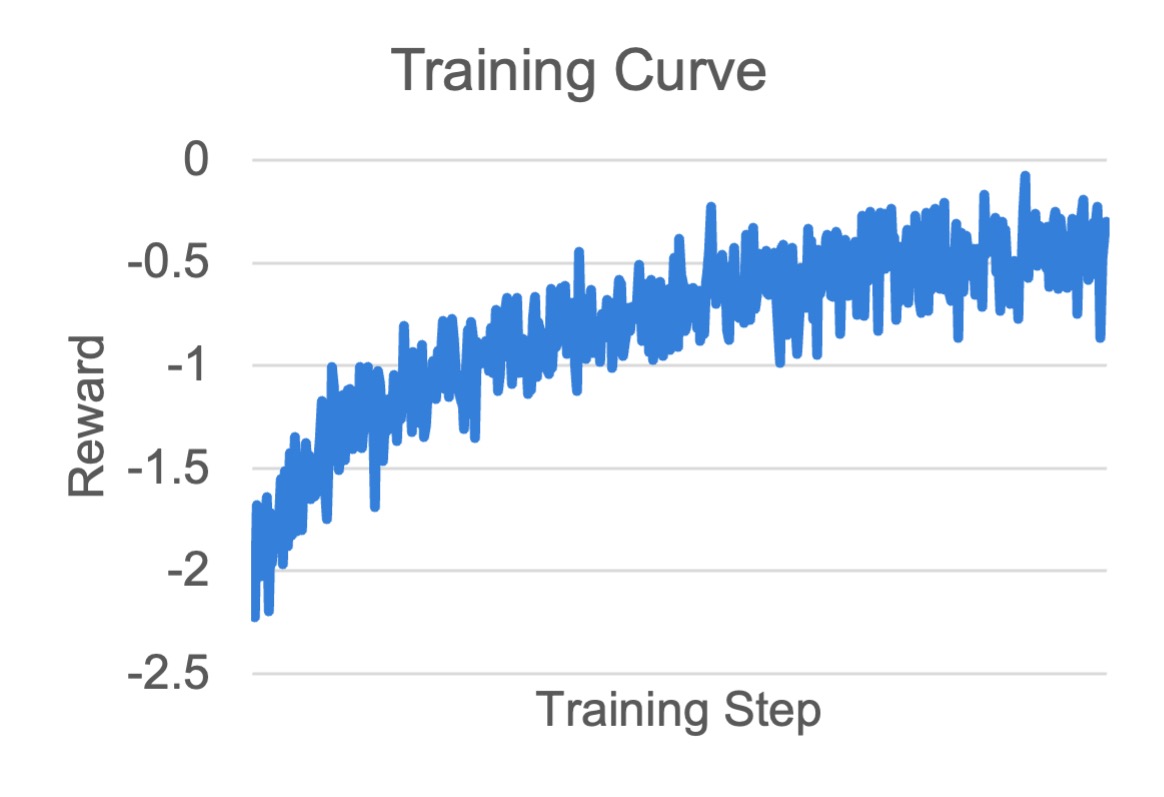
MATH 1.5B
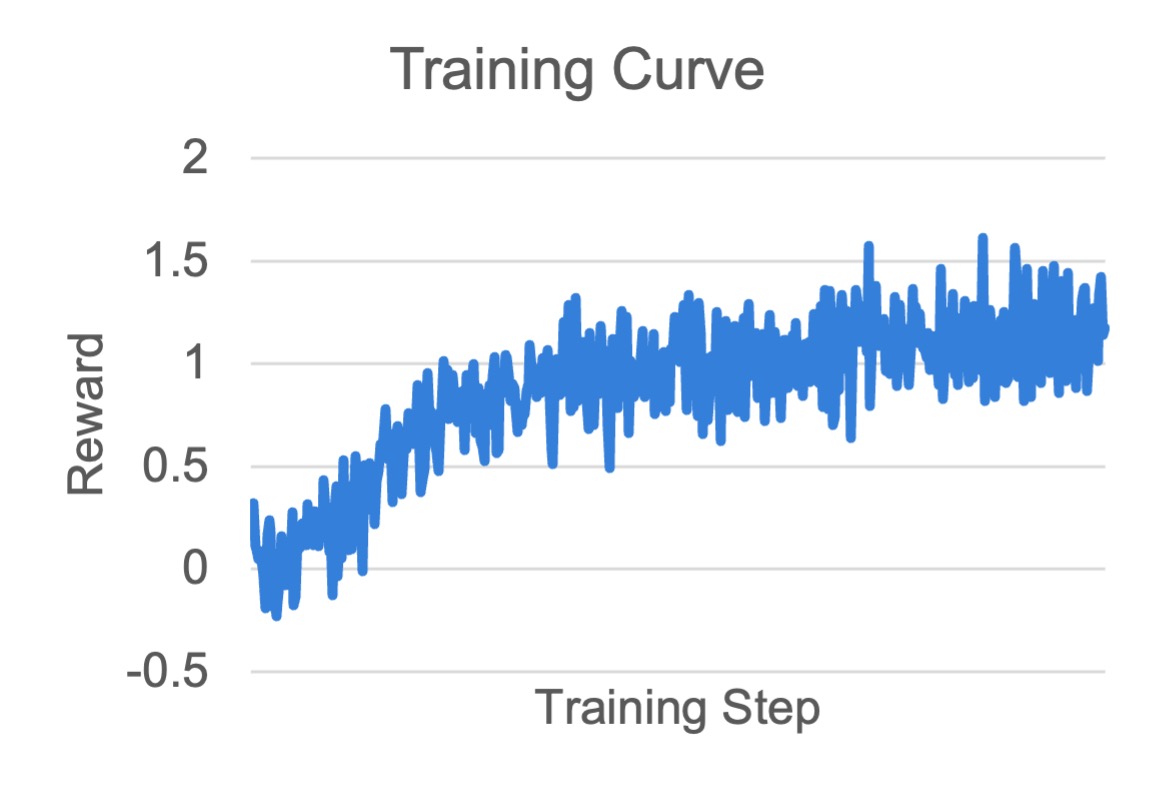
MATH 7B
Final Performance#
We provide an evaluation toolkit.
Measured performance on AIME24, AIME25, and GPQA-diamond shows RLinf achieves SOTA performance.
Model |
AIME 24 |
AIME 25 |
GPQA-diamond |
Average |
|---|---|---|---|---|
28.33 |
24.90 |
27.45 |
26.89 |
|
37.80 |
30.42 |
32.11 |
33.44 |
|
40.41 |
30.93 |
27.54 |
32.96 |
|
40.73 |
31.56 |
28.10 |
33.46 |
|
AReaL-1.5B-retrain* |
44.42 |
34.27 |
33.81 |
37.50 |
43.65 |
32.49 |
35.00 |
37.05 |
|
48.44 |
35.63 |
38.46 |
40.84 |

* We retrain the model using the default settings for 600 steps.
Model |
AIME 24 |
AIME 25 |
GPQA-diamond |
Average |
|---|---|---|---|---|
54.90 |
40.20 |
45.48 |
46.86 |
|
61.66 |
49.38 |
46.93 |
52.66 |
|
66.87 |
52.49 |
44.43 |
54.60 |
|
68.55 |
51.24 |
43.88 |
54.56 |
|
67.30 |
55.00 |
45.57 |
55.96 |
|
68.33 |
52.19 |
48.18 |
56.23 |
Public Checkpoints#
We release trained models on Hugging Face for public use: