RL on ABot-M0#
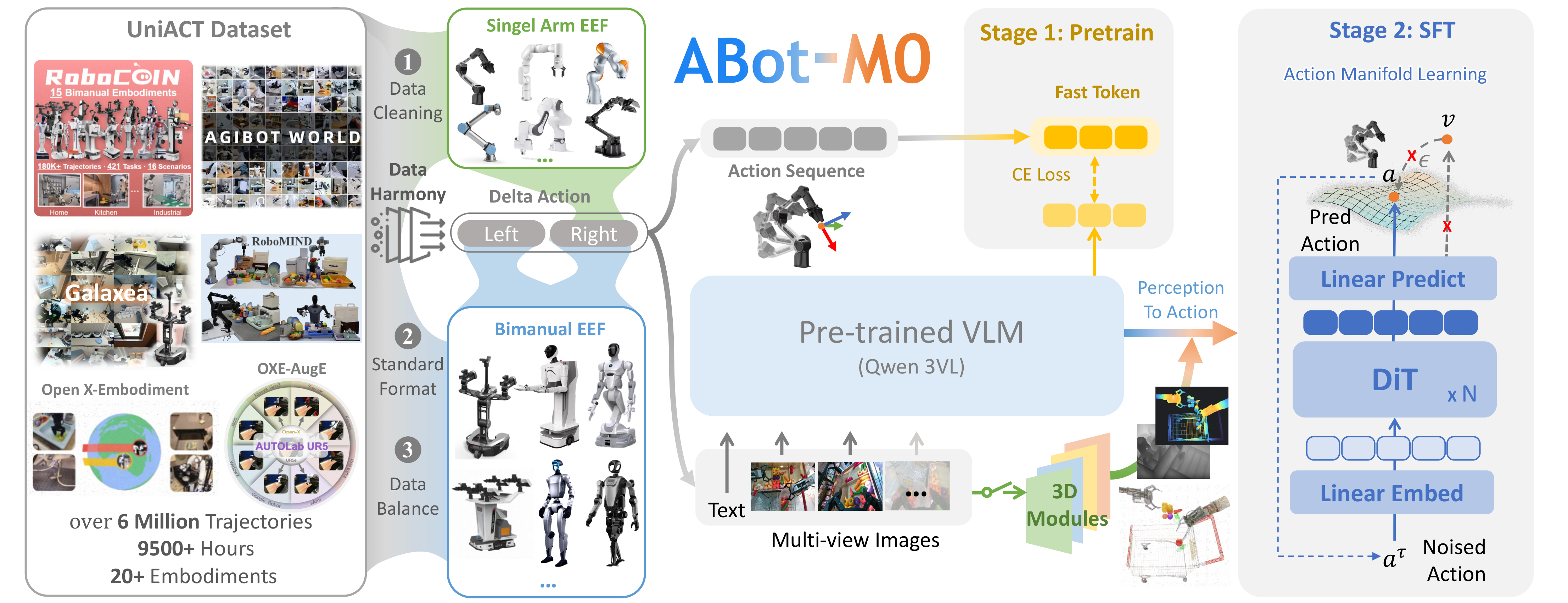
ABot-M0: a VGGT-grounded VLA policy.#
Run evaluation and PPO training for ABot-M0 in RLinf, on standard LIBERO and LIBERO-Plus. The integration uses the HuggingFace rollout backend and FSDP actor training: ABot-M0 generates action chunks during rollout, and RLinf recomputes log-probabilities and value estimates from the stored rollout inputs during actor updates.
Overview#
Fine-tune ABot-M0 on LIBERO-10 / LIBERO-Plus with PPO (actor-critic).
LIBERO · LIBERO-Plus
PPO
LIBERO-10
1 node · GPUs
model_path → evaluate → launch run_embodiment.sh → watch env/success_once.ABot-M0 is the VLA policy: the RLinf wrapper keeps pretrained perception components frozen, trains the action model through the RL objective, and adds a value head for actor-critic PPO (GAE advantages/returns, ratio clipping, value clipping, optional entropy regularization).
Tasks#
Select the model page by matching the environment, task family, and config or checkpoint artifact.
Environment |
Task / Suite |
Config / Weights |
Focus |
|---|---|---|---|
LIBERO |
LIBERO-10 |
|
PPO fine-tuning for the ABot-M0 release checkpoint. |
LIBERO |
LIBERO-10+ |
|
Long-horizon LIBERO-10+ training with ABot-M0. |
Observation and Action#
Field |
Description |
|---|---|
Observation |
LIBERO RGB observations and robot state expected by ABot-M0. |
Action |
Continuous robot actions decoded from ABot-M0 policy outputs. |
Reward |
LIBERO success signal or task reward used by PPO. |
Prompt |
Natural-language instruction associated with each LIBERO task. |
Installation#
Install ABot-M0, VGGT, and the LIBERO runtime in the same Python environment as RLinf.
First, clone the RLinf repository:
# Mainland China users can use a mirror for faster cloning:
# git clone https://ghfast.top/github.com/RLinf/RLinf.git
git clone https://github.com/RLinf/RLinf.git
cd RLinf
Then set up the dependencies with one of the two methods below — a prebuilt
Docker image (recommended) or a custom environment. The general setup
(prerequisites, GPU drivers, the in-image switch_env helper, mirrors, and
troubleshooting) is documented once in Installation;
the commands in this recipe only differ in the Docker image tag and the
--env value.
Option 1: Docker image — image tag agentic-rlinf0.3-maniskill_libero:
docker run -it --rm --gpus all \
   --shm-size 20g \
   --network host \
   --name rlinf \
   -v .:/workspace/RLinf \
   rlinf/rlinf:agentic-rlinf0.3-maniskill_libero
   # Mainland China mirror: docker.1ms.run/rlinf/rlinf:agentic-rlinf0.3-maniskill_libero

# Inside the container, switch to the ABot-M0 virtual environment:
source switch_env abot_m0
Option 2: Custom environment — install bundle --env maniskill_libero. The
installer clones ABot-M0 and VGGT automatically; set ABOT_PATH / VGGT_PATH
first to reuse local checkouts:
# Optional: use local source checkouts instead of installer-managed clones.
# export ABOT_PATH=<path_to_ABot-Manipulation>
# export VGGT_PATH=<path_to_vggt>

# Add --use-mirror for faster downloads in mainland China.
bash requirements/install.sh embodied --model abot_m0 --env maniskill_libero
source .venv/bin/activate
For LIBERO-Plus experiments, install the additional LIBERO-plus runtime in
the same environment:
# For mainland China users, you can add the `--use-mirror` flag to the install.sh command for better download speed.
bash requirements/install.sh embodied --model abot_m0 --env liberoplus
source .venv/bin/activate
Download the LIBERO-Plus Assets#
LIBERO-Plus requires hundreds of new objects, textures, and other assets to
function correctly. Download the assets.zip archive from the Hugging Face
dataset Sylvest/LIBERO-plus and extract it into the installed
liberoplus.liberoplus package directory:
# Resolve the installed liberoplus package directory.
# Note: importing liberoplus may emit config-init logs, so use tail -n 1 to keep only the final path.
export LIBERO_PLUS_PACKAGE_DIR=$(python -c "import pathlib; import liberoplus.liberoplus as l_plus; print(pathlib.Path(l_plus.__file__).resolve().parent)" | tail -n 1)

echo "LIBERO_PLUS_PACKAGE_DIR=${LIBERO_PLUS_PACKAGE_DIR}"

# Optional mirror for environments that cannot access Hugging Face directly.
# export HF_ENDPOINT=https://hf-mirror.com

# Download the assets archive from the Hugging Face dataset repo.
hf download --repo-type dataset Sylvest/LIBERO-plus assets.zip \
    --local-dir "${LIBERO_PLUS_PACKAGE_DIR}"

# assets.zip contains a long original path prefix, so extract only the assets/ subtree.
python - <<'PY'
import zipfile
from pathlib import Path

pkg = Path(__import__("os").environ["LIBERO_PLUS_PACKAGE_DIR"])
zip_path = pkg / "assets.zip"
out_dir = pkg / "assets"

with zipfile.ZipFile(zip_path) as z:
    for info in z.infolist():
        name = info.filename

        if "/assets/" not in name:
            continue

        rel = name.split("/assets/", 1)[1]
        if not rel:
            continue

        target = out_dir / rel

        if info.is_dir():
            target.mkdir(parents=True, exist_ok=True)
        else:
            target.parent.mkdir(parents=True, exist_ok=True)
            with z.open(info) as src, open(target, "wb") as dst:
                dst.write(src.read())

print("Extracted LIBERO-Plus assets to:", out_dir)
PY

# Verify the assets directory structure.
ls -lh "${LIBERO_PLUS_PACKAGE_DIR}/assets"
After extraction, the directory should look like:
<installed liberoplus package dir>/
└── assets/
    ├── articulated_objects/
    ├── new_objects/
    ├── scenes/
    ├── stable_hope_objects/
    ├── stable_scanned_objects/
    ├── textures/
    ├── turbosquid_objects/
    ├── serving_region.xml
    ├── wall_frames.stl
    └── wall.xml
See the LIBERO-Pro & LIBERO-Plus section of the LIBERO benchmarks page for full LIBERO-Plus details.
Download the Model#
Before training, download the ABot-M0 checkpoint and the required backbone weights:
acvlab/ABot-M0-LIBEROfor standalone evaluation.HaoyunOvO/ABot-m0-LIBERO-10k-stepas the PPO training baseline.StarVLA/Qwen3-VL-4B-Instruct-Actionas the Qwen3-VL backbone.facebook/VGGT-1Bfor offline VGGT loading when Hugging Face cannot be reached at runtime.
# Method 1: Using git clone
git lfs install
git clone https://huggingface.co/acvlab/ABot-M0-LIBERO
git clone https://huggingface.co/HaoyunOvO/ABot-m0-LIBERO-10k-step
git clone https://huggingface.co/StarVLA/Qwen3-VL-4B-Instruct-Action
git clone https://huggingface.co/facebook/VGGT-1B

# Method 2: Using huggingface-hub
# For mainland China users, you can use the following for better download speed:
# export HF_ENDPOINT=https://hf-mirror.com
pip install huggingface-hub
hf download acvlab/ABot-M0-LIBERO --local-dir ./ABot-M0-LIBERO
hf download HaoyunOvO/ABot-m0-LIBERO-10k-step --local-dir ./ABot-m0-LIBERO-10k-step
hf download StarVLA/Qwen3-VL-4B-Instruct-Action --local-dir ./Qwen3-VL-4B-Instruct-Action
hf download facebook/VGGT-1B --local-dir ./VGGT-1B
For PPO training, the 10k-step ABot-M0 LIBERO checkpoint provides an initial LIBERO success rate of approximately 40% and is suitable as the starting point for further RL training.
Note
ABot-M0 checkpoints include config.yaml. After download, update
qwenvl.base_vlm so it points to your local
Qwen3-VL-4B-Instruct-Action path.
qwenvl:
  base_vlm: /path/to/Qwen3-VL-4B-Instruct-Action
ABot currently initializes VGGT with
VGGT.from_pretrained("facebook/VGGT-1B"). If the runtime cannot access
Hugging Face or a mirror, place VGGT-1B in your local Hugging Face cache or
explicitly set VGGT loading to a local directory in your ABot installation.
Example local override:
self.spatial_model = spatial_model = VGGT.from_pretrained('/workspace/models/VGGT-1B')
Configure Further#
For common Hydra sections and path fields, see Training configuration.
Two configs are provided, one per benchmark:
LIBERO:
examples/embodiment/config/libero_10_ppo_abot_m0.yamlLIBERO-Plus:
examples/embodiment/config/libero_10_plus_ppo_abot_m0.yaml
Set both fields to the checkpoint used for evaluation or training:
rollout.model.model_pathactor.model.model_path
For the 10k-step RL baseline, use:
rollout:
  model:
    model_path: /path/to/ABot-m0-LIBERO-10k-step/checkpoints/steps_10000_pytorch_model.pt
actor:
  model:
    model_path: /path/to/ABot-m0-LIBERO-10k-step/checkpoints/steps_10000_pytorch_model.pt
Import Sanity Check#
python -c "import rlinf; import ABot; import vggt; print('IMPORT_OK')"
If the command prints IMPORT_OK, the package-level dependency wiring is valid.
Standalone Evaluation#
Use the unified Evaluation section to verify ABot-M0 checkpoints before training.
Start from the LIBERO evaluation guide and
set the ABot-M0 checkpoint in both actor.model.model_path and
rollout.model.model_path.
Suite |
Config source |
What to change |
|---|---|---|
LIBERO-10 |
|
Set |
LIBERO-10+ |
|
Set |
For CLI usage, Hydra overrides, logs, and video output, use the Evaluation CLI reference and Evaluation results reference.
Run It#
PPO training uses the same launch flow as evaluation. Select the target suite
with LIBERO_TYPE and launch the corresponding config.
Common environment setup:
source .venv/bin/activate
export REPO_PATH=$(pwd)
export EMBODIED_PATH=$(pwd)/examples/embodiment
export PYTHONPATH=${REPO_PATH}:$PYTHONPATH
export MUJOCO_GL=egl
export PYOPENGL_PLATFORM=egl
export ROBOT_PLATFORM=LIBERO

ray stop || true
ray start --head --port=6379
LIBERO:
export LIBERO_TYPE=standard
bash examples/embodiment/run_embodiment.sh libero_10_ppo_abot_m0
LIBERO-Plus:
export LIBERO_TYPE=plus
bash examples/embodiment/run_embodiment.sh libero_10_plus_ppo_abot_m0
Visualization and Results#
Watch env/success_once for the task success rate. For every logged metric, see
Training metrics.
tensorboard --logdir <runner.logger.log_path> --port 6006