
RL on Dexbotic Models#
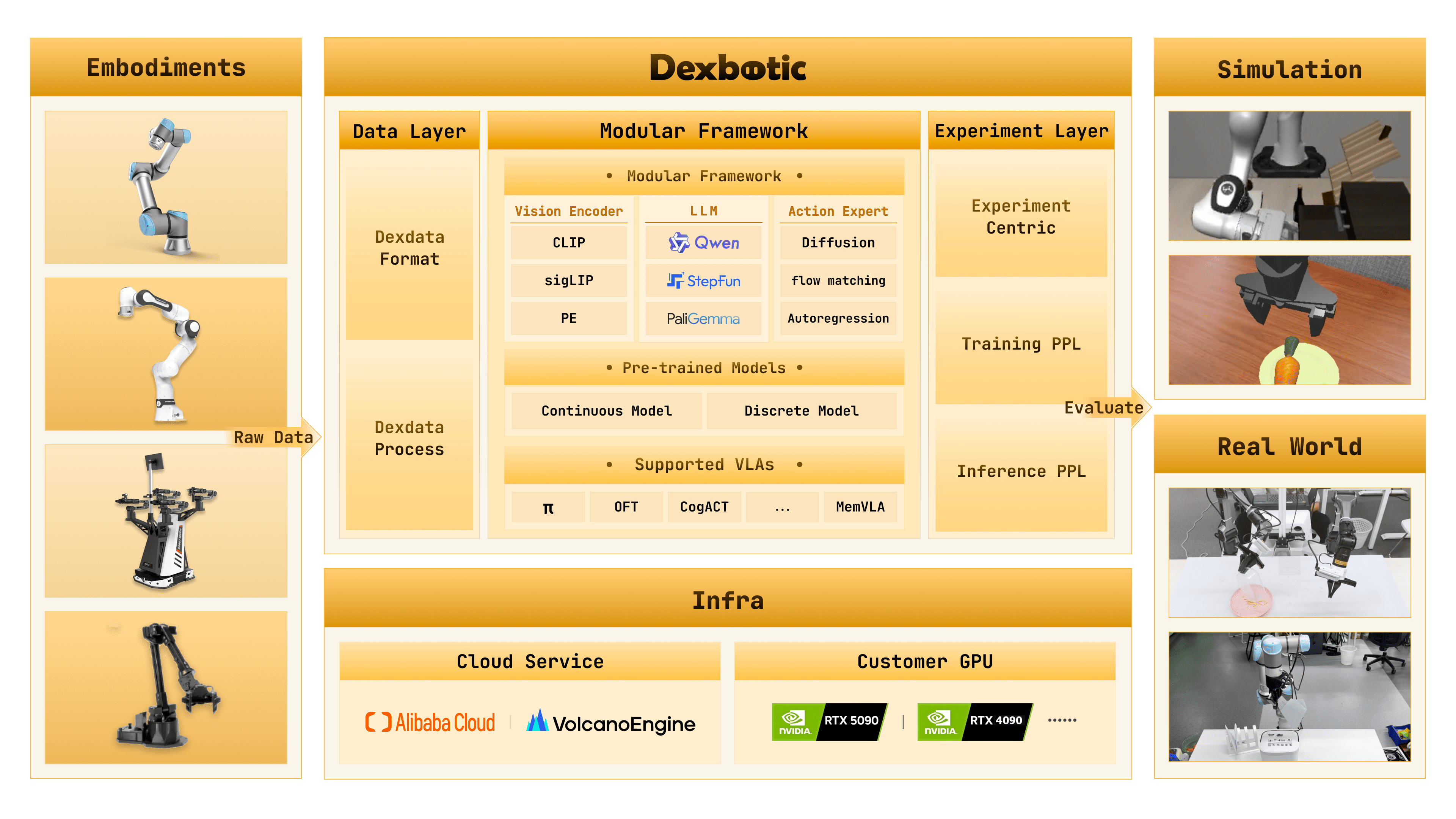
Dexbotic is an open-source VLA toolbox from Dexmal. RLinf uses the Dexbotic π0and DM0 policies as LIBERO action-generation models, then fine-tunes them online with PPO.
Overview#
Fine-tune Dexbotic π0or DM0 on LIBERO with PPO.
LIBERO
PPO
LIBERO Spatial · Object · Goal · 10
1 node · 8 GPUs
run_embodiment.sh → watch env/success_once.Tasks#
Select the model page by matching the environment, task family, and config or checkpoint artifact.
Environment |
Task / Suite |
Config / Weights |
Focus |
|---|---|---|---|
LIBERO |
LIBERO-Spatial |
|
Dexbotic pi0/dm0 policies on spatial manipulation tasks. |
LIBERO |
LIBERO-Object |
|
Dexbotic pi0 on object manipulation tasks. |
LIBERO |
LIBERO-Goal / LIBERO-10 |
|
Goal-conditioned and long-horizon LIBERO suites. |
Observation and Action#
Field |
Description |
|---|---|
Observation |
LIBERO camera streams and proprioception packaged for Dexbotic policies. |
Action |
Chunked continuous actions produced by the selected Dexbotic policy backend, including flow-matching / flow-SDE settings. |
Reward |
LIBERO success signal or simulator reward used for PPO updates. |
Prompt |
Natural-language LIBERO instruction consumed by the policy processor. |
Installation#
First, clone the RLinf repository:
# Mainland China users can use a mirror for faster cloning:
# git clone https://ghfast.top/github.com/RLinf/RLinf.git
git clone https://github.com/RLinf/RLinf.git
cd RLinf
Then set up the dependencies with one of the two methods below — a prebuilt
Docker image (recommended) or a custom environment. The general setup
(prerequisites, GPU drivers, the in-image switch_env helper, mirrors, and
troubleshooting) is documented once in Installation;
the commands in this recipe only differ in the Docker image tag and the
--env value.
Option 1: Docker image — image tag agentic-rlinf0.3-maniskill_libero:
docker run -it --rm --gpus all \
   --shm-size 20g \
   --network host \
   --name rlinf \
   -v .:/workspace/RLinf \
   rlinf/rlinf:agentic-rlinf0.3-maniskill_libero
   # Mainland China mirror: docker.1ms.run/rlinf/rlinf:agentic-rlinf0.3-maniskill_libero

# Inside the container, switch to the Dexbotic virtual environment:
source switch_env dexbotic
Option 2: Custom environment — install bundle --model dexbotic --env maniskill_libero:
# Add --use-mirror for faster downloads in mainland China.
bash requirements/install.sh embodied --model dexbotic --env maniskill_libero
source .venv/bin/activate
Download the Model#
Download one or both Dexbotic checkpoints (either method works):
# Method 1: git clone
git lfs install
git clone https://huggingface.co/Dexmal/libero-db-pi0
git clone https://huggingface.co/Dexmal/DM0-libero

# Method 2: huggingface-hub (set HF_ENDPOINT=https://hf-mirror.com in mainland China)
pip install huggingface-hub
huggingface-cli download Dexmal/libero-db-pi0 --local-dir libero-db-pi0
huggingface-cli download Dexmal/DM0-libero --local-dir DM0-libero
After downloading, point your config YAML at the checkpoint — set the same path for both the rollout and the actor model:
rollout:
   model:
      model_path: /path/to/downloaded-checkpoint
actor:
   model:
      model_path: /path/to/downloaded-checkpoint
Run It#
Each recipe is a YAML config under examples/embodiment/config/:
Task suite |
Model |
Config |
|---|---|---|
LIBERO Spatial |
Dexbotic π₀ |
|
LIBERO Spatial |
DM0 |
|
LIBERO Object |
Dexbotic π₀ |
|
LIBERO Goal |
Dexbotic π₀ |
|
LIBERO 10 |
Dexbotic π₀ |
|
Launch a config with run_embodiment.sh:
bash examples/embodiment/run_embodiment.sh libero_spatial_ppo_dexbotic_pi0
What this command does:
Loads
examples/embodiment/config/libero_spatial_ppo_dexbotic_pi0.yaml.Builds LIBERO actor, rollout, and env workers according to
cluster.component_placement.Runs PPO and writes logs/checkpoints under
runner.logger.log_path.
Configure further
π₀ checkpoint path → set
actor.model.model_pathandrollout.model.model_pathtolibero-db-pi0.DM0 checkpoint path → set both model paths to
DM0-liberoinlibero_spatial_ppo_dexbotic_dm0.yaml.Action chunks → π₀ uses
num_action_chunks: 5; DM0 usesnum_action_chunks: 10.Metric definitions and logging backends → Training metrics
Placement and throughput → Placement and Execution modes
Standalone Evaluation#
Run Dexbotic’s LIBERO evaluator for a trained checkpoint:
python toolkits/standalone_eval_scripts/dexbotic/libero_eval.py \
   --config_name db_pi0_libero \
   --pretrained_path /path/to/checkpoint \
   --task_suite_name libero_spatial \
   --num_trials_per_task 50 \
   --action_chunk 5 \
   --num_steps 10
For DM0, switch the evaluator config and action chunk:
python toolkits/standalone_eval_scripts/dexbotic/libero_eval.py \
   --config_name dm0_libero \
   --pretrained_path /path/to/checkpoint \
   --task_suite_name libero_spatial \
   --num_trials_per_task 50 \
   --action_chunk 10 \
   --num_steps 10
You can also use RLinf’s unified VLA evaluation flow. See evaluation.
Visualization and Results#
Launch TensorBoard to watch training live:
tensorboard --logdir ./logs --port 6006
The key signal to watch is ``env/success_once`` — the episodic success rate. For every logged metric, see Training metrics.