
MLP Policy Reinforcement Learning Training#
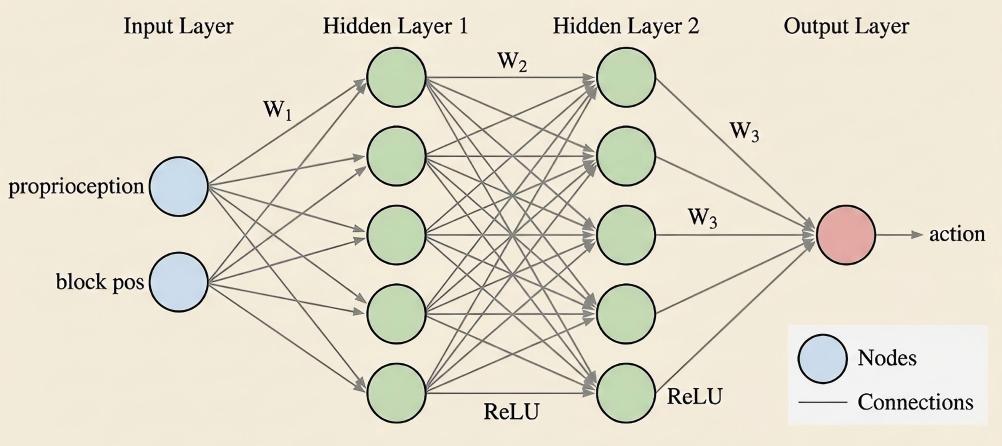
A multi-layer perceptron policy.#
An MLP policy is a lightweight network for robotics control from low-dimensional state inputs (joint angles, end-effector pose, object states). RLinf trains MLP policies with PPO, SAC, and GRPO across several simulators — useful for quickly validating environments, training pipelines, and network architectures.
Overview#
Train an MLP policy with PPO/SAC/GRPO on low-dimensional state across ManiSkill, LIBERO-Spatial, and FrankaSim.
ManiSkill · LIBERO · FrankaSim
PPO · SAC · GRPO
PickCube · LIBERO-Spatial
1 node · GPUs
run_embodiment.sh → watch env/success_once.Tasks#
Select an environment via the defaults list (env/<env_name>@env.train / @env.eval); override parallel-env count, episode length, and recording under env.train / env.eval.
Environment |
Task / Suite |
Config / Weights |
Focus |
|---|---|---|---|
ManiSkill3 |
PickCube |
|
Low-dimensional state policy training. |
LIBERO |
LIBERO-Spatial |
|
GRPO with an MLP policy on a LIBERO spatial task. |
MuJoCo / FrankaSim |
PickCube |
|
FrankaSim state-based PPO training. |
Observation and Action#
Field |
Description |
|---|---|
Observation |
Low-dimensional state vectors such as robot joints, end-effector pose, and object states. |
Action |
Continuous robot control commands configured by |
Reward |
Simulator task reward or success signal. |
Prompt |
Not used by the MLP policy; tasks are selected through Hydra configs. |
Installation#
For running in simulation environments, please refer to Installation for installation instructions.
This configuration series uses Hydra’s searchpath to load external configuration directories via environment variables:
hydra.searchpath: file://${oc.env:EMBODIED_PATH}/config/
Please ensure that EMBODIED_PATH is correctly set and that dependencies/resources for ManiSkill3 / FrankaSim are installed.
Run It#
1. Configuration Files
RLinf provides several default MLP configurations covering different environments and algorithm settings:
ManiSkill + PPO + MLP:
maniskill_ppo_mlpManiSkill + SAC + MLP:
maniskill_sac_mlpFrankaSim + PPO + MLP:
frankasim_ppo_mlp
2. Key Parameter Configuration
2.1 Model Parameters (Model)
The MLP model is introduced via model/mlp_policy@actor.model and can be overridden in different configurations. Key fields include:
model_type: "mlp_policy"                # Use MLP policy network as actor (Multi-Layer Perceptron; fits low-dim state inputs)

model_path: ""

policy_setup: "panda-qpos"              # Select action semantics and control mode; 'panda-qpos' usually implies joint space control (e.g., qpos/joint targets or deltas)

obs_dim: 42                             # Input dimension of the state vector (must match environment state output)

action_dim: 8                           # Output dimension of the action vector (must match environment action space)

num_action_chunks: 1                    # Number of action chunks generated per forward pass

hidden_dim: 256                         # Width/Channel size of MLP hidden layers

precision: "32"                         # Model parameter and computation precision

add_value_head: True                    # Whether to attach an additional value head to the policy network

is_lora: False                          # Whether to enable LoRA

lora_rank: 32                           # LoRA rank dimension 'r'; only effective when is_lora=True
2.2 Cluster & Hardware Configuration (Cluster)
For real-robot training, a multi-node configuration is used, deploying the Actor/Policy on GPU servers and the Env/Robot on control machines (NUC/Industrial PC). For specific configurations, please refer to Real-World RL with Franka.
3. Launch Commands
ManiSkill (PPO-MLP)
bash examples/embodiment/run_embodiment.sh maniskill_ppo_mlp
ManiSkill (SAC-MLP)
bash examples/embodiment/run_embodiment.sh maniskill_sac_mlp
Note
SAC specifics. SAC learns Q-values via Bellman backups with entropy
regularization (off-policy), so enable the Q-related heads in the config
(add_q_head: True). It also supports automatic entropy tuning via
entropy_tuning (e.g. alpha_type: softplus) to balance exploration and
exploitation.
Libero-Spatial (GRPO-MLP)
bash examples/embodiment/run_embodiment.sh libero_spatial_0_grpo_mlp
FrankaSim (PPO-MLP)
bash examples/embodiment/run_embodiment.sh frankasim_ppo_mlp
Visualization and Results#
1. TensorBoard Logs
# Launch TensorBoard
tensorboard --logdir ../results
2. Key metrics
The key signal to watch is ``env/success_once`` — the task success rate. For every logged metric, see Training metrics.