
RL with LIBERO Benchmarks#
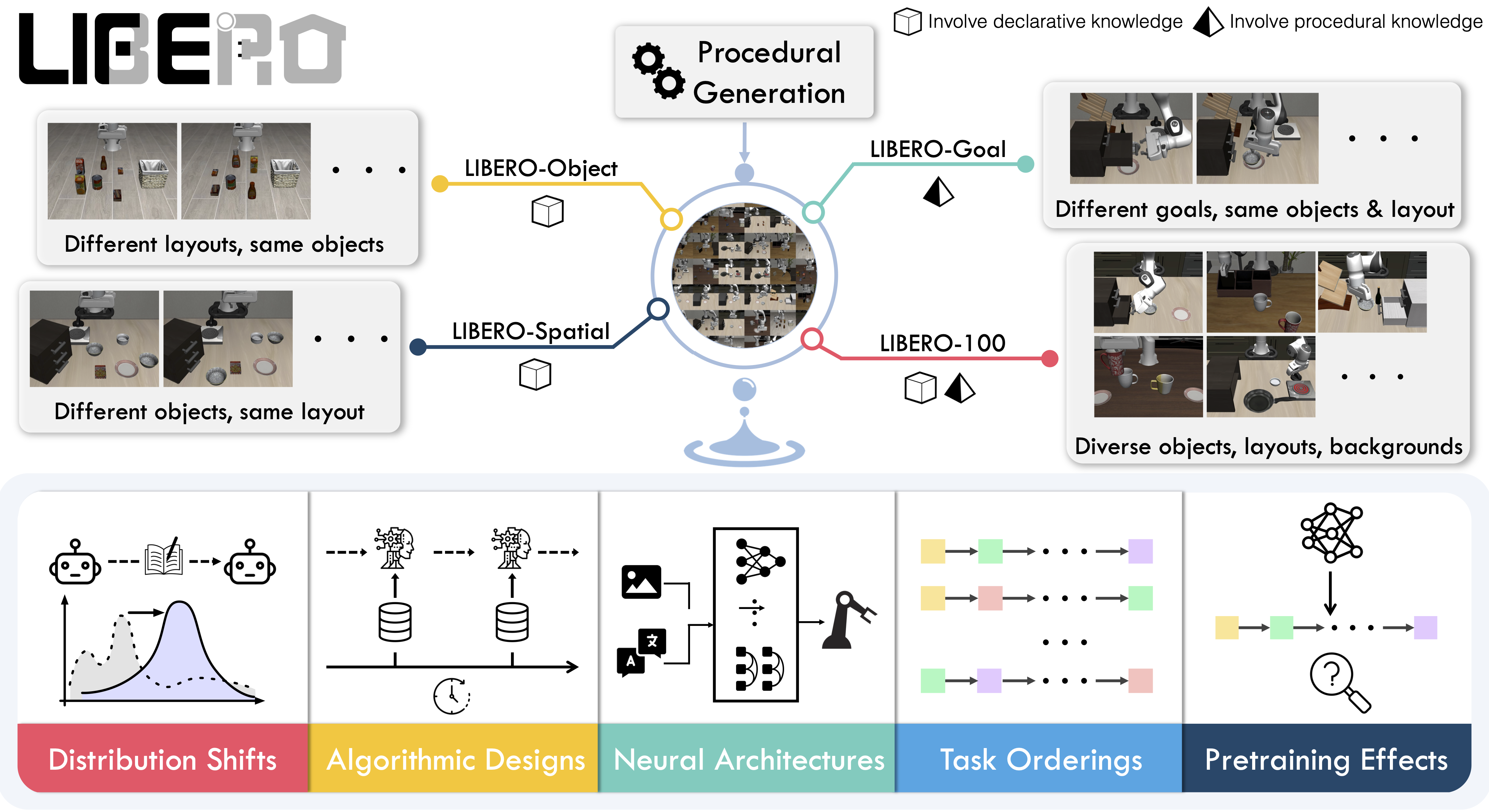
An overview of the LIBERO benchmark (image: LIBERO project).#
LIBERO is a benchmark for lifelong robot learning: a 7-DoF Franka arm performs language-conditioned manipulation — pick-and-place, stacking, opening drawers, spatial rearrangement — in robosuite / MuJoCo. RLinf uses LIBERO to RL-fine-tune vision-language-action (VLA) policies and push task success toward saturation.
This page covers two families of LIBERO recipes:
Original LIBERO suites — train OpenVLA-OFT and other VLAs with PPO/GRPO.
LIBERO-Pro / LIBERO-Plus — harder suites that stress generalization with anti-memorization perturbations.
For LIBERO setup on AMD ROCm or Ascend CANN accelerators, see the Supported Accelerators tutorial.
Overview#
RL-finetune a VLA on the original LIBERO suites; OpenVLA-OFT + GRPO reaches ~98–99% success.
OpenVLA-OFT · π₀ / π₀.₅ · GR00T · Dexbotic · ABot-M0 · StarVLA · MLP
PPO · GRPO · DSRL · DAgger
130 across 5 suites
1–2 nodes · 8–16 GPUs
run_embodiment.sh → watch env/success_once.Tasks#
LIBERO ships five task suites covering 130 tasks, from single-step pick-and-place
to long-horizon, multi-step scenarios. Pick a suite through the config name; libero_130
trains one unified policy across all of them.
Suite |
Config id |
Tasks |
Focus |
|---|---|---|---|
LIBERO-Spatial |
|
10 |
Same objects, different spatial arrangements — tests spatial reasoning. |
LIBERO-Object |
|
10 |
Same layout, different objects — tests object grounding. |
LIBERO-Goal |
|
10 |
Same objects and layout, different goals — tests goal conditioning. |
LIBERO-Long |
|
10 |
Long-horizon, multi-step tasks from LIBERO-100. |
LIBERO-90 |
|
90 |
Short-horizon tasks from LIBERO-100. |
LIBERO-130 |
|
130 |
All suites combined, for large-scale multi-task RL. |
Observation and Action#
Field |
Specification |
|---|---|
Observation |
RGB from a third-person (agentview) and a wrist camera — typically 128×128 or 224×224 — plus 8-dim proprioception (end-effector pose and gripper). |
Action |
7-dim continuous, |
Reward |
Sparse — |
Task prompt |
|
Standard LIBERO Suites#
The walkthrough below uses OpenVLA-OFT with PPO/GRPO; switch the config to use another supported model.
Installation#
First, clone the RLinf repository:
# Mainland China users can use a mirror for faster cloning:
# git clone https://ghfast.top/github.com/RLinf/RLinf.git
git clone https://github.com/RLinf/RLinf.git
cd RLinf
Then set up the dependencies with one of the two methods below — a prebuilt
Docker image (recommended) or a custom environment. The general setup
(prerequisites, GPU drivers, the in-image switch_env helper, mirrors, and
troubleshooting) is documented once in Installation;
the commands in this recipe only differ in the Docker image tag and the
--env value.
Option 1: Docker image — image tag agentic-rlinf0.3-maniskill_libero:
docker run -it --rm --gpus all \
   --shm-size 20g \
   --network host \
   --name rlinf \
   -v .:/workspace/RLinf \
   rlinf/rlinf:agentic-rlinf0.3-maniskill_libero
   # Mainland China mirror: docker.1ms.run/rlinf/rlinf:agentic-rlinf0.3-maniskill_libero

# Inside the container, switch to the model's virtual environment:
source switch_env openvla-oft
Option 2: Custom environment — install bundle --env maniskill_libero:
# Add --use-mirror for faster downloads in mainland China.
bash requirements/install.sh embodied --model openvla-oft --env maniskill_libero
source .venv/bin/activate
Download the Model#
Download a pretrained base checkpoint (either method works):
# Method 1: git clone
git lfs install
git clone https://huggingface.co/RLinf/RLinf-OpenVLAOFT-LIBERO-90-Base-Lora
git clone https://huggingface.co/RLinf/RLinf-OpenVLAOFT-LIBERO-130-Base-Lora

# Method 2: huggingface-hub (set HF_ENDPOINT=https://hf-mirror.com in mainland China)
pip install huggingface-hub
hf download RLinf/RLinf-OpenVLAOFT-LIBERO-90-Base-Lora --local-dir RLinf-OpenVLAOFT-LIBERO-90-Base-Lora
hf download RLinf/RLinf-OpenVLAOFT-LIBERO-130-Base-Lora --local-dir RLinf-OpenVLAOFT-LIBERO-130-Base-Lora
After downloading, point your config YAML at the checkpoint — set the same path for both the rollout and the actor model:
rollout:
   model:
      model_path: /path/to/downloaded-checkpoint
actor:
   model:
      model_path: /path/to/downloaded-checkpoint
Run It#
Each recipe is a YAML config under examples/embodiment/config/. For OpenVLA-OFT on LIBERO:
OpenVLA-OFT + PPO —
libero_10_ppo_openvlaoft.yamlOpenVLA-OFT + GRPO —
libero_10_grpo_openvlaoft.yaml
Launch a config with run_embodiment.sh:
bash examples/embodiment/run_embodiment.sh libero_10_grpo_openvlaoft
What this command does:
Loads
examples/embodiment/config/libero_10_grpo_openvlaoft.yaml.Attaches to (or starts) Ray and places the actor, rollout, and env workers per
cluster.component_placement.Runs the GRPO training loop, writing logs and checkpoints under
runner.logger.log_path.
Configure further
Placement and throughput → Placement and Execution modes
All config keys → Configuration
Metric definitions and logging backends → Training metrics
Resuming from a checkpoint → Resume
Stuck or hitting OOM? → FAQ
Visualization and Results#
Launch TensorBoard to watch training live:
tensorboard --logdir ./logs --port 6006
The key signal to watch is ``env/success_once`` — the unnormalized episodic success rate. For every logged metric, see Training metrics.
To save evaluation videos, enable them in the config:
env:
   eval:
      video_cfg:
         save_video: True
         video_base_dir: ${runner.logger.log_path}/video/eval
Choose logging backends (TensorBoard, Weights & Biases, SwanLab) under runner.logger:
runner:
   task_type: embodied
   logger:
      log_path: "../results"
      project_name: rlinf
      experiment_name: "libero_10_grpo_openvlaoft"
      logger_backends: ["tensorboard"]  # wandb, swanlab
LIBERO Results#
To show RLinf’s large-scale multi-task RL, we train a single unified model on all 130
LIBERO tasks and evaluate across the five suites. We evaluate every task_id × trial_id
combination: 500 environments each for Object/Spatial/Goal/Long (10 tasks × 50 trials),
4,500 for LIBERO-90, and 6,500 for LIBERO-130. SFT (LoRA-base) models use do_sample = False;
RL models use do_sample = True and temperature_train = 1.6 in rollout.sampling_params, and env.train.rollout_epoch = 2.
Note
This unified base model is fine-tuned by ourselves. For details, see the paper https://arxiv.org/abs/2510.06710.
Model |
Object |
Spatial |
Goal |
Long |
90 |
130 |
|---|---|---|---|---|---|---|
50.20% |
51.61% |
49.40% |
11.90% |
42.67% |
42.09% |
|
99.60% |
98.69% |
98.09% |
93.45% |
98.02% |
97.85% |
|
Improvement |
+49.40% |
+47.08% |
+48.69% |
+81.55% |
+55.35% |
+55.76% |

LIBERO-Pro & LIBERO-Plus Suites#
Stress-test generalization on the harder LIBERO-Pro / LIBERO-Plus perturbation suites.
Both suites share the same robosuite/MuJoCo setup and 7-DoF action space as standard LIBERO, but apply systematic perturbations to defeat memorization and stress generalization.
LIBERO-Pro applies four orthogonal anti-memorization perturbations:
Perturbation |
What it changes |
|---|---|
Object attributes |
Non-essential attributes of target objects (color, texture, size), preserving semantics. |
Initial positions |
Absolute and relative spatial arrangements of objects at episode start. |
Instructions |
Semantic paraphrasing (e.g. “grab” vs “pick up”) and target-object swaps. |
Environment |
Background workspace / scene appearance. |
LIBERO-Plus expands to 10,030 tasks across 5 difficulty levels, perturbing seven physical and semantic dimensions:
Perturbation |
What it changes |
|---|---|
Objects layout |
Injects distractor objects and shifts the target’s position/pose. |
Camera viewpoints |
Third-person camera distance, spherical position (azimuth/elevation), and orientation. |
Robot initial states |
Random perturbations to the arm’s initial joint angles (qpos). |
Language instructions |
LLM rewrites adding conversational distractions, common-sense or complex reasoning. |
Light conditions |
Diffuse color, light direction, specular highlights, and shadow casting. |
Background textures |
Scene themes (e.g. brick walls) and surface materials. |
Sensor noise |
Motion/Gaussian/zoom blur, fog, and glass-refraction distortions. |
Installation#
Install the RLinf-maintained forks for the suite you want.
First, clone the RLinf repository:
# Mainland China users can use a mirror for faster cloning:
# git clone https://ghfast.top/github.com/RLinf/RLinf.git
git clone https://github.com/RLinf/RLinf.git
cd RLinf
Then set up the dependencies with one of the two methods below — a prebuilt
Docker image (recommended) or a custom environment. The general setup
(prerequisites, GPU drivers, the in-image switch_env helper, mirrors, and
troubleshooting) is documented once in Installation;
the commands in this recipe only differ in the Docker image tag and the
--env value.
Option 1: Docker image — pick the tag for the suite:
# LIBERO-Pro: tag agentic-rlinf0.3-liberopro
# LIBERO-Plus: tag agentic-rlinf0.3-liberoplus
docker run -it --rm --gpus all \
   --shm-size 20g \
   --network host \
   --name rlinf \
   -v .:/workspace/RLinf \
   rlinf/rlinf:agentic-rlinf0.3-liberopro   # or ...-liberoplus
Option 2: Custom environment — pick the install bundle for the suite:
# Add --use-mirror for faster downloads in mainland China.
bash requirements/install.sh embodied --model openvla-oft --env liberopro    # LIBERO-Pro
bash requirements/install.sh embodied --model openvla-oft --env liberoplus   # LIBERO-Plus
source .venv/bin/activate
Download the Assets (LIBERO-Plus)#
LIBERO-Plus needs hundreds of extra objects, textures, and scenes. Download assets.zip
from the Hugging Face dataset Sylvest/LIBERO-plus and extract it into the installed
liberoplus.liberoplus package directory:
LIBERO_PLUS_PACKAGE_DIR=$(python -c "import pathlib; import liberoplus.liberoplus as l_plus; print(pathlib.Path(l_plus.__file__).resolve().parent)")
# Set HF_ENDPOINT=https://hf-mirror.com in mainland China.
hf download --repo-type dataset Sylvest/LIBERO-plus assets.zip --local-dir "${LIBERO_PLUS_PACKAGE_DIR}"
unzip -o "${LIBERO_PLUS_PACKAGE_DIR}/assets.zip" -d "${LIBERO_PLUS_PACKAGE_DIR}"
After extraction the directory should look like:
<installed liberoplus package dir>/
└── assets/
    ├── articulated_objects/
    ├── new_objects/
    ├── scenes/
    ├── stable_hope_objects/
    ├── stable_scanned_objects/
    ├── textures/
    ├── turbosquid_objects/
    ├── serving_region.xml
    ├── wall_frames.stl
    └── wall.xml
Download the Model#
LIBERO-Pro / LIBERO-Plus reuse the standard LIBERO base checkpoints:
git lfs install
git clone https://huggingface.co/RLinf/RLinf-OpenVLAOFT-LIBERO-90-Base-Lora
git clone https://huggingface.co/RLinf/RLinf-OpenVLAOFT-LIBERO-130-Base-Lora
After downloading, point your config YAML at the checkpoint — set the same path for both the rollout and the actor model:
rollout:
   model:
      model_path: /path/to/downloaded-checkpoint
actor:
   model:
      model_path: /path/to/downloaded-checkpoint
Run It#
Both suites reuse the standard LIBERO config family and select the suite with the
LIBERO_TYPE environment variable. Train with run_embodiment.sh; for
standalone evaluation, use the LIBERO evaluation guide with the same environment variable.
# Train (set LIBERO_TYPE=pro or plus)
export LIBERO_TYPE=pro
bash examples/embodiment/run_embodiment.sh libero_10_grpo_openvlaoft
Evaluation configs such as libero_10_openvlaoft_eval are covered by the
guide.
See Training metrics for the metrics logged during training and evaluation.