
RL-based Sim-Real Co-Training#
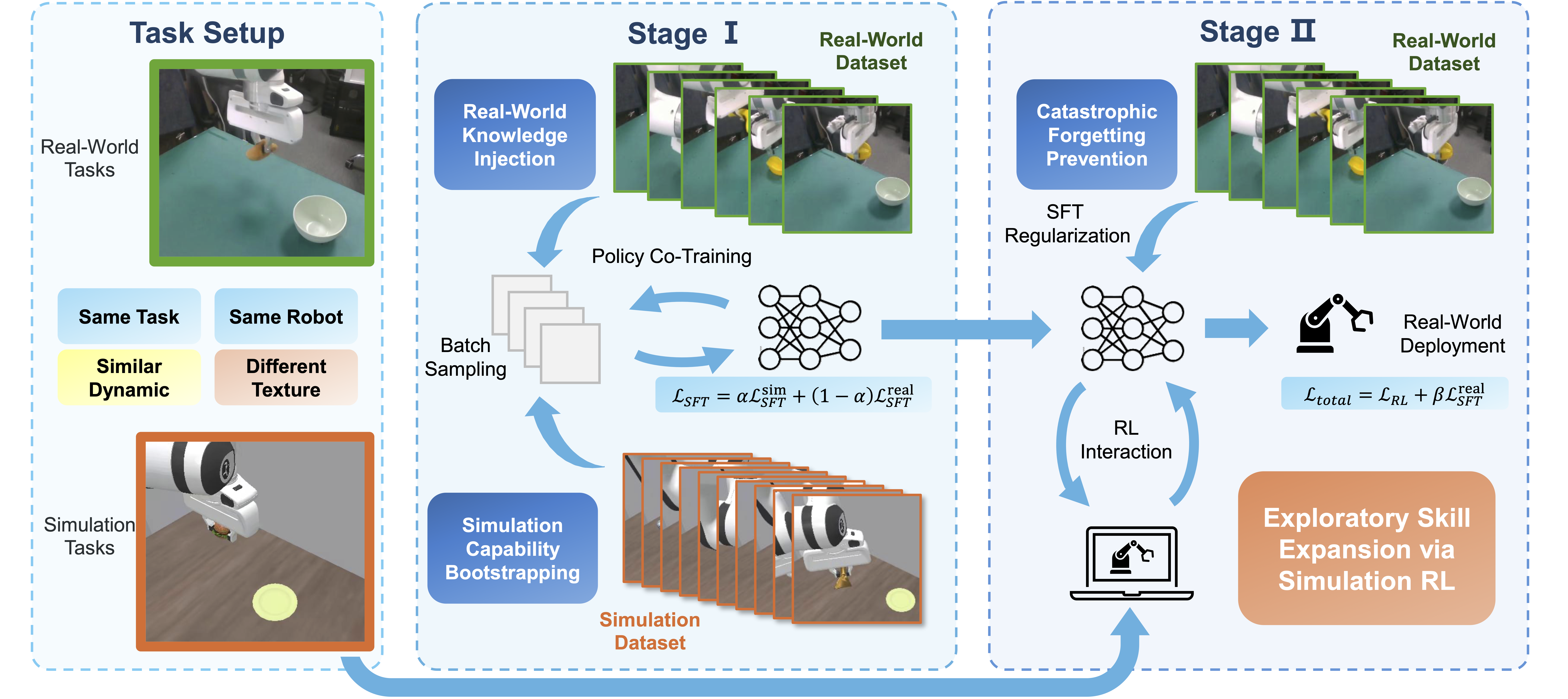
Sim-real co-training overview.#
Sim-real co-training trains a π₀.₅ policy by combining PPO in simulation with SFT on real data, so the policy improves task success in sim while retaining real-world priors and avoiding sim-only overfitting that hurts sim-to-real transfer. For technical details, see Beyond Imitation: RL-Based Sim-Real Co-Training for VLA Models.
Overview#
Co-train π₀.₅ on a ManiSkill digital twin — PPO in sim + SFT on 50 real trajectories (~35%→~50% sim success).
PPO + SFT (RL-Co)
π₀.₅
ManiSkill digital twin
2-stage sim-real
env/success_once.Setup#
This example ships one demo setup; for your own robot, collect data and build a matching sim scene.
Part |
Detail |
|---|---|
Task |
Pick-and-place — move an object from the table into a bowl. |
Real |
Franka Emika Panda + RealSense; third-person RGB (640×480); 7-DoF action (x, y, z, roll, pitch, yaw, gripper). |
Sim |
ManiSkill3 digital twin aligned with the real setup in layout, camera view, task logic, language, and action space; dynamics tuned to approximate real physics. |
Installation#
1. Clone the RLinf Repository#
# For faster downloads in mainland China you can use:
# git clone https://ghfast.top/github.com/RLinf/RLinf.git
git clone https://github.com/RLinf/RLinf.git
cd RLinf
2. Install Dependencies#
Option 1: Docker
docker run -it --rm --gpus all \
   --shm-size 20g \
   --network host \
   --name rlinf \
   -v .:/workspace/RLinf \
   rlinf/rlinf:agentic-rlinf0.3-maniskill_libero
# For faster image pull in mainland China you can use:
# docker.1ms.run/rlinf/rlinf:agentic-rlinf0.3-maniskill_libero
Then switch to the OpenPI env inside the container:
source switch_env openpi
Option 2: Local install
# Add --use-mirror for faster install in some regions
bash requirements/install.sh embodied --model openpi --env maniskill_libero
source .venv/bin/activate
ManiSkill assets#
Refer to the ManiSkill example for base asset setup, then download the assets required for this example:
cd <path_to_RLinf>/rlinf/envs/maniskill/assets
# For faster download in some regions you can set:
# export HF_ENDPOINT=https://hf-mirror.com
hf download --repo-type dataset RLinf/RLCo-maniskill-assets --include "custom_assets/*" --local-dir .
Run It#
Stage I: SFT Pretraining#
Stage I injects real and sim data via supervised learning before RL. You can either train yourself or use a provided checkpoint.
Option A: SFT with real + sim data
We provide a LeRobot-format dataset (50 real + 1499 sim trajectories) at RLinf/RLCo-Example-Mix-Data.
Download the dataset:
# For faster download in some regions you can set:
# export HF_ENDPOINT=https://hf-mirror.com
hf download --repo-type dataset RLinf/RLCo-Example-Mix-Data --local-dir RLCo-Example-Mix-Data
Run SFT using OpenPi or the SFT example.
Option B: Use an SFT checkpoint
Skip training and use the provided SFT checkpoint:
# Download the Spatial-Object-Goal model (choose one method)
# Method 1: git clone
git lfs install
git clone https://huggingface.co/RLinf/RLinf-Pi05-RLCo-PandaPutOnPlateInScene25DigitalTwin-V1-SFT

# Method 2: huggingface-hub
# For faster download in some regions you can set:
# export HF_ENDPOINT=https://hf-mirror.com
hf download RLinf/RLinf-Pi05-RLCo-PandaPutOnPlateInScene25DigitalTwin-V1-SFT --local-dir RLinf-Pi05-RLCo-PandaPutOnPlateInScene25DigitalTwin-V1-SFT
Stage II: Sim-Real Co-Training (RL)#
This stage adds SFT loss into the PPO loop for joint optimization.
Data
Download the 50 real trajectories in LeRobot format used for co-training:
# For faster download in some regions you can set:
# export HF_ENDPOINT=https://hf-mirror.com
hf download --repo-type dataset RLinf/RLCo-Example-Real-Data --local-dir RLCo-Example-Real-Data
Important config
The config maniskill_ppo_co_training_openpi_pi05.yaml is provided. For common path, cluster, and runner fields, see Training configuration. For general PPO settings see π₀ and π₀.₅ RL training. Co-training-specific options:
Model paths
Point model_path to your SFT checkpoint and sft_data_path to the real data path:
rollout:
   model:
      model_path: /path/to/RLinf-Pi05-RLCo-PandaPutOnPlateInScene25DigitalTwin-V1-SFT
actor:
   sft_data_path: /path/to/RLCo-Example-Real-Data
   model:
      model_path: /path/to/RLinf-Pi05-RLCo-PandaPutOnPlateInScene25DigitalTwin-V1-SFT
Co-training options
actor:
    model:
        openpi:
            config_name: "pi05_maniskill_sim_real_co_training"
    enable_sft_co_train: True
    sft_loss_weight: 0.2
enable_sft_co_train: Set toTrueto enable co-training;Falsefor PPO-only.sft_loss_weight: Weight \(\beta\) for the SFT term (\(\mathcal{L}_{SFT}\)) in the total loss.
The dataconfig pi05_maniskill_sim_real_co_training is defined in rlinf/models/embodiment/openpi/dataconfig/__init__.py. Keep model architecture and normalization consistent with Stage I.
Batch size
The config batch_size is the micro-batch size before gradient accumulation. Effective batch size is:
See RL on π0 and π0.5 Models for global_batch_size and micro_batch_size settings.
Run
bash examples/embodiment/run_embodiment.sh maniskill_ppo_co_training_openpi_pi05
Visualization and Results#
TensorBoard
tensorboard --logdir ./logs --port 6006
Metrics
Besides the standard metrics (see Training metrics), co-training adds:
train/ppo_loss: PPO (RL) loss.train/sft_loss: SFT loss on real data.actor/total_loss: \(\mathcal{L}_{Total} = \mathcal{L}_{RL} + \beta \mathcal{L}_{SFT}\).train/loss_ratio: \(\frac{\beta \lvert \mathcal{L}_{SFT} \rvert}{\lvert \mathcal{L}_{RL} \rvert}\). If this stays very large (e.g. \(> 10^5\)), the logger will warn; consider loweringsft_loss_weight.
Example outcomes
After loading Stage I: ~35% zero-shot success in sim.
After 100 co-training steps: ~50% success in sim.
For real-robot deployment and ablations, see the paper: Beyond Imitation: Reinforcement Learning-Based Sim-Real Co-Training for VLA Models.