
VLM Supervised Fine-Tuning#
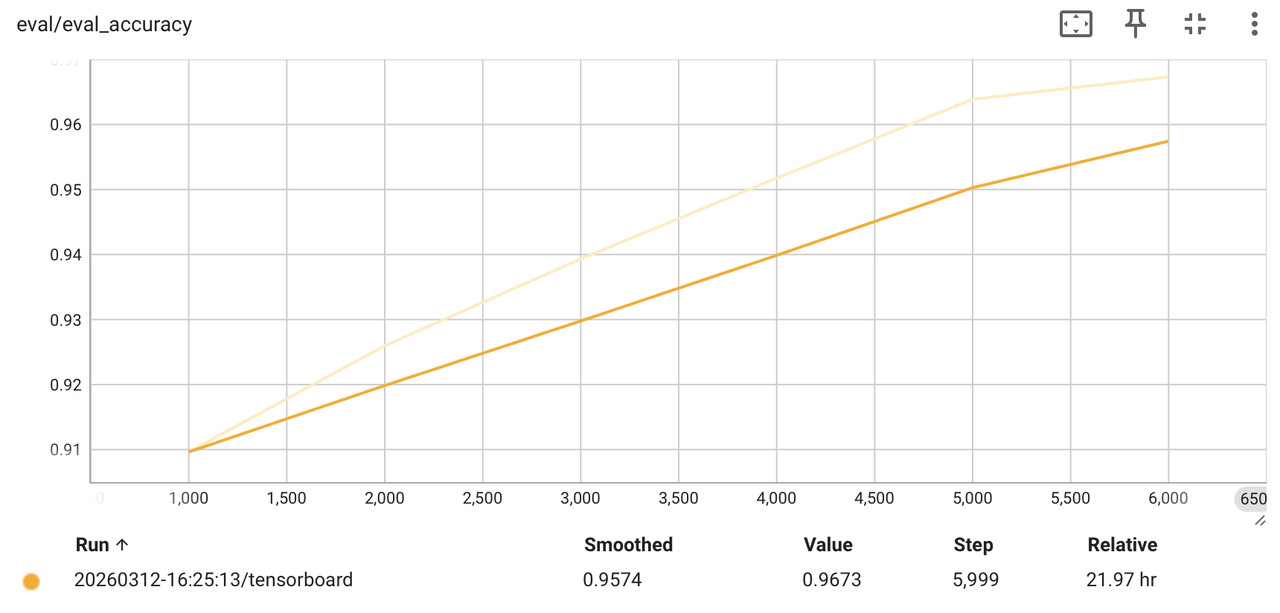
Qwen2.5-VL supervised fine-tuning on the Robo2VLM visual-QA dataset.#
Run full-parameter supervised fine-tuning for vision-language models (Qwen2.5-VL, Qwen3-VL, Qwen3-VL-MoE) on multimodal QA data with RLinf — train, evaluate, and convert the resulting checkpoint to HuggingFace format.
Overview#
Full-parameter SFT for Qwen-VL models on the Robo2VLM visual-QA dataset, with FSDP and built-in evaluation.
Qwen2.5-VL · Qwen3-VL · Qwen3-VL-MoE
Full-parameter SFT
Robo2VLM (visual QA)
1–2 nodes · GPUs
run_vlm_sft.sh → watch loss and eval accuracy.This recipe centers on two files — the launch script examples/sft/run_vlm_sft.sh and
the training config examples/sft/config/qwen2_5_vl_sft_vlm.yaml.
Installation#
Pull the RLinf image:
rlinf/rlinf:agentic-rlinf0.3-torch2.6.0-sglang0.4.6.post5-vllm0.8.5-megatron0.13.0-te2.1.Download model weights: Qwen2.5-VL-3B-Instruct.
Download the dataset: Robo2VLM-1.
Edit
examples/sft/config/qwen2_5_vl_sft_vlm.yamland runexamples/sft/run_vlm_sft.sh.
Warning
After downloading Robo2VLM, the train and eval parquet files are mixed in one
directory (e.g. train-00000-of-00262.parquet and test-0000X-of-00003.parquet).
Split them into separate folders, or RLinf may load the entire dataset.
Note
To train qwen3_vl or qwen3_vl_moe, make sure transformers >= 4.57.1.
Run It#
1. Configuration
The launch script uses examples/sft/config/qwen2_5_vl_sft_vlm.yaml by default and writes
logs to <repo>/logs/<timestamp>/. It runs:
python examples/sft/train_vlm_sft.py \
  --config-path examples/sft/config/ \
  --config-name <your_config_name> \
  runner.logger.log_path=<auto_generated_log_dir>
The config structure matches other RLinf training configs; you mainly adapt data and
actor.model. Fields you must change are commented; keep the rest unchanged for a baseline run.
defaults:
  - override hydra/job_logging: stdout

hydra:
  run:
    dir: .
  output_subdir: null

cluster:
  num_nodes: 1
  component_placement:
    actor: all

runner:
  task_type: sft
  logger:
    log_path: "../results"
    project_name: rlinf
    experiment_name: "qwen2_5_vl_sft_demo"
    logger_backends: ["tensorboard"]

  max_epochs: 6000
  max_steps: -1
  val_check_interval: 1000
  save_interval: 1000

data:
  type: vlm
  dataset_name: "robo2vlmsft"

  # Data paths: split train and eval files into different directories
  train_data_paths: "/path/to/Robo2VLM-1/train_data"
  # For eval-only runs, set train_data_paths to null
  val_data_paths: "/path/to/Robo2VLM-1/test_data"

  # Keys must match dataset columns
  prompt_key: "question"
  choice_key: "choices"
  answer_key: "correct_answer"
  image_keys: ["image"]

  apply_chat_template: True
  use_chat_template: True
  max_prompt_length: 1024
  lazy_loading: false
  num_workers: 4

algorithm:
  adv_type: gae

actor:
  group_name: "ActorGroup"
  training_backend: "fsdp"
  micro_batch_size: 4
  eval_batch_size: 4
  global_batch_size: 256
  seed: 42

  model:
    model_type: "qwen2.5_vl"
    precision: fp32
    # Download model weights locally and set the path here
    model_path: "/path/to/Qwen2.5-VL-3B-Instruct"
    is_lora: False

  optim:
    lr: 1e-5
    adam_beta1: 0.9
    adam_beta2: 0.999
    adam_eps: 1.0e-08
    weight_decay: 0.01
    clip_grad: 1.0
    lr_scheduler: "cosine"
    total_training_steps: ${runner.max_epochs}
    lr_warmup_steps: 200

  fsdp_config:
    strategy: "fsdp"
    sharding_strategy: "no_shard"
    use_orig_params: False
    gradient_checkpointing: False
    mixed_precision:
      param_dtype: bf16
      reduce_dtype: fp32
      buffer_dtype: bf16

reward:
  use_reward_model: False

critic:
  use_critic_model: False
2. Launch
Run from the repository root:
bash examples/sft/run_vlm_sft.sh
With no argument, the script uses
qwen2_5_sft_vlmby default.For a different config (e.g.
my_vlm_config.yaml), pass its name:bash examples/sft/run_vlm_sft.sh my_vlm_config.
Eval-Only Mode#
To run evaluation only, set data.train_data_paths: null and point
data.val_data_paths at your validation data, then use the same launch command:
bash examples/sft/run_vlm_sft.sh <config_name>
Visualization and Results#
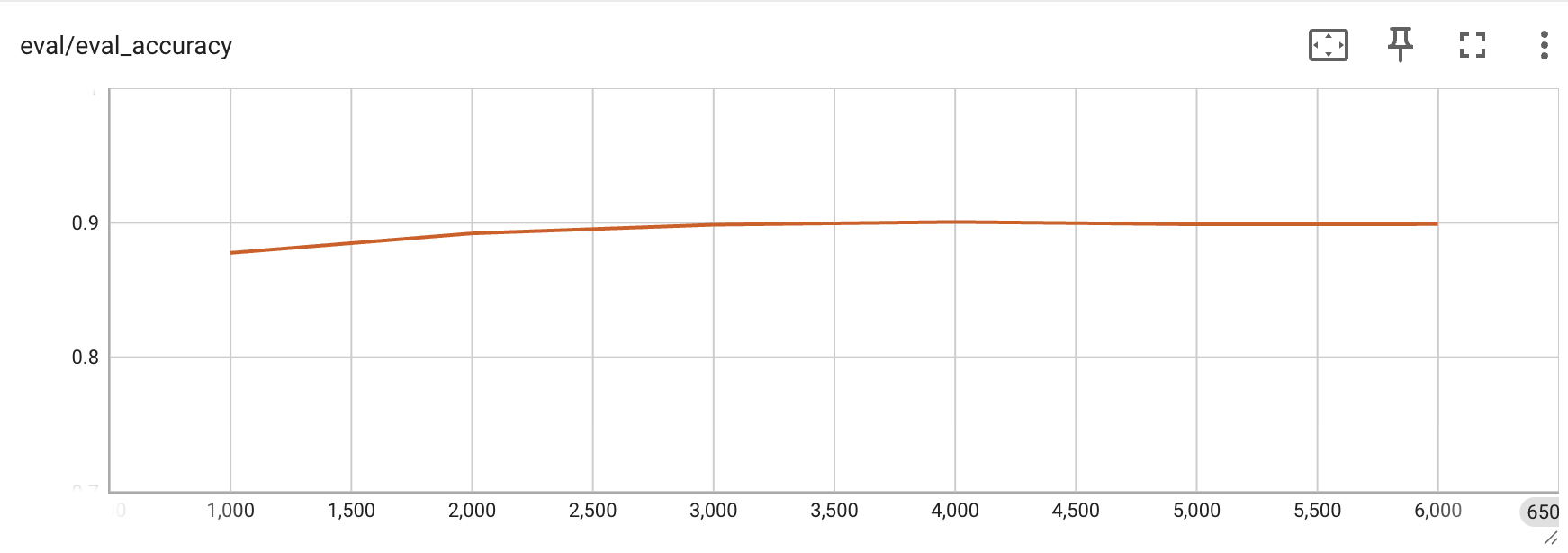
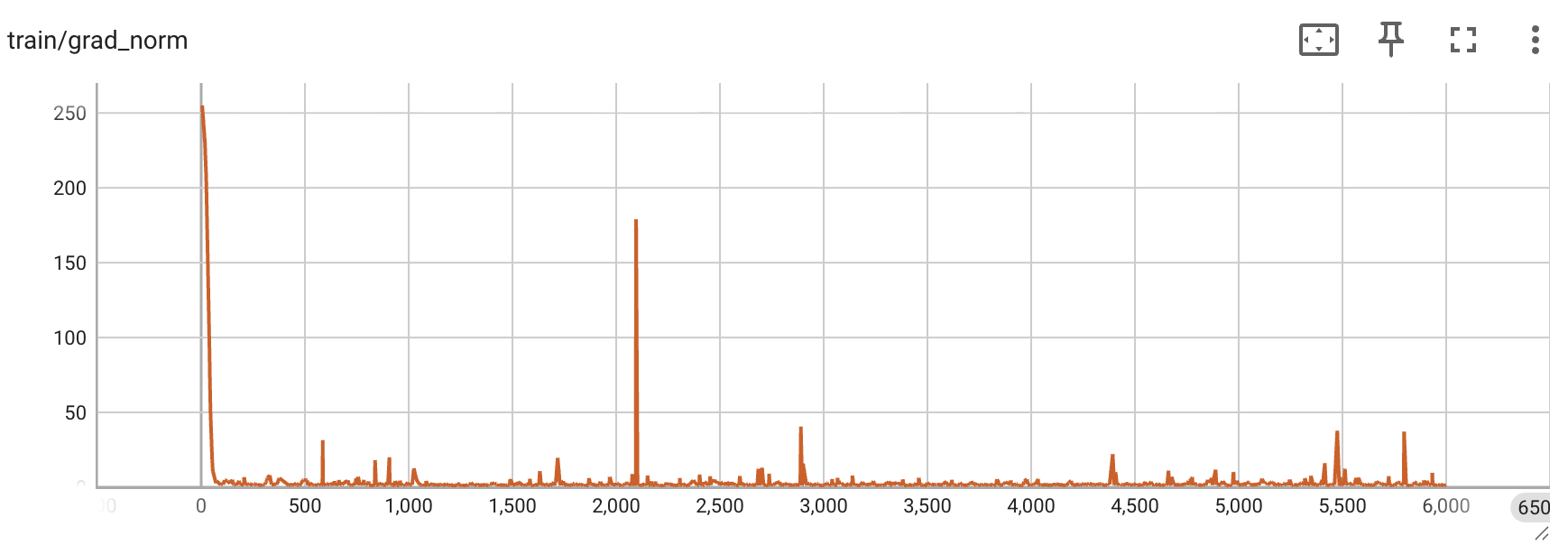
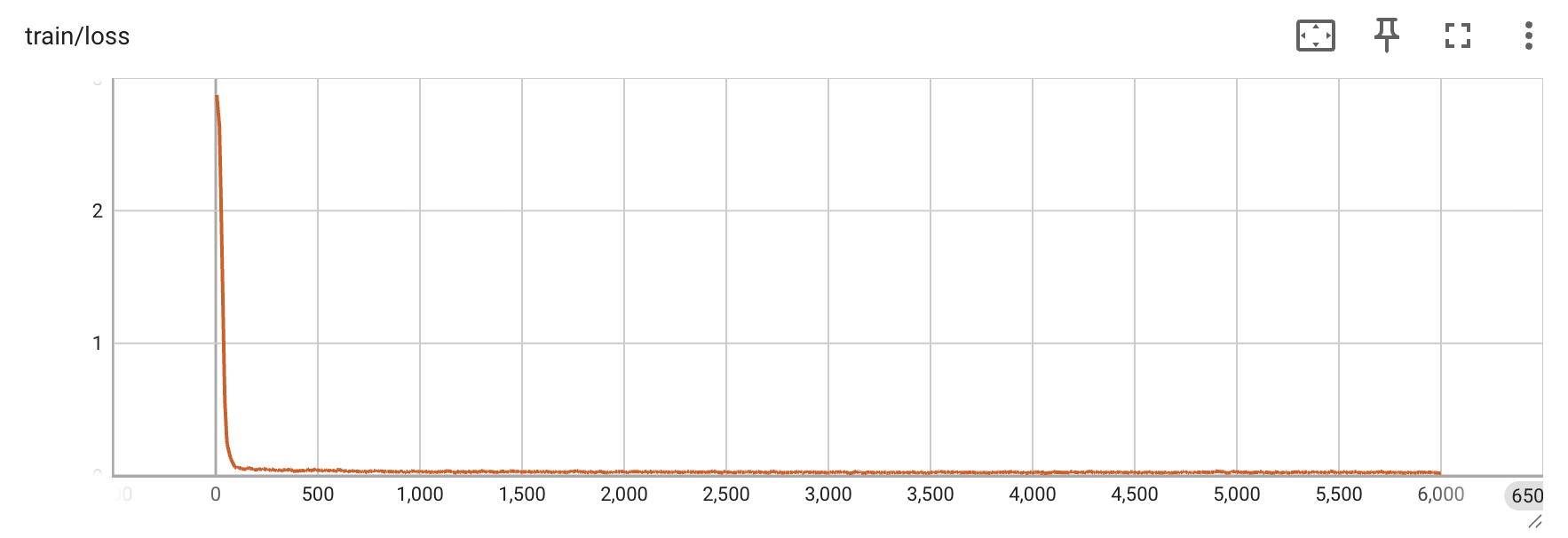
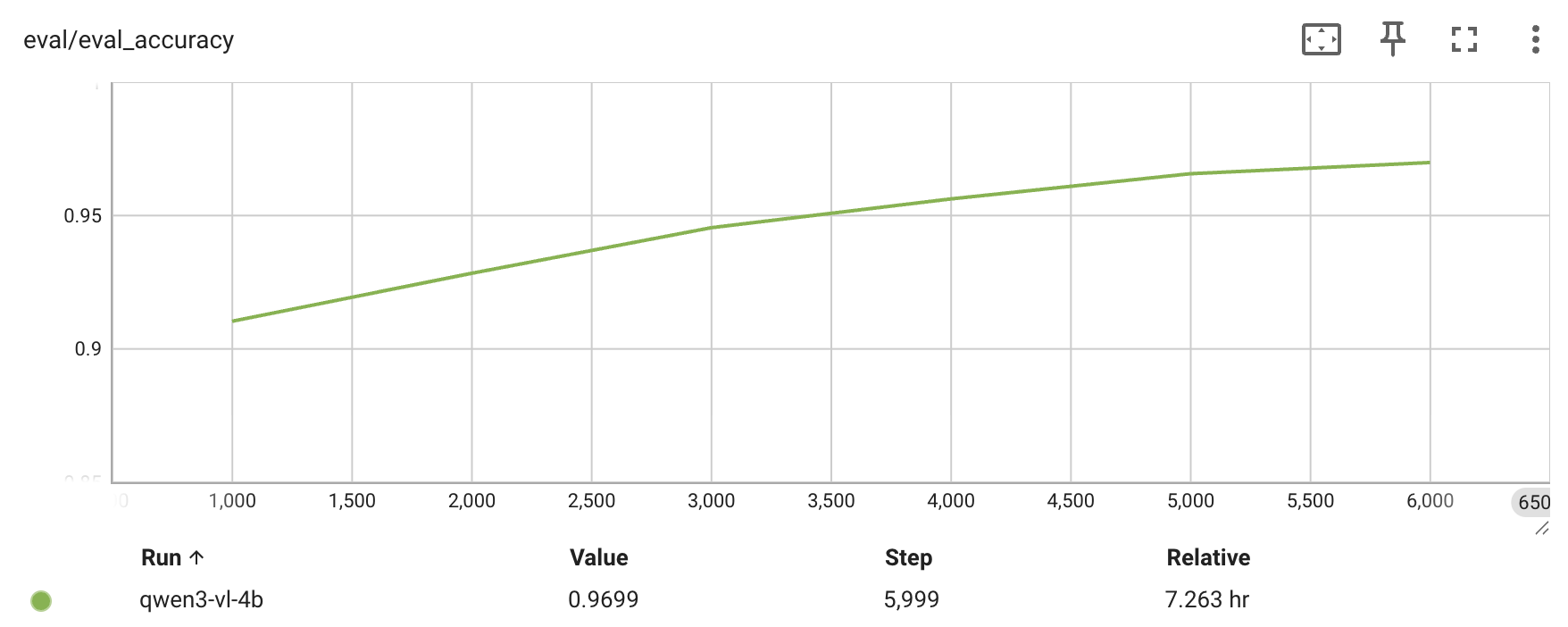
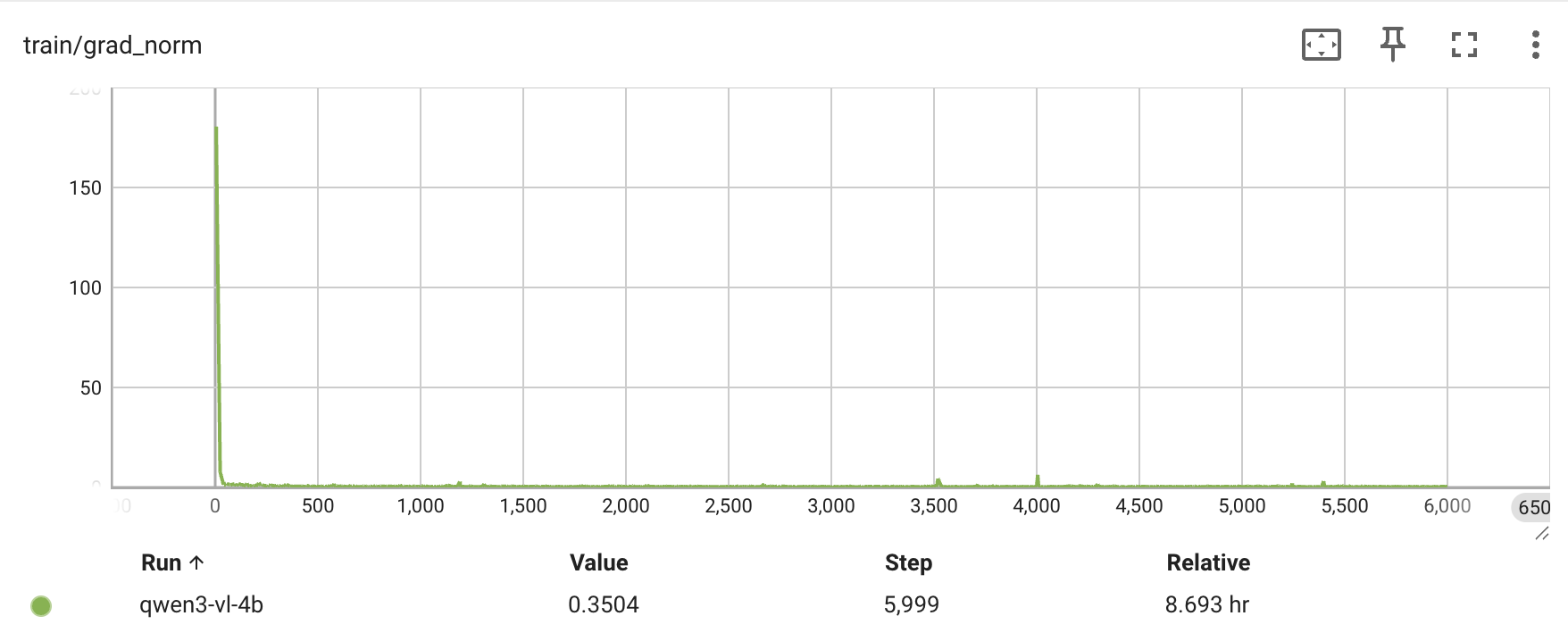
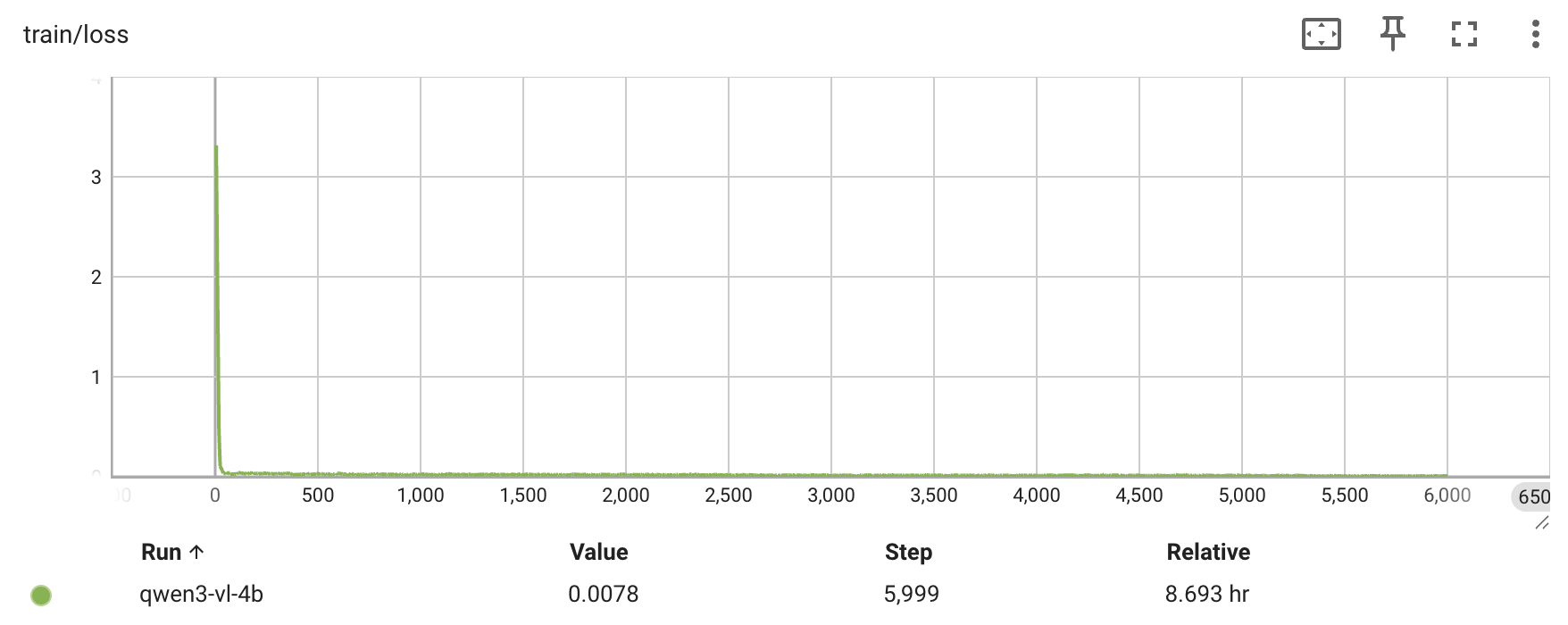
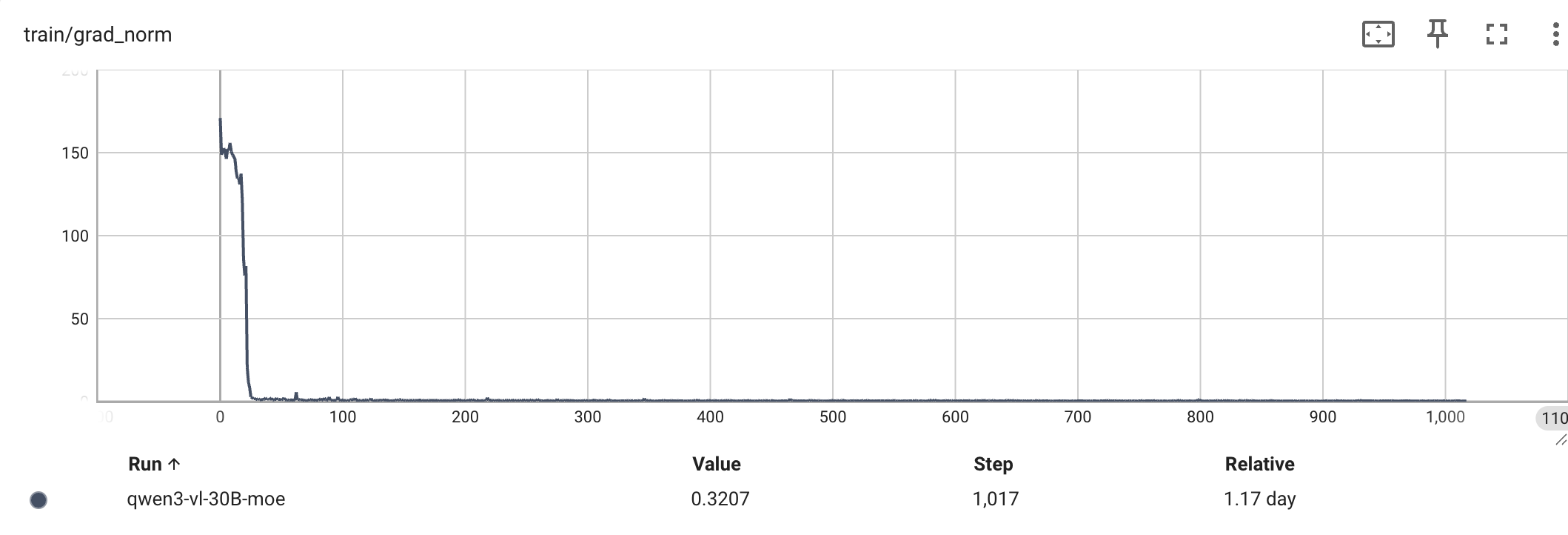
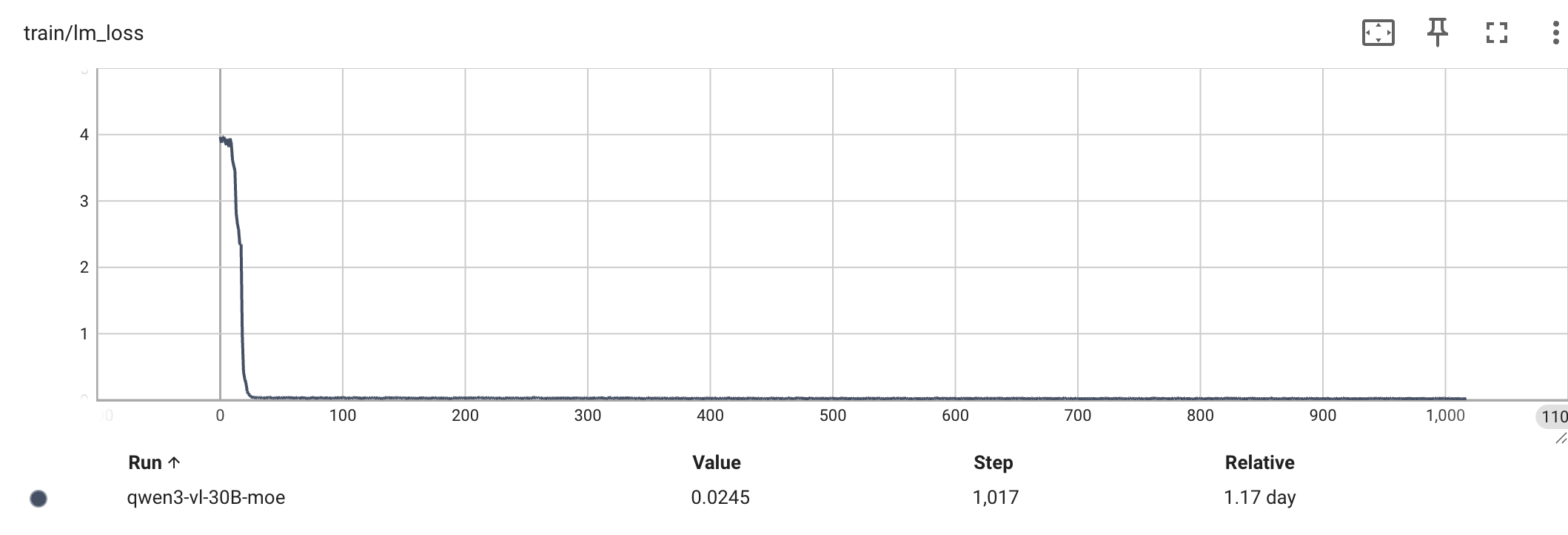
A healthy run shows the loss decreasing and the eval accuracy climbing. The script
creates logs/<timestamp> automatically; visualize with TensorBoard. For every logged
metric, see Training metrics.
tensorboard --logdir /path/to/RLinf/logs --port 6006
# open http://localhost:6006
Reference runs across model scales:
Model |
Hardware |
Iters |
Eval accuracy (before → after) |
|---|---|---|---|
Qwen2.5-VL-3B |
8 × H100 |
6000 |
— → 89.96% |
Qwen3-VL-4B |
4 × H100 |
6000 |
— → 96.9% |
Qwen3-VL-30B-A3B (MoE) |
2 × 8 × A100 |
1000 |
58.4% → 91.3% |
Qwen2.5-VL-3B — eval accuracy, grad_norm, and loss every 1000 iterations:
Qwen3-VL-4B — eval accuracy, grad_norm, and loss every 1000 iterations:
Qwen3-VL-30B-A3B (MoE) — grad_norm and loss over 1000 iterations:
Checkpoint Conversion#
SFT with FSDP saves checkpoints in FSDP format (for example, full_weights.pt). To get
HuggingFace format, use the built-in converter
rlinf/utils/ckpt_convertor/fsdp_convertor/convert_pt_to_hf.py with the
fsdp_model_convertor config. First set, in
rlinf/utils/ckpt_convertor/fsdp_convertor/config/fsdp_model_convertor.yaml:
convertor.ckpt_path: path tofull_weights.ptconvertor.save_path: output HF model directorymodel.model_path: base model pathmodel.model_type: model type (e.g.qwen2.5_vl,qwen3_vl, orqwen3_vl_moe)
Then run:
python -m rlinf.utils.ckpt_convertor.fsdp_convertor.convert_pt_to_hf \
    --config-path rlinf/utils/ckpt_convertor/fsdp_convertor/config \
    --config-name fsdp_model_convertor
See Checkpoint conversion for details.
Field Reference#
micro_batch_size: per-GPU batch size per forward/backward.global_batch_size: total batch size across all GPUs (must be divisible).max_epochs: number of full passes over the dataset.save_interval: checkpoint save frequency (in steps).model_path: local model directory (must exist).train_data_paths/val_data_paths: dataset directory or file path.
Common Issues and Fixes#
Model path not found — verify
actor.model.model_pathis correct and readable.Dataset key mismatch — verify
prompt_key/choice_key/answer_key/image_keysmatch your dataset columns.OOM (out of memory) — reduce
micro_batch_sizefirst, thennum_workers; if it persists, use a smaller model or shorter input length.Quick smoke test — use a very small data subset, set
max_epochsto 1, and set a smallersave_intervalfor faster feedback.