
Real-World RL with Dexmal DOS-W1#
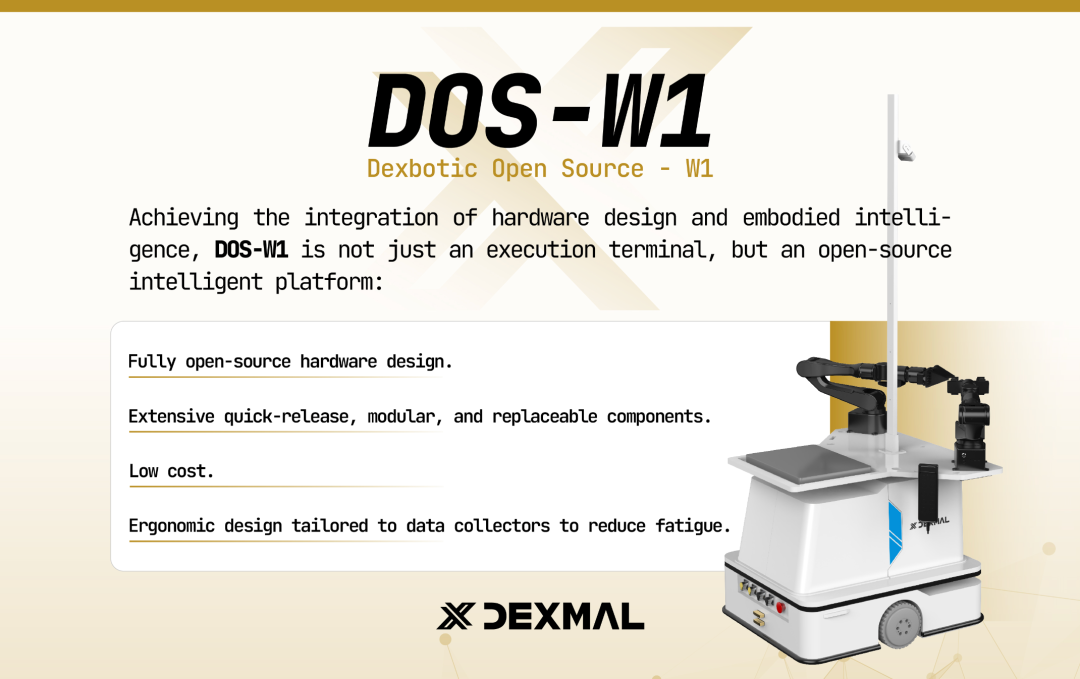
Dexmal DOS-W1 dual-arm robot used for the Flow Matching single-arm pick workflow.#
Train a Flow Matching policy on the Dexmal DOS-W1 dual-arm robot. The current recipe runs a single-arm pick task with AirBot services, RealSense cameras, keyboard-gated episodes, and SAC/RLPD-style real-world training.
Overview#
Train a visual flow policy for the DOS-W1 pick task.
Flow policy · ResNet-10
SAC · RLPD optional
Single-arm pick
DOS-W1 · AirBot · RealSense
Tasks#
Task |
Config / entry point |
Description |
|---|---|---|
Dummy smoke test |
|
Validate config wiring without cameras or hardware calls. |
Data collection |
|
Collect optional teleoperated demos for RLPD warm start. |
Training |
|
Train the flow policy with SAC on the pick task. |
Observation and Action#
Field |
Description |
|---|---|
Observation |
|
Action |
14-D joint-space action: left/right 6 joints plus gripper widths. |
Reward |
Dense reach/grasp/lift shaping with terminal success at |
Prompt |
|
Hardware Setup#
Robot: DOS-W1 dual-arm with leader arms (used for teleoperation).
Cameras: Up to three Intel RealSense cameras (serial numbers fed into
cluster.node_groups[<dosw1>].hardware.configs[*].camera_serials). The code also works with 1 camera if you setimage_num: 1and only list one serial.Training / Rollout Node: A machine with at least one CUDA GPU (RTX 4090 or better recommended).
Robot Controller Node: The DOS-W1 itself (or a small PC in the same local network) running the AirBot gRPC services.
Warning
The training node and the DOS-W1 must be reachable over the same local network. The default AirBot gRPC ports are:
left_arm_port = 50051(left follower)left_lead_port = 50050(left leader)right_arm_port = 50053(right follower)right_lead_port = 50052(right leader)
Installation#
The robot node and the training / rollout node share the same install command,
but only the robot node needs the official AirBot SDK (airbot_py
wheel + airbot_api source). The GPU node talks to the robot over gRPC
only and does not import airbot_py.
Robot Node#
The AirBot SDK is typically pre-deployed on a DOS-W1 robot, so the install command below can pick it up automatically.
A. Clone RLinf Repository#
# For mainland China users, you can use the following for better download speed:
# git clone https://gh-proxy.com/github.com/RLinf/RLinf.git
git clone https://github.com/RLinf/RLinf.git
cd RLinf
B. Install Dependencies#
# Mainland China users can add --use-mirror for better download speed.
bash requirements/install.sh embodied --env dosw1
source .venv/bin/activate
By default the installer looks for the AirBot SDK at:
~/dos_w1/airbot/5.1.6/airbot_py-5.1.6-py3-none-any.whl~/dos_w1/airbot/airbot_api(installed in editable mode)
If your SDK files live elsewhere, point the installer at the correct paths:
export DOSW1_SDK_WHEEL=/path/to/airbot_py-5.1.6-py3-none-any.whl
export DOSW1_API_PATH=/path/to/airbot_api
bash requirements/install.sh embodied --env dosw1
Training / Rollout Nodes#
A. Clone RLinf Repository#
# For mainland China users, you can use the following for better download speed:
# git clone https://gh-proxy.com/github.com/RLinf/RLinf.git
git clone https://github.com/RLinf/RLinf.git
cd RLinf
B. Install Dependencies#
# Mainland China users can add --use-mirror for better download speed.
bash requirements/install.sh embodied --env dosw1
source .venv/bin/activate
A GPU server typically does not have a ~/dos_w1/airbot directory, so
the installer prints a warning and skips the AirBot SDK step — this is
expected. The remaining dependencies (embodied extra, evdev,
opencv-python, RLinf itself) are installed as usual.
Note
Do not run only uv pip install -e . — it will not install the
embodied extra and you will be missing environment-side dependencies
(evdev, opencv-python, RealSense bindings, …).
Download the Model#
Download the ResNet-10 pretrained checkpoint used by the Flow Matching
policy (actor.model.encoder_config.ckpt_name: resnet10_pretrained.pt):
# Method 1: git clone
git lfs install
git clone https://huggingface.co/RLinf/RLinf-ResNet10-pretrained

# Method 2: huggingface-hub (mainland China: export HF_ENDPOINT=https://hf-mirror.com)
pip install huggingface-hub
hf download RLinf/RLinf-ResNet10-pretrained --local-dir RLinf-ResNet10-pretrained
Point actor.model.model_path and rollout.model.model_path in the YAML
at the downloaded directory.
Run It#
Target Joint Calibration#
target_grasp_joint and target_lift_joint must reflect the physical
layout of your workspace. The recommended way to calibrate them is to
teleoperate the follower arm to the desired pose via the leader arm and read
back the current joint positions.
On the robot node, start the follower service (for example
sh ~/dos_w1/airbot/whole_start.sh) and verify all panels come up without errors.Activate the venv and run the teleoperation check script:
source .venv/bin/activate

python toolkits/realworld_check/test_dosw1_controller.py \
    --robot-url <ROBOT_IP> \
    --print-hz 5
Drag the left leader arm until the left follower arm is at the desired grasp pose. The terminal prints lines such as:
[1713600000.000] left_joint=[-0.4725 -1.1332  0.6510  1.4082 -0.5987 -1.0904  0.0700]
[1713600000.000] left_eef=[...] right_eef=[...]
left_jointhas 7 values: the first 6 are joint angles (radians), the last is the gripper width. Copy the first 6 values intotarget_grasp_joint.Move the leader arm up to a safe lift pose and copy the new
left_joint[:6]values intotarget_lift_joint.
Tip
left_eef and right_eef are useful for sanity-checking that the
end-effector is where you expect, but the target fields expect joint
angles, not ee poses.
Cluster Setup#
Real-world training uses a two-node Ray cluster: one GPU node
(actor/rollout) and one robot node (env).
Source the venv on every node and export
RLINF_NODE_RANKbefore starting Ray. Ray freezes the interpreter and env vars atray starttime, so anything set after will not be visible to the workers.Start Ray:
# GPU node (node rank 0, Ray head)
export RLINF_NODE_RANK=0
ray start --head --port=6379 --node-ip-address=<GPU_SERVER_IP>

# Robot node (node rank 1, Ray worker)
export RLINF_NODE_RANK=1
ray start --address=<GPU_SERVER_IP>:6379
Verify with
ray statusthat both nodes are connected.
Configuration File#
Use examples/embodiment/config/dosw1_pick_sac_flow.yaml as the canonical
template. The async variant with weight-sync decoupling is
dosw1_pick_sac_flow_async.yaml.
Fields that you should update for your setup:
cluster:
  num_nodes: 2
  component_placement:
    actor:   { node_group: "gpu",   placement: 0 }
    rollout: { node_group: "gpu",   placement: 0 }
    env:     { node_group: dosw1,   placement: 0 }
  node_groups:
    - label: "gpu"
      node_ranks: 0
    - label: dosw1
      node_ranks: 1
      # Robot connection info (gRPC URL / ports / camera serials) is
      # managed by the scheduler, not the env config.
      hardware:
        type: DOSW1
        configs:
          - robot_url: "<ROBOT_IP>"            # DOS-W1 gRPC address
            left_arm_port: 50051
            right_arm_port: 50053
            left_lead_port: 50050
            right_lead_port: 50052
            camera_serials:                    # RealSense serial numbers
              - "<SERIAL_1>"
              - "<SERIAL_2>"
              - "<SERIAL_3>"
            node_rank: 1

env:
  train:
    keyboard_intervention_wrapper: True
    override_cfg:
      is_dummy: False
      use_dense_reward: True
      target_grasp_joint: [...]                # from calibration above
      target_lift_joint:  [...]                # from calibration above
      max_joint_delta: 0.1                     # rad/step (~5.7°)
      action_scale: 1.0
      # ee-pose safety box (xyz in meters, inclusive)
      left_ee_pose_limit_min: [0.1, -0.35, 0.02]
      left_ee_pose_limit_max: [0.4,  0.08, 0.40]
      right_ee_pose_limit_min: [0.28, -0.01, 0.16]
      right_ee_pose_limit_max: [0.30,  0.01, 0.17]
      enable_human_in_loop: True

actor:
  model:
    model_path: "/path/to/RLinf-ResNet10-pretrained"
    state_dim: 14        # 6 joints + 1 gripper per arm, dual arm
    action_dim: 14
    image_num: 3         # 1 → cam_left only; 3 → use all three cameras
rollout:
  model:
    model_path: "/path/to/RLinf-ResNet10-pretrained"
Warning
cluster.num_nodes must match the actual node count, and each
node_ranks entry must equal the RLINF_NODE_RANK of the
corresponding machine. Do not hand-craft a partial config by copying
diff snippets — always start from the full
dosw1_pick_sac_flow.yaml template.
Keyboard Intervention#
DOS-W1 episodes are gated by a keyboard listener on the robot node. To enable it, keep these two flags on in the YAML (they already are in the provided templates):
env:
  train:
    keyboard_intervention_wrapper: True
    override_cfg:
      enable_human_in_loop: True
Before training, give the current user access to /dev/input event
devices (see the Real-World RL with Franka Headless Keyboard Reward Wrapper section
for the full explanation of RLINF_KEYBOARD_DEVICE):
sudo usermod -aG input $USER
# log out and back in for the group change to take effect
Supported keys during a run:
Key |
Effect |
|---|---|
|
During free-teleop / reset, request the start of a new episode. |
|
Abort the current episode and return to free-teleop (not saved). |
|
Mark the current episode as “manually done” and save it. |
|
Switch from |
|
From |
|
From |
When manual_episode_control_only is set, the p / t / m
shortcuts are ignored — the run stays in leader-arm teleop mode and only
s / r / d are active.
Data Collection (optional, for RLPD)#
If you want to warm-start training with teleoperated demos, collect them
with the provided script. dosw1_collect_data.yaml already enables
enable_human_in_loop and the keyboard wrapper, and runs on a single
robot node (cluster.num_nodes: 1).
On the robot node:
source .venv/bin/activate

bash examples/embodiment/collect_data.sh dosw1_collect_data
Edit the cluster.node_groups[<dosw1>].hardware.configs entry in
examples/embodiment/config/dosw1_collect_data.yaml (robot_url,
the four gRPC ports and camera_serials) to match your hardware
before running.
A typical collection loop:
The env enters free-teleop. Use the leader arms to position the follower arms at the initial pose.
Press
sto start an episode.Teleoperate the grasp + lift.
Press
dto save a successful demo, orrto discard and retry.The script exits after
runner.num_data_episodes(default20) saved episodes.
Saved trajectories land in <log_path>/demos/. Plug that path into the
training config:
algorithm:
  demo_buffer:
    load_path: "/path/to/logs/dosw1-collect/<timestamp>/demos"
Remove the demo_buffer block if you do not want RLPD.
Testing the Setup (Optional)#
Before wiring up the real robot, run the tiny dummy config shipped with the
CI suite. It sets is_dummy: true (no hardware calls) and uses a
state-only MLP so it runs on a single node without cameras:
export REPO_PATH=$(pwd)
ray start --head

python examples/embodiment/train_embodied_agent.py \
    --config-path $REPO_PATH/tests/e2e_tests/embodied/ \
    --config-name dosw1_dummy_sac_mlp_pick \
    runner.max_epochs=1
Use this to validate the config tree and cluster plumbing end-to-end. It is not a real-robot training recipe — the image pipeline is disabled.
Visualization and Results#
Once calibration, demos, and the YAML are ready, launch training from the GPU node:
# Synchronous pipeline
bash examples/embodiment/run_realworld.sh dosw1_pick_sac_flow

# Async pipeline (decoupled rollout / learner weight sync)
bash examples/embodiment/run_realworld_async.sh dosw1_pick_sac_flow_async
The scripts pick up logs in logs/<timestamp>-<config>/.
Key Safety Mechanisms#
DOSW1Env._execute_model_action applies three layers of safety before any
command is sent to the SDK:
Per-step joint clamp — target joints are clipped to
current ± max_joint_delta(default0.1rad ≈ 5.7° per step).Absolute joint limits — clipped to
[joint_limit_min, joint_limit_max](default±π; tighten for your workspace).End-effector safety box — a binary search along the joint-space interpolation finds the largest fraction whose forward-kinematics result still fits inside
left_ee_pose_limit_min/max/right_ee_pose_limit_min/max. Out-of-box motions are truncated automatically.
All three apply identically in TELEOP mode, so an operator with the leader arm cannot push the follower arm outside the workspace.
Visualization and Results#
TensorBoard
On the Ray head node:
tensorboard --logdir ./logs --port 6006
Key Metrics
Environment:
env/episode_len,env/return,env/reward,env/success_once(unnormalized episodic success rate — the primary signal to monitor).Training (SAC):
train/sac/critic_loss,train/sac/actor_loss,train/sac/alpha_loss,train/sac/alpha,train/actor/entropy,train/actor/grad_norm,train/critic/grad_norm.Replay buffer:
train/replay_buffer/size,train/replay_buffer/{mean,max,min,std}_reward,train/replay_buffer/utilization.
Troubleshooting#
- ``ImportError: airbot_sdk is not installed`` (robot node)
The AirBot wheel was not found at the default path. Re-run the installer with
DOSW1_SDK_WHEEL/DOSW1_API_PATHpointing at your SDK files. For a pipeline-only smoke test, setenv.train.override_cfg.is_dummy: trueinstead.- ``TimeoutError: Timed out waiting for DOSW1 state from AirbotRobot``
The gRPC services are not responding within 5 s. Verify:
The robot is powered and the follower/leader services are running (
sh ~/dos_w1/airbot/whole_start.sh).robot_urland the four ports undercluster.node_groups[<dosw1>].hardware.configsmatch the robot’s configuration.The GPU node can
pingthe robot and TCP-connect on 50050–50053.
- ``RuntimeError: DOSW1Connection is not connected``
Connect was never called successfully. Re-check the preceding logs for
[DOSW1SDK] Connecting via AirbotRobot.- No cameras / ``Camera … is not producing frames``
Check
rs-enumerate-deviceson the robot node. Make sure every serial listed undercluster.node_groups[<dosw1>].hardware.configs[*].camera_serialsis visible, and that the USB cables are seated. If you are running on a headless server, setoverride_cfg.enable_camera_player: falseto disable the preview window (training is unaffected).- Reward stays at 0 / phase stuck in ``reach``
Most common causes:
is_dummyis stilltruein the active config.target_grasp_jointis unreachable — re-calibrate withtest_dosw1_controller.pyand confirm the arm physically reaches it.joint_reward_sharpnessis too high (dense reward saturates to 0 away from the target). Try lowering to1.0.
- ``Missing key runner`` / Hydra config errors
You are composing from a partial snippet instead of the full template. Always start from
examples/embodiment/config/dosw1_pick_sac_flow.yaml(ordosw1_pick_sac_flow_async.yaml) and override fields in place; for quick checks usetests/e2e_tests/embodied/dosw1_dummy_sac_mlp_pick.yaml.- Training is unstable / diverges
A few SAC knobs that commonly help:
Lower
actor.optim.lrandactor.critic_optim.lr(e.g.1e-4).Raise
algorithm.replay_buffer.min_buffer_sizeso training waits until the buffer has more on-policy data.Shorten the effective horizon via
algorithm.gammaif the task is short (0.8 – 0.9is often a good starting point for pick).Collect a few teleoperated demos and enable RLPD via
algorithm.demo_buffer.load_path.