
RL with MetaWorld Benchmark#
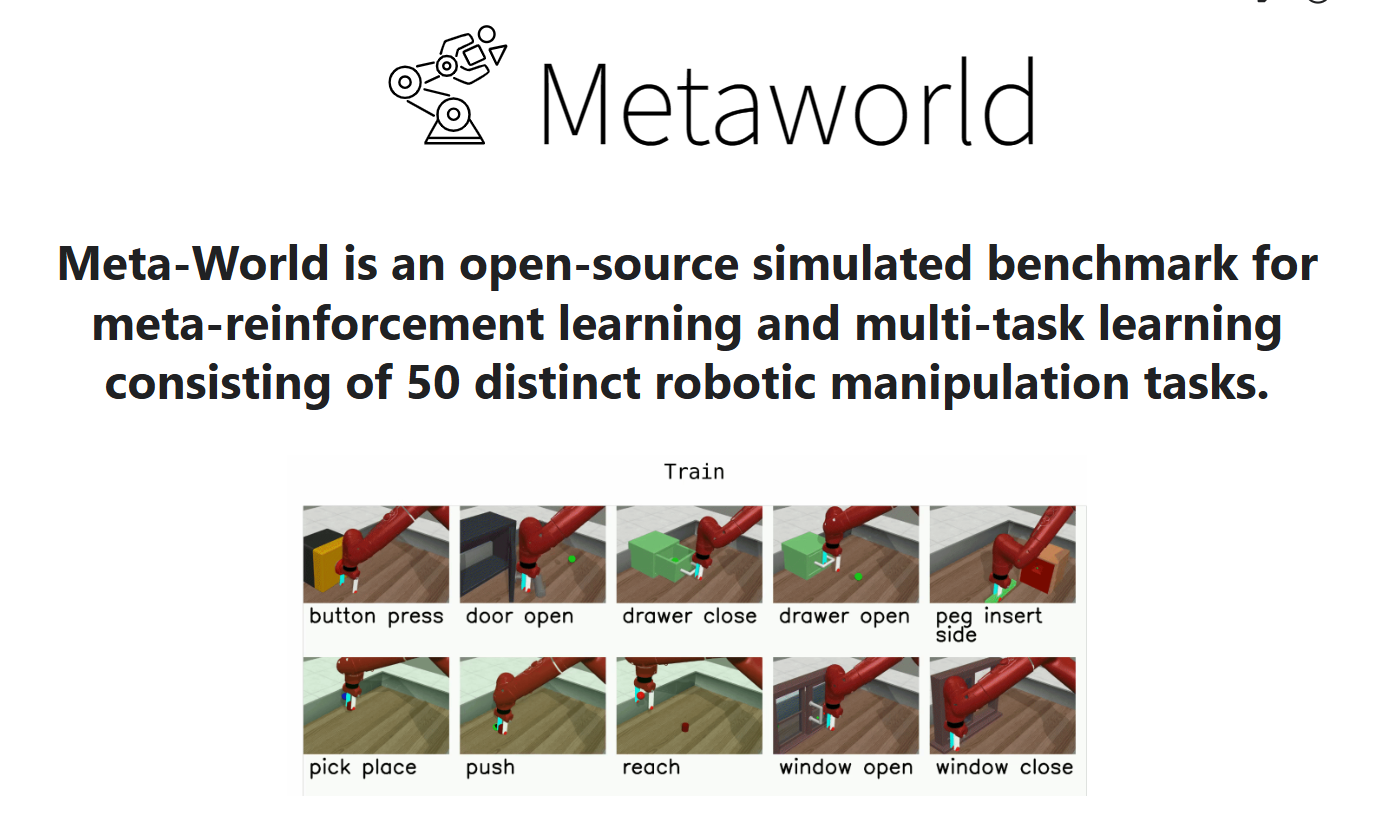
The Meta-World benchmark (image: Meta-World).#
Meta-World is a multi-task manipulation benchmark on MuJoCo: a 7-DoF arm performs 50 diverse tabletop tasks. RLinf uses it to RL-fine-tune vision-language-action (VLA) policies, including held-out (OOD) generalization.
Overview#
RL-finetune a VLA across Meta-World’s 50 tasks; pi0 + PPO reaches ~78% average success.
OpenVLA-OFT · π₀ / π₀.₅
PPO · GRPO
MT50 · ML45 (5 OOD)
1 node · 8 GPUs
run_embodiment.sh → watch env/success_once.Tasks#
Suite |
Tasks |
Setting |
|---|---|---|
MT50 |
50 |
Multi-task training and evaluation across all 50 tasks. |
ML45 |
45 + 5 |
Train on 45 tasks; evaluate on 5 held-out (OOD) tasks. |
Observation and Action#
Field |
Specification |
|---|---|
Observation |
RGB (480×480) from off-screen cameras around the workspace. |
Action |
4-dim continuous: 3D end-effector position (x, y, z) + gripper open/close. |
Reward |
Sparse — based on task completion. |
Installation#
First, clone the RLinf repository:
# Mainland China users can use a mirror for faster cloning:
# git clone https://gh-proxy.com/github.com/RLinf/RLinf.git
git clone https://github.com/RLinf/RLinf.git
cd RLinf
Then set up the dependencies with one of the two methods below — a prebuilt
Docker image (recommended) or a custom environment. The general setup
(prerequisites, GPU drivers, the in-image switch_env helper, mirrors, and
troubleshooting) is documented once in Installation;
the commands in this recipe only differ in the Docker image tag and the
--env value.
Option 1: Docker image — image tag agentic-rlinf0.4-metaworld:
docker run -it --rm --gpus all \
   --shm-size 20g \
   --network host \
   --name rlinf \
   -v .:/workspace/RLinf \
   rlinf/rlinf:agentic-rlinf0.4-metaworld
   # Mainland China mirror: docker.1ms.run/rlinf/rlinf:agentic-rlinf0.4-metaworld

# Inside the container, switch to the model's virtual environment:
source switch_env openpi        # or: source switch_env openvla-oft
Option 2: Custom environment — install bundle --env metaworld:
# Add --use-mirror for faster downloads in mainland China.
bash requirements/install.sh embodied --model openpi --env metaworld
# Or install the OpenVLA-OFT environment:
# bash requirements/install.sh embodied --model openvla-oft --env metaworld

source .venv/bin/activate
Download the Model#
Download the SFT checkpoints used by the reference recipes (either method works):
# Method 1: git clone
git lfs install
git clone https://huggingface.co/RLinf/RLinf-Pi0-MetaWorld-SFT
git clone https://huggingface.co/RLinf/RLinf-Pi05-MetaWorld-SFT
git clone https://huggingface.co/RLinf/RLinf-OpenVLAOFT-MetaWorld-SFT

# Method 2: huggingface-hub (set HF_ENDPOINT=https://hf-mirror.com in mainland China)
# export HF_ENDPOINT=https://hf-mirror.com
pip install huggingface-hub
hf download RLinf/RLinf-Pi0-MetaWorld-SFT --local-dir RLinf-Pi0-MetaWorld-SFT
hf download RLinf/RLinf-Pi05-MetaWorld-SFT --local-dir RLinf-Pi05-MetaWorld-SFT
hf download RLinf/RLinf-OpenVLAOFT-MetaWorld-SFT --local-dir RLinf-OpenVLAOFT-MetaWorld-SFT
Alternatively, you can also download the model from ModelScope at https://www.modelscope.cn/models/RLinf/RLinf-Pi0-MetaWorld.
After downloading, point your config YAML at the checkpoint — set the same path for both the rollout and the actor model:
rollout:
   model:
      model_path: /path/to/downloaded-checkpoint
actor:
   model:
      model_path: /path/to/downloaded-checkpoint
Run It#
Each recipe is a YAML config under examples/embodiment/config/:
Setting |
Model / algorithm |
Config |
|---|---|---|
MT50 |
π₀ + PPO |
|
MT50 |
π₀.₅ + PPO |
|
MT50 |
OpenVLA-OFT + GRPO |
|
ML45 |
π₀ + PPO |
|
Launch a config with run_embodiment.sh:
bash examples/embodiment/run_embodiment.sh metaworld_50_ppo_openpi
What this command does:
Loads
examples/embodiment/config/metaworld_50_ppo_openpi.yaml.Starts Meta-World MT50 rollout/evaluation workers according to
cluster.component_placement.Runs the PPO training loop and writes logs/checkpoints under
runner.logger.log_path.
Configure further
Placement and throughput → Placement and Execution modes
All config keys → Configuration
Metric definitions and logging backends → Training metrics
Resuming from a checkpoint → Resume
Visualization and Results#
Launch TensorBoard to watch training live:
tensorboard --logdir ./logs --port 6006
The key signal to watch is ``env/success_once`` — the task success rate. For every logged metric, see Training metrics.
To save evaluation videos, enable them in the config:
env:
   eval:
      video_cfg:
         save_video: True
         video_base_dir: ${runner.logger.log_path}/video/eval
MetaWorld Results#
The results for Diffusion Policy, TinyVLA, and SmolVLA in the table below are referenced from the SmolVLA paper. The SFT results for π0 and π0.5 are obtained by retraining using the official dataset provided by LeRobot.
Methods |
Easy |
Medium |
Hard |
Very Hard |
Avg. |
|---|---|---|---|---|---|
Diffusion Policy |
23.1 |
10.7 |
1.9 |
6.1 |
10.5 |
TinyVLA |
77.6 |
21.5 |
11.4 |
15.8 |
31.6 |
SmolVLA |
87.1 |
51.8 |
70.0 |
64.0 |
68.2 |
π0 |
77.9 |
51.8 |
53.3 |
20.0 |
50.8 |
π0 + PPO |
92.1 |
74.6 |
61.7 |
84.0 |
78.1 |
π0.5 |
68.2 |
37.3 |
41.7 |
28.0 |
43.8 |
π0.5 + PPO |
86.4 |
55.5 |
75.0 |
66.0 |
70.7 |