
RL with ManiSkill Benchmark#
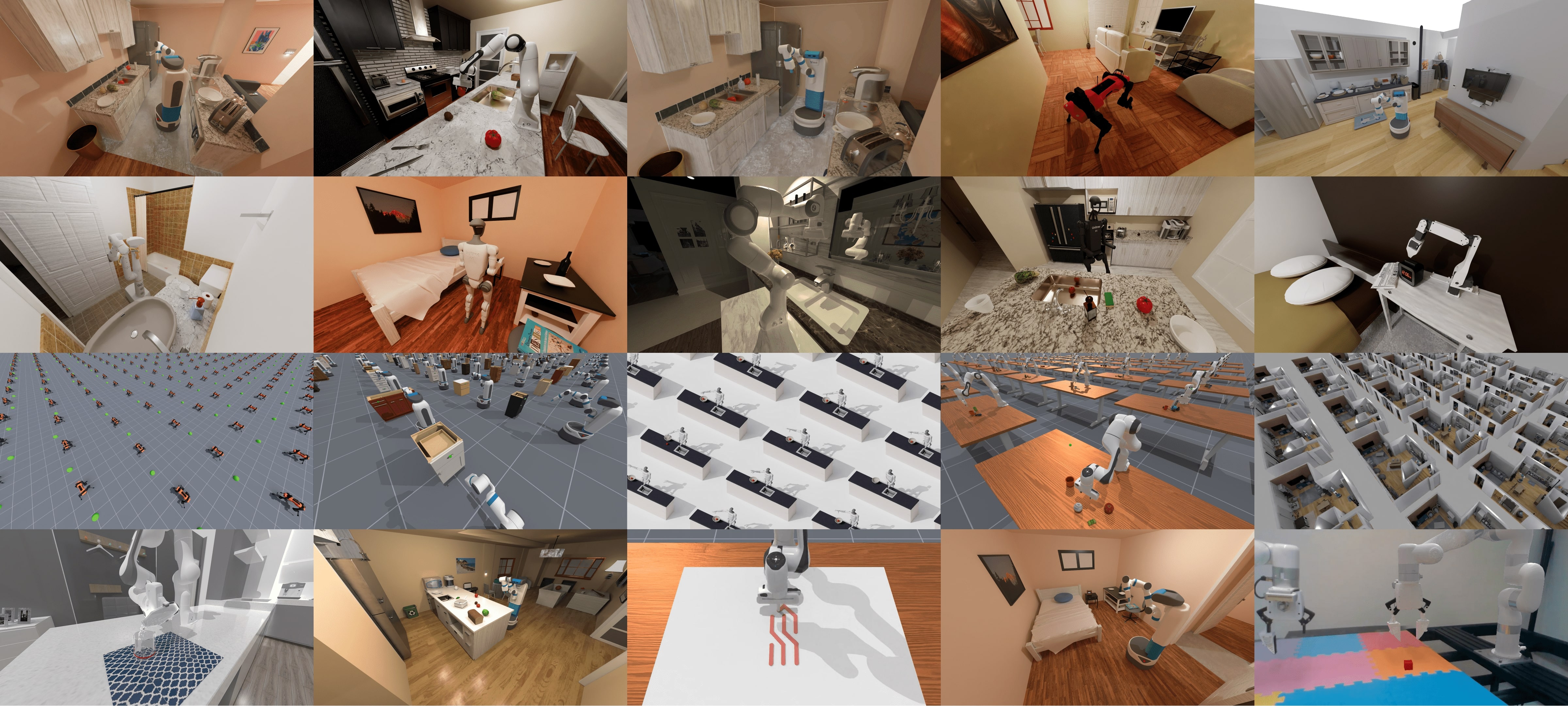
ManiSkill is a GPU-parallelized robotics simulator and benchmark for manipulation. A 7-DoF arm performs language-conditioned tabletop tasks; RLinf uses ManiSkill3 to RL-fine-tune vision-language-action (VLA) policies and reach state-of-the-art success rates, including on out-of-distribution (OOD) variations.
Overview#
RL-finetune a VLA on ManiSkill3; OpenVLA and OpenVLA-OFT exceed 90% success on plate-25.
OpenVLA · OpenVLA-OFT · π₀ / π₀.₅ · MLP · ResNet
PPO · GRPO · SAC · CrossQ · DAgger
Tabletop manipulation (plate-25 + OOD)
1–2 nodes · 8–16 GPUs
run_embodiment.sh → watch env/success_once.Tasks#
The reference recipe trains on the PutOnPlateInScene25Main-v3 (plate-25) task and
evaluates both in-distribution (IND) and on out-of-distribution (OOD) settings:
Setting |
What it tests |
|---|---|
Training (IND) |
The plate-25 training task. |
Vision (OOD) |
Visual variations of the scene. |
Semantic (OOD) |
Semantic variations (objects, instructions). |
Execution (OOD) |
Execution-time variations. |
Observation and Action#
Field |
Specification |
|---|---|
Observation |
RGB from a third-person camera (224×224); language task description. |
Action |
7-dim continuous: 3D end-effector position, 3D rotation, and 1-D gripper open/close. |
Reward |
Step-level reward based on task progress and success. |
Task prompt |
|
The walkthrough below uses OpenVLA / OpenVLA-OFT with PPO/GRPO; switch the config to use another supported model.
See also
To run ManiSkill with OpenPI (π0 / π0.5), see RL on π₀ and π₀.₅ Models.
Installation#
First, clone the RLinf repository:
# Mainland China users can use a mirror for faster cloning:
# git clone https://gh-proxy.com/github.com/RLinf/RLinf.git
git clone https://github.com/RLinf/RLinf.git
cd RLinf
Then set up the dependencies with one of the two methods below — a prebuilt
Docker image (recommended) or a custom environment. The general setup
(prerequisites, GPU drivers, the in-image switch_env helper, mirrors, and
troubleshooting) is documented once in Installation;
the commands in this recipe only differ in the Docker image tag and the
--env value.
Option 1: Docker image — image tag agentic-rlinf0.4-maniskill_libero:
docker run -it --rm --gpus all \
   --shm-size 20g \
   --network host \
   --name rlinf \
   -v .:/workspace/RLinf \
   rlinf/rlinf:agentic-rlinf0.4-maniskill_libero
   # Mainland China mirror: docker.1ms.run/rlinf/rlinf:agentic-rlinf0.4-maniskill_libero

# Inside the container, switch to the model's virtual environment:
source switch_env openvla        # or: source switch_env openvla-oft
Option 2: Custom environment — install bundle --env maniskill_libero:
# Add --use-mirror for faster downloads in mainland China.
# Use --model openvla-oft for the OpenVLA-OFT experiments.
bash requirements/install.sh embodied --model openvla --env maniskill_libero
source .venv/bin/activate
Download the Assets#
Download the ManiSkill assets:
# Set HF_ENDPOINT=https://hf-mirror.com in mainland China.
hf download --repo-type dataset RLinf/maniskill_assets --local-dir ./maniskill_assets
Important
The assets must be placed under rlinf/envs/maniskill/assets — this is where the env loads them from. Copy them into the env package directory:
cp -r ./maniskill_assets <path_to_RLinf>/rlinf/envs/maniskill/assets
Download the Model#
Download a pretrained base checkpoint (either method works):
# Method 1: git clone
git lfs install
git clone https://huggingface.co/gen-robot/openvla-7b-rlvla-warmup

# Method 2: huggingface-hub (set HF_ENDPOINT=https://hf-mirror.com in mainland China)
pip install huggingface-hub
hf download gen-robot/openvla-7b-rlvla-warmup --local-dir openvla-7b-rlvla-warmup
After downloading, point your config YAML at the checkpoint — set the same path for both the rollout and the actor model:
rollout:
   model:
      model_path: /path/to/downloaded-checkpoint
actor:
   model:
      model_path: /path/to/downloaded-checkpoint
Run It#
Each recipe is a YAML config under examples/embodiment/config/:
OpenVLA + PPO —
maniskill_ppo_openvla.yamlOpenVLA-OFT + PPO —
maniskill_ppo_openvlaoft.yamlOpenVLA + GRPO —
maniskill_grpo_openvla.yamlOpenVLA-OFT + GRPO —
maniskill_grpo_openvlaoft.yaml
Launch a config with run_embodiment.sh:
bash examples/embodiment/run_embodiment.sh maniskill_ppo_openvla
What this command does:
Loads
examples/embodiment/config/maniskill_ppo_openvla.yaml.Attaches to (or starts) Ray and places the actor, rollout, and env workers per
cluster.component_placement.Runs the PPO training loop, writing logs and checkpoints under
runner.logger.log_path.
Configure further
Placement and throughput → Placement and Execution modes
All config keys → Configuration
Metric definitions and logging backends → Training metrics
Resuming from a checkpoint → Resume
Stuck or hitting OOM? → FAQ
Visualization and Results#
Launch TensorBoard to watch training live:
tensorboard --logdir ./logs --port 6006
The key signal to watch is ``env/success_once`` — the unnormalized episodic success rate. For every logged metric, see Training metrics.
To save evaluation videos, enable them in the config:
env:
   eval:
      video_cfg:
         save_video: True
         video_base_dir: ${runner.logger.log_path}/video/eval
ManiSkill3 Results#
Running on a single 8-GPU H100 machine, OpenVLA (left) and OpenVLA-OFT (right) achieve over 90% success on ManiSkill3’s plate-25-main task.
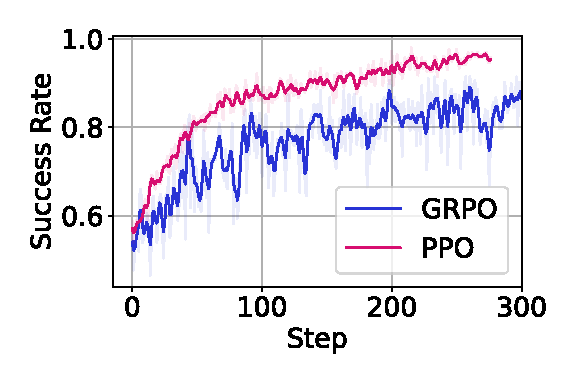
OpenVLA
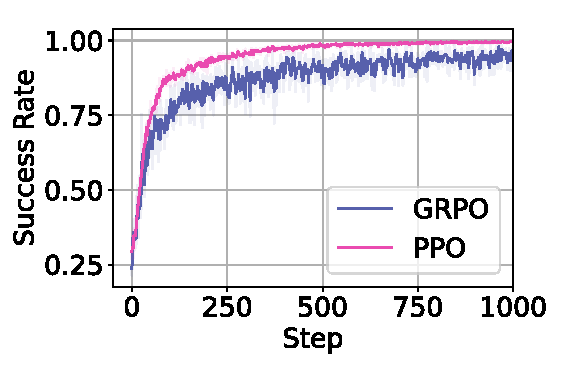
OpenVLA-OFT
We evaluate on both in-distribution (IND) and OOD scenarios (Vision, Semantic, Execution). The best result per column is in bold.
Note
The same OOD test set as rl4vla is used for a fair
comparison. Base models: OpenVLA uses the pretrained
openvla-7b-rlvla-warmup;
OpenVLA-OFT uses our own LoRA fine-tune on PutOnPlateInScene25Main-v3 data
(OpenVLA-OFT (Base)).
Model |
Training Setting(IND) |
Vision (OOD) |
Semantic (OOD) |
Execution (OOD) |
Average of OOD |
|---|---|---|---|---|---|
53.91% |
38.75% |
35.75% |
42.11% |
39.10% |
|
93.75% |
80.47% |
75.00% |
81.77% |
79.15% |
|
96.09% |
82.03% |
78.35% |
85.42% |
81.93% |
|
84.38% |
74.69% |
72.99% |
77.86% |
75.15% |
|
28.13% |
27.73% |
12.95% |
11.72% |
18.29% |
|
97.66% |
92.11% |
64.84% |
73.57% |
77.05% |
|
94.14% |
84.69% |
45.54% |
44.66% |
60.64% |

Note
The rl4vla model is PPO + OpenVLA under a small batch size, so it should be
compared only with our PPO+OpenVLA trained under similar conditions. Our PPO+OpenVLA
uses RLinf’s large-scale infrastructure to train with larger batch sizes, which we
found significantly improves performance.
The animation below shows OpenVLA trained on ManiSkill3’s multi-task benchmark with PPO in RLinf.