
DreamZero Supervised Fine-Tuning and Franka Real-World Deployment#
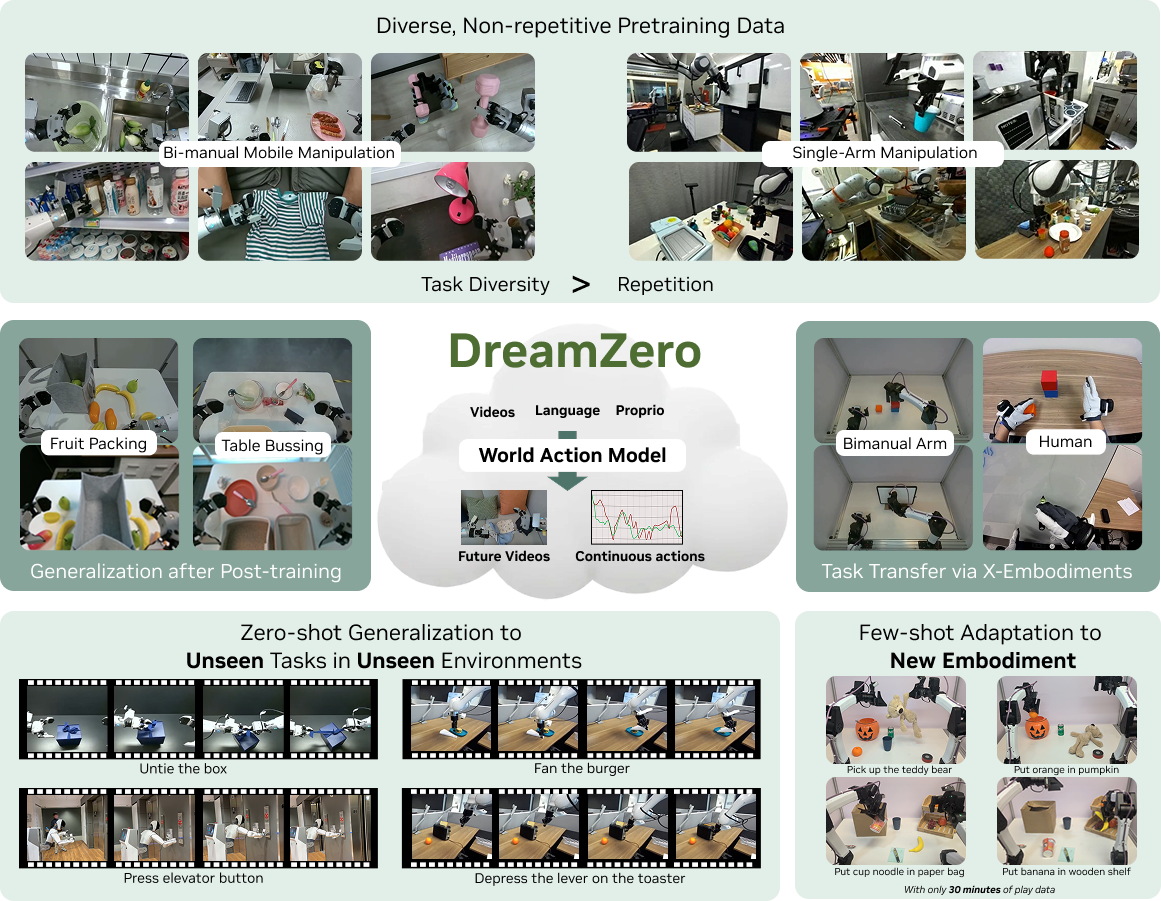
DreamZero: a video-generation world model fine-tuned into a VLA policy.#
Run DreamZero supervised fine-tuning (SFT) in RLinf — from model and data preparation through configuration, training, evaluation, and troubleshooting — then deploy the trained policy on a real Franka robot.
Overview#
Fine-tune a WAN-based DreamZero world model into a manipulation policy on LeRobot data, evaluate it in simulation, and deploy it on a Franka.
WAN2.1 · WAN2.2
SFT · Mixture SFT
LIBERO · DROID · Franka PnP
1+ nodes · GPUs
metadata.json → launch run_vla_sft.sh → evaluate in sim or on Franka.Currently supported
Datasets: LIBERO (
libero_sim), OXE DROID (oxe_droid), Franka pick-and-place (franka_pnp); mixture SFT across embodiments (seelibero_franka_mix_sft_dreamzero_5b.yaml).Backbones: WAN2.1 (e.g. DreamZero-DROID 14B), WAN2.2 (e.g. Wan2.2-TI2V-5B cold start).
Installation#
First, clone the RLinf repository:
# Mainland China users can use a mirror for faster cloning:
# git clone https://ghfast.top/github.com/RLinf/RLinf.git
git clone https://github.com/RLinf/RLinf.git
cd RLinf
Then set up the dependencies with one of the two methods below — a prebuilt
Docker image (recommended) or a custom environment. The general setup
(prerequisites, GPU drivers, the in-image switch_env helper, mirrors, and
troubleshooting) is documented once in Installation;
the commands in this recipe only differ in the Docker image tag and the
--env value.
Option 1: SFT-only environment — install DreamZero without simulator dependencies:
# Add --use-mirror for faster downloads in mainland China.
bash requirements/install.sh embodied --model dreamzero
source .venv/bin/activate
Option 2: SFT + LIBERO evaluation — add LIBERO simulator dependencies:
bash requirements/install.sh embodied --model dreamzero --env libero
source .venv/bin/activate
Clone the DreamZero repository separately and set DREAMZERO_PATH before SFT or eval:
git clone https://github.com/RLinf/dreamzero.git
export DREAMZERO_PATH=/path/to/dreamzero
What this does:
Creates a DreamZero-specific uv virtual environment through
requirements/install.sh.Installs only offline SFT dependencies by default, or adds LIBERO when you need simulator evaluation.
Makes the external DreamZero package importable through
DREAMZERO_PATH;examples/sft/run_vla_sft.shalso appends it toPYTHONPATH.
Model Preparation#
Resume from a Checkpoint#
Set actor.model.model_path to a downloaded checkpoint directory; architecture and weights load from that path. Options:
DreamZero 14B (DROID / AgiBot): DreamZero-DROID, DreamZero-AgiBot — see
droid_sft_dreamzero_14b.yamlRLinf 5B (LIBERO SFT): RLinf-DreamZero-WAN2.2-5B-LIBERO-SFT-Step18000 — see
libero_sft_dreamzero_5b.yamland pointmodel_pathat that directory
Download example:
pip install -U huggingface_hub
huggingface-cli download GEAR-Dreams/DreamZero-DROID --local-dir ./DreamZero-DROID
YAML example (DROID + official 14B; see droid_sft_dreamzero_14b.yaml):
defaults:
  - model/dreamzero_14b@actor.model

actor:
  model:
    model_path: ./DreamZero-DROID
    tokenizer_path: google/umt5-xxl
    embodiment_tag: oxe_droid
For AgiBot data, set model_path to ./DreamZero-AgiBot instead.
Train from Scratch (WAN2.2 Component Cold Start)#
Set model_path: null and fill each *_pretrained_path. Download from Hugging Face:
Wan-AI/Wan2.2-TI2V-5B (DiT, T5, VAE)
Wan2.1 CLIP file
models_clip_open-clip-xlm-roberta-large-vit-huge-14.pth(not in the 5B repo)
Download example:
huggingface-cli download Wan-AI/Wan2.2-TI2V-5B --local-dir ./Wan2.2-TI2V-5B
huggingface-cli download Wan-AI/Wan2.1-I2V-14B-480P \
  models_clip_open-clip-xlm-roberta-large-vit-huge-14.pth --local-dir ./Wan2.1-CLIP
huggingface-cli download google/umt5-xxl --local-dir ./umt5-xxl
YAML example (LIBERO cold start; see libero_sft_dreamzero_5b.yaml):
defaults:
  - model/dreamzero_5b@actor.model

actor:
  model:
    model_path: null
    tokenizer_path: google/umt5-xxl
    diffusion_model_pretrained_path: Wan-AI/Wan2.2-TI2V-5B
    image_encoder_pretrained_path: Wan-AI/Wan2.1-I2V-14B-480P/models_clip_open-clip-xlm-roberta-large-vit-huge-14.pth
    text_encoder_pretrained_path: Wan-AI/Wan2.2-TI2V-5B/models_t5_umt5-xxl-enc-bf16.pth
    vae_pretrained_path: Wan-AI/Wan2.2-TI2V-5B/Wan2.2_VAE.pth
    metadata_json_path: /path/to/metadata.json
    embodiment_tag: libero_sim
Data Preparation#
Training data must follow the LeRobot v2/v3 layout (meta/, data/, etc.). Set a local path or Hugging Face dataset ID via data.train_data_paths.
Download Datasets#
Supported datasets:
LIBERO: physical-intelligence/libero —
embodiment_tag: libero_sim; seelibero_sft_dreamzero_14b.yaml/libero_sft_dreamzero_5b.yamlDROID: GEAR-Dreams/DreamZero-DROID-Data —
embodiment_tag: oxe_droid; seedroid_sft_dreamzero_14b.yamlFranka PnP: RLinf/dreamzero-franka-pnp —
embodiment_tag: franka_pnp; transforms indata_transforms/franka_pnp.py(extendslibero_simdual-view layout)Mixture SFT:
libero_franka_mix_sft_dreamzero_5b.yamluses a list fordata.train_data_paths; each entry can setdataset_path,embodiment_tag,metadata_json_path, andweight
Download example:
pip install -U huggingface_hub
# LIBERO
huggingface-cli download physical-intelligence/libero --repo-type dataset --local-dir ./libero
# DROID
huggingface-cli download GEAR-Dreams/DreamZero-DROID-Data --repo-type dataset --local-dir ./DreamZero-DROID-Data
# Franka PnP real-world data
huggingface-cli download RLinf/dreamzero-franka-pnp --repo-type dataset --local-dir ./franka_pnp
Generate metadata.json#
For a new dataset or cold start (no experiment_cfg/metadata.json), generate normalization stats for the corresponding embodiment_tag first:
# LIBERO
python toolkits/lerobot/generate_dreamzero_metadata.py \
  --preset libero_sim \
  --dataset-root /path/to/libero \
  --output-metadata /path/to/metadata.json

# DROID (use --merge for multiple datasets)
python toolkits/lerobot/generate_dreamzero_metadata.py \
  --preset oxe_droid \
  --dataset-root /path/to/droid \
  --output-metadata /path/to/metadata.json \
  --merge

# Franka PnP
python toolkits/lerobot/generate_dreamzero_metadata.py \
  --preset franka_pnp \
  --dataset-root /path/to/franka_pnp \
  --output-metadata /path/to/franka_pnp_metadata.json
Then set actor.model.metadata_json_path in config (or place the file at model_path/experiment_cfg/metadata.json).
Configure Further#
Configs are managed by Hydra; the entry script is examples/sft/train_vla_sft.py. Below, data fields and model/training fields are explained separately.
Model and Training Settings#
Identity and weight paths
Field |
Meaning and role |
|---|---|
|
Must be |
|
Full checkpoint directory; when non-null, architecture loads from |
|
UMT5 tokenizer path (required for training and collate). |
|
Causal DiT (diffusion backbone) pretrained weights; required for cold start. |
|
WAN image encoder; WAN2.2 must point to WAN2.1 CLIP weights. |
|
T5 text encoder weights. |
|
VAE weights; WAN2.2 uses |
|
Dataset |
|
Selects data transform and collate template: |
Temporal and action shape (must align with data and WAN capacity)
Field |
Meaning and role |
|---|---|
|
Action steps per WAN temporal block (LIBERO 16, DROID 24). |
|
State rows per sample (usually 1, one state per macro anchor). |
|
Align with DiT |
|
Multi-anchor macro temporal blocks / Causal DiT capacity; tied to |
|
Padding limits and max text sequence length in DreamTransform. |
Video size and DROID-specific options
Field |
Meaning and role |
|---|---|
|
WAN policy head target resolution after multi-view concat (5B preset e.g. 176×320; Libero often 160×320). Model-internal resize only; do not use for per-view data transform resize. |
|
(Optional) per-view resize overrides for DROID. |
|
Relative action settings; DROID often uses |
Other training options
precision: main precision for Actor/optimizer (fp32/bf16). Recommended: ``fp32`` withactor.fsdp_config.mixed_precisionfor mixed precision:precision: fp32keeps optimizer states and master weights in FP32 (more stable), while FSDP runs forward/backward matmuls in BF16 viamixed_precision(saves memory, faster). Example:actor: model: precision: fp32 fsdp_config: mixed_precision: param_dtype: bf16 reduce_dtype: bf16 buffer_dtype: bf16
Setting
precision: bf16also lowers optimizer state precision and is usually less stable. With FSDP CPU offload, keepprecision: fp32.is_lora: LoRA fine-tuning (DreamZero SFT examples typically use full fine-tuningFalse).actor.micro_batch_size/actor.global_batch_size: per-GPU micro-batch and global effective batch size.actor.optim.*: learning rate, warmup, cosine schedule, etc.actor.fsdp_config: FSDP2 sharding, gradient checkpointing;mixed_precisioncontrols compute/comm dtypes (works withactor.model.precisionabove).
Example config sketch
# ---------- data (single dataset) ----------
data:
  train_data_paths: /path/to/libero
  lazy_load: True
  sampling_mode: multi_anchor
  video_backend: torchcodec
  num_workers: 8

# ---------- data (mixture; see libero_franka_mix_sft_dreamzero_5b.yaml) ----------
data:
  train_data_paths:
    - dataset_path: /path/to/libero
      weight: 4
      embodiment_tag: libero_sim
      metadata_json_path: /path/to/libero_metadata.json
    - dataset_path: /path/to/franka_pnp
      weight: 1
      embodiment_tag: franka_pnp
      metadata_json_path: /path/to/franka_metadata.json

# ---------- model (resume from checkpoint) ----------
actor:
  model:
    model_path: /path/to/DreamZero-DROID
    tokenizer_path: /path/to/umt5-xxl
    embodiment_tag: oxe_droid
    action_horizon: 24
    metadata_json_path: /path/to/metadata.json   # if no experiment_cfg/metadata.json
Run It#
From the repository root:
# LIBERO + WAN2.1 (checkpoint, dreamzero_14b preset)
bash examples/sft/run_vla_sft.sh libero_sft_dreamzero_14b

# LIBERO + WAN2.2 (cold start, dreamzero_5b preset)
bash examples/sft/run_vla_sft.sh libero_sft_dreamzero_5b

# DROID + WAN2.1 (dreamzero_14b preset; model_path -> DreamZero-DROID)
bash examples/sft/run_vla_sft.sh droid_sft_dreamzero_14b

# LIBERO + Franka mixture (WAN2.2; see libero_franka_mix_sft_dreamzero_5b.yaml)
bash examples/sft/run_vla_sft.sh libero_franka_mix_sft_dreamzero_5b
Equivalent command:
python examples/sft/train_vla_sft.py \
  --config-path examples/sft/config/ \
  --config-name <config_name> \
  runner.logger.log_path=<auto_log_dir>
Logs:
<repo>/logs/<timestamp>-<config_name>/run_embodiment.log
Resume training with runner.resume_dir pointing to a checkpoint directory (field provided in example configs such as droid_sft_dreamzero_14b.yaml and libero_sft_dreamzero_5b.yaml).
Standalone Evaluation#
Use the unified Evaluation section for standalone simulator or real-robot evaluation. This SFT page only records the DreamZero-specific handoff points.
Target |
Start from |
DreamZero-specific fields |
|---|---|---|
LIBERO simulation |
LIBERO evaluation guide with |
Set |
Franka deployment / evaluation |
real-world evaluation guide with |
Set the full DreamZero checkpoint directory, |
For command syntax, Hydra overrides, logs, and result files, use the
Evaluation CLI reference and
Evaluation results reference. If your SFT
checkpoint is still sharded as .distcp, convert it first with the
checkpoint conversion guide.
Note
max_steps_per_rollout_epoch must be divisible by actor.model.num_action_chunks
for DreamZero rollout evaluation.
Pretrained checkpoint evaluation results
Evaluation on LIBERO Spatial for RLinf-DreamZero-WAN2.2-5B-LIBERO-SFT-Step18000 (num_trajectory=512):
Training step |
success_once |
|---|---|
3000 |
7.81% |
6000 |
66.41% |
9000 |
89.06% |
12000 |
88.48% |
15000 |
66.60% |
18000 |
96.68% |
21000 |
90.43% |
Visualization and Results#
Inspect
run_embodiment.log: stabletime/step; reasonabletrain/loss,train/action_loss,train/dynamics_loss.TensorBoard:
tensorboard --logdir ./logs --port 6006
Check early in the run:
images/state/actionshapes, dtypes, value rangesValid ratios for
state_mask/action_mask/text_attention_maskFor WAN2.2: input resolution and
frame_seqlenmatchconfig.jsonor the preset
Extend DreamZero to a New embodiment_tag#
To train DreamZero SFT on a new robot or LeRobot dataset, add an embodiment_tag and register the corresponding transforms and metadata tooling in RLinf. Use existing modules as templates:
rlinf/data/datasets/dreamzero/data_transforms/libero_sim.py(two views, simple state/action columns)rlinf/data/datasets/dreamzero/data_transforms/franka_pnp.py(two views, extendslibero_sim, customnum_frames, etc.)rlinf/data/datasets/dreamzero/data_transforms/oxe_droid.py(three views,meta/modality.jsonslicing)
Data flow:
LeRobot dataset
     → DreamZeroLeRobotDataset (reads parquet/mp4 via transform keys)
     → ComposedModalityTransform + DreamTransform (normalize, multi-view concat, tokenize)
     → DreamZeroCollator → training
Step 1: Implement the Embodiment Transform Module#
Create a new transform module under rlinf/data/datasets/dreamzero/data_transforms/ named for your tag, for example your_tag.py. Implement DreamZeroEmbodimentTransform (see base.py), including at least:
Member / method |
Description |
|---|---|
|
String id; must exactly match |
|
|
|
Default per-block action steps (LIBERO 16, DROID 24); align with |
|
Returns |
|
Build |
|
T5 prompt prefix describing the multi-view layout (consistent with Groot training templates). |
|
Concatenate |
|
A |
``modality_keys`` naming (wired to DreamZeroLeRobotDataset):
Video:
video.<short_name>(e.g.video.image); short names resolve viameta/modality.jsonoriginal_keyorinfo.jsonobservation.images.*/ bare column names.State/action:
state.<name>,action.<name>; withmeta/modality.json, usestart/endslices; otherwise fallback to fullobservation.state/actioncolumns or heuristics (see_build_component_sourcesinlerobot_dataset.py).Keys in training YAML must match
*_concat_orderinConcatTransform.
Step 2: Register in RLinf#
Add a member to
EmbodimentTaginrlinf/data/datasets/dreamzero/data_transforms/embodiment_tag.py(value must equal yourTAGstring).Edit
rlinf/data/datasets/dreamzero/data_transforms/__init__.py:from ...<your_tag> import YourEmbodimentDataTransformAdd
YourEmbodimentDataTransform.TAG: YourEmbodimentDataTransformto_EMBODIMENT_REGISTRY
No manual Groot patch is required: get_model() replaces groot.vla.data.schema.embodiment_tags.EmbodimentTag with the RLinf enum via Patcher.add_patch.
If unregistered, build_dreamzero_composed_transform errors and lists known tags.
Step 3: Generate metadata.json#
Compute normalization stats; the output key must equal TAG:
Option A (recommended): add an entry to PRESETS in toolkits/lerobot/generate_dreamzero_metadata.py (mirror libero_sim / oxe_droid: state_key, action_key, video_keys, use_modality_json), then:
python toolkits/lerobot/generate_dreamzero_metadata.py \
  --preset <your_tag> \
  --dataset-root /path/to/lerobot_dataset \
  --output-metadata /path/to/metadata.json
Option B: use CLI flags without editing the script (--embodiment-tag, --state-key, --action-key, --video-keys, --use-modality-json).
Set actor.model.metadata_json_path in training config (or model_path/experiment_cfg/metadata.json).
Step 5: Validate with a Short Run#
Run the metadata script alone; confirm
metadata.json[<your_tag>]statistics/modalities match parquet dimensions.Run 50–200 SFT steps; ensure no
Could not map transform video keysorembodiment_tag not found in metadataerrors.Check finite
train/action_loss; verify batchimagesconcat shape andembodiment_idvsDEFAULT_TAG_MAPPING.
Pitfall checklist
embodiment_tagstring must match in four places:embodiment_tag.pyenum value, PythonTAG, config /train_data_pathsentry, and metadata.json top-level key.multi_anchor+ mp4 data: must setdata.lazy_load: True.Dataset action length is
action_horizon × max_chunk_size; do not change only one.Multi-view concat order must match prompt text or training signal is wrong.
Do not change
DEFAULT_TAG_MAPPINGinteger IDs arbitrarily when fine-tuning official weights.Per-view
VideoResizelives in each embodiment’sdata_transformsmodule (e.g.libero_simandfranka_pnpboth use 256×256);target_video_height/widthis for WAN resize after multi-view concat only—do not mix the two. Mix dataset training requires identical post-concatimagesspatial shape (H×W) fromDreamTransformacross sub-datasets, or collate will fail; alignVideoResizein the corresponding transform modules when concat layouts differ (e.g.oxe_droiduses a 2×2 grid) or per-view defaults differ.Inference/eval: set
embodiment_tagcorrectly in DreamZero eval configs underexamples/embodiment/config/.
For inference only (no RLinf code changes) when upstream Groot/DreamZero already supports the tag, metadata.json and eval config may suffice; SFT on new data requires the enum member, registry entry, and transform module above (get_model patches Groot EmbodimentTag automatically).
Common Issues#
Missing weights (No safetensors weights)
Check
model.safetensorsor a sharded index undermodel_pathFor cold start, ensure all
*_pretrained_pathentries are valid and match the architecture
WAN2.2 dimension mismatch
Verify effective config (
model_path/config.jsonordreamzero_5bpreset):diffusion_model_cfgis ti2v,in_dim/out_dim=48,vae_cfgisWanVideoVAE38Image encoder must use WAN2.1 CLIP paths
metadata.json not found
Run
toolkits/lerobot/generate_dreamzero_metadata.pyand setmetadata_json_pathConfirm JSON contains a key matching
embodiment_tag
Abnormally high action_loss
Check normalization stats match the current dataset
Check
relative_actionsettings vs dataAlign
action_horizon,max_chunk_size, andsampling_mode
DROID video size errors
Do not use
target_video_height/widthfor per-view data transform resize; adjust DROID view sizes in theoxe_droidtransform code
multi_anchor requires lazy_load
Set
data.lazy_load: True
``AttributeError: GR1_UNIFIED_SEGMENTATION`` or unknown ``EmbodimentTag``
Use
dream_transform.DreamTransform(RLinf subclass) in the transform chain, not the Groot base class directlyRegister new tags in
embodiment_tag.pyand_EMBODIMENT_REGISTRY;get_model()patches the Groot enum at model load
Practical Recommendations#
For stable convergence, prefer continuing SFT from released DreamZero weights (set
model_path).Full WAN2.2 adaptation via cold start needs more data and longer training; after config changes, run 50–200 steps to validate shapes and loss.
Regenerate or update
metadata.jsonwhenever you change datasets orembodiment_tag.Do not mix LIBERO and DROID config templates;
action_horizon,embodiment_tag, and multi-view concat logic differ.
Training Acceleration#
The RLinf team has deeply rebuilt and accelerated the DreamZero training pipeline at the systems level. Compared to the official DreamZero baseline training script, RLinf achieves a ~4× training throughput boost while maintaining, and in some cases improving, convergence quality.
End-to-End Performance Benchmarks#
All tests below use the Droid dataset (three views per sample: left, right, wrist; video spec: 33 frames × 480 × 640) on 8×H100 GPUs.
DreamZero-14B
For the 14B model, memory pressure leaves the official baseline little choice but DeepSpeed ZeRO-offload, incurring severe compute/communication waste and CPU swap overhead. Through engineering optimization, we replaced DeepSpeed ZeRO-offload with FSDP2 full_shard, and further incorporated compute graph optimizations (operator fusion and CUDA Graph).
Configuration |
Step Time |
Throughput (samples/sec/GPU) |
Speedup (vs. baseline) |
|---|---|---|---|
DeepSpeed ZeRO2 + Offload (official) |
18.0 s |
0.055 |
baseline |
FSDP2 Base (native) |
9.0 s |
0.111 |
+100% (2.0×) |
RLinf optimized |
6.7 s |
0.150 |
+170% (2.7×) |
14B tested with MBS=1 and GBS=8. RLinf achieves a 2.7× speedup over the DeepSpeed baseline, and 35% further gain even over unoptimized FSDP2.
DreamZero-5B
For the 5B mid-scale model, RLinf’s advantage lies in stable large-microbatch execution through recompute, combined with compute graph tuning to fully unleash GPU utilization.
Configuration |
Step Time |
Throughput (samples/sec/GPU) |
Speedup (vs. baseline) |
|---|---|---|---|
DeepSpeed ZeRO2 + Offload (official, mbs=32 × 8 GPU) |
30.0 s |
1.10 |
baseline |
FSDP2 Base (mbs=1 × 8 GPU) |
1.8 s |
0.56 |
-49% (constrained: small mbs, low operator efficiency, high CPU overhead, FSDP2 comm not hidden) |
RLinf optimized (mbs=32 + recompute × 8 GPU) |
7.2 s |
4.44 |
+300% (4.0×) |
5B tested with GBS=256. The FSDP2 Base version cannot open large mbs due to PyTorch limitations, capping throughput; RLinf resolves these issues and achieves substantial throughput growth. Training throughput soars from 1.1 samples/sec/gpu (official) to 4.44 samples/sec/gpu—a ~4× training acceleration.
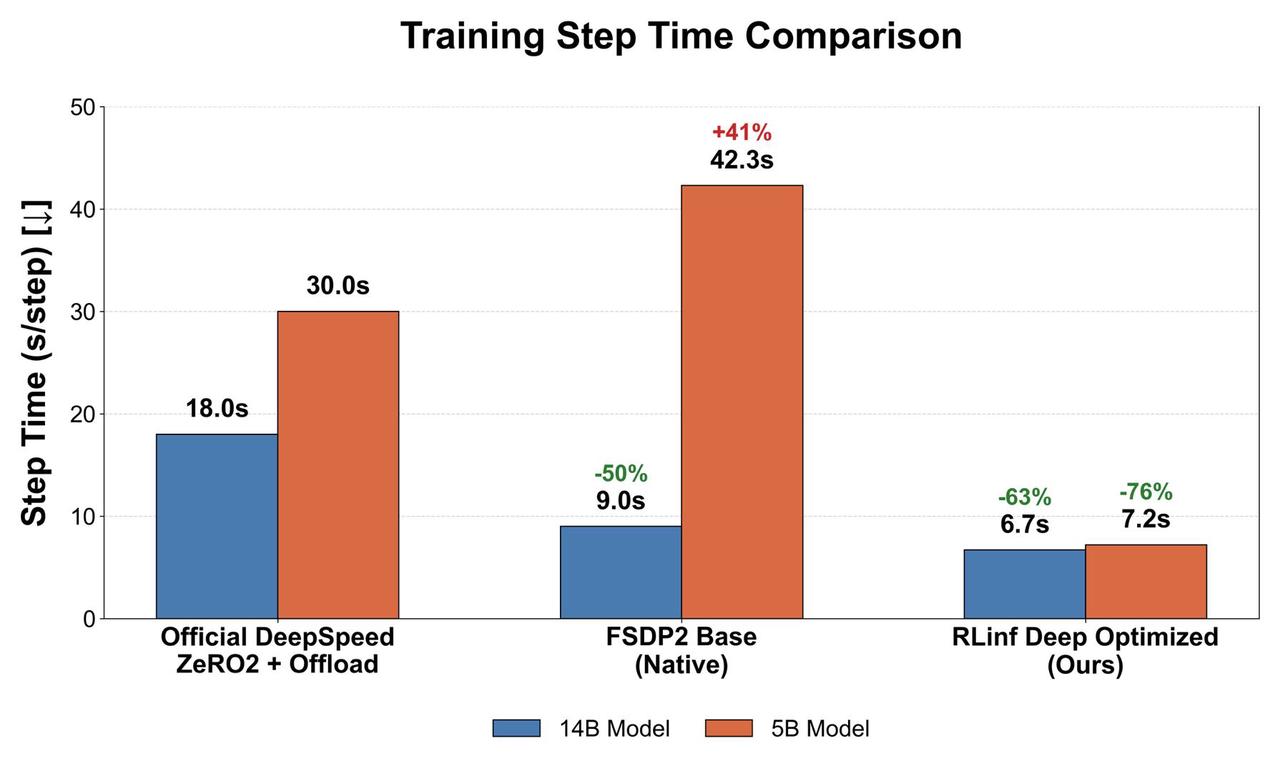
Speedup comparison for DreamZero 5B and 14B models#
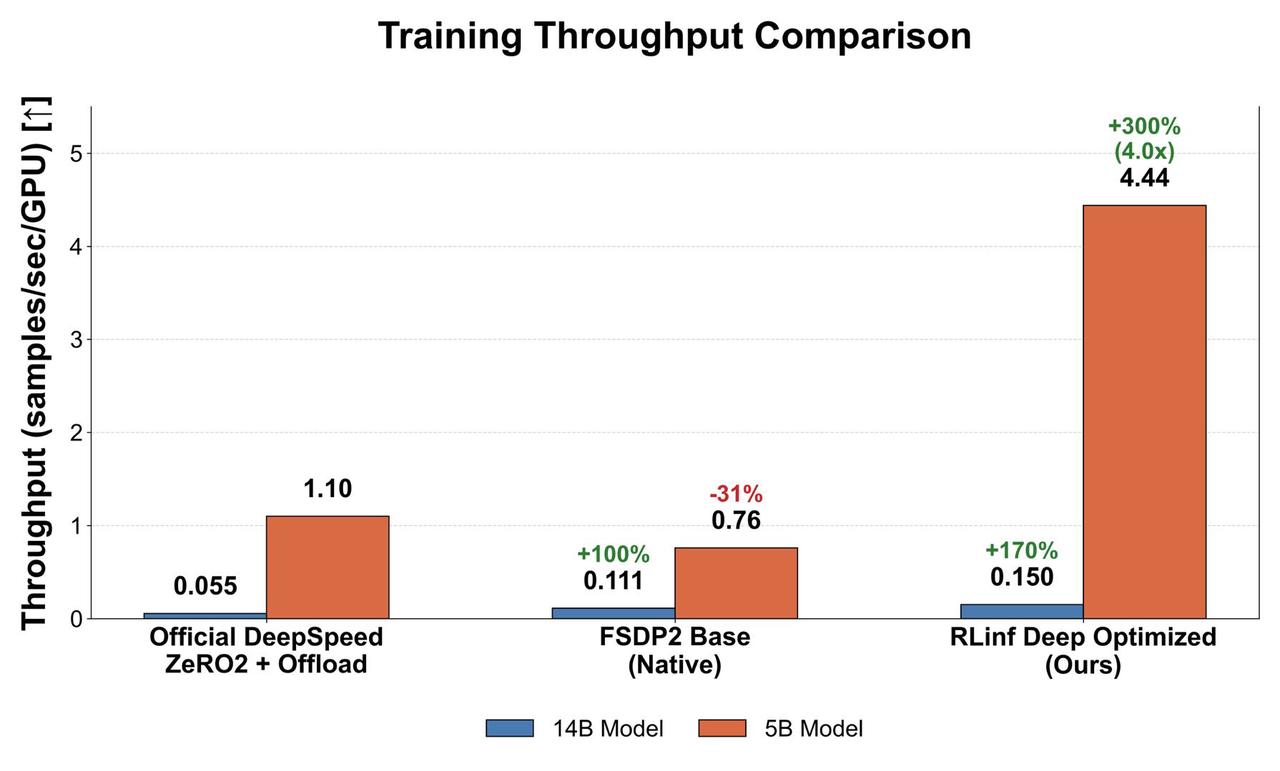
Throughput improvement for DreamZero 5B and 14B models#