
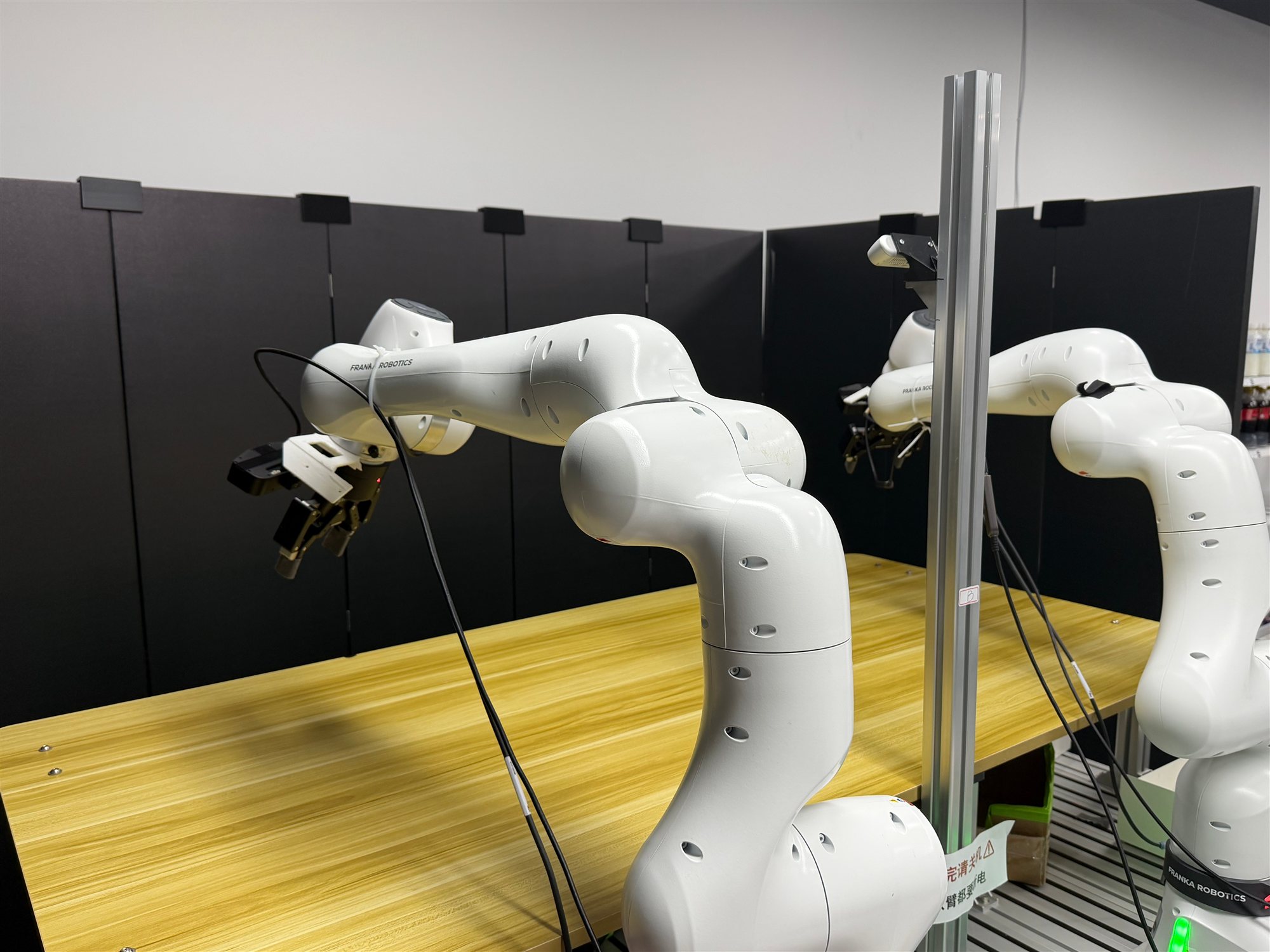
Using Dual Franka#
Dual-Franka data collection, fine-tuning, and deployment workflow.#
Run the supported dual-Franka workflow: collect joint-space demonstrations with GELLO, convert them to tcp_rot6d data, fine-tune OpenPI π₀.₅, and deploy the checkpoint back to the robot nodes.
Overview#
Build a dual-arm dataset, train π₀.₅, and deploy on a two-node Franka rig.
OpenPI π₀.₅
SFT · eval-only deployment
Dual-arm manipulation
2× Franka · 2 robot nodes · GELLO
Tasks#
Task |
Config / entry point |
Description |
|---|---|---|
Collection |
|
Collect dual-arm joint trajectories. |
SFT |
|
Fine-tune π₀.₅ on tcp_rot6d actions. |
Deployment |
|
Run eval-only deployment on the robot nodes. |
Observation and Action#
Field |
Description |
|---|---|
Observation |
Wrist/global camera views plus dual-arm robot state. |
Action |
Dual-arm tcp_rot6d: |
Reward |
Evaluation success signal or operator-gated deployment outcome. |
Prompt |
Task text in the OpenPI data/config metadata. |
Installation#
Robot Nodes#
Run the robot-node installation on both node 0 and node 1.
Choose LIBFRANKA_VERSION from the official Franka compatibility
matrix; avoid
libfranka 0.18.0.
git clone https://github.com/RLinf/RLinf.git
cd RLinf

export LIBFRANKA_VERSION=0.15.0       # replace with your compatible version
bash requirements/install.sh embodied --env franka-franky --use-mirror
source .venv/bin/activate
Install GELLO dependencies on node 0 by following Using GELLO with Franka.
The two GELLO leaders must stay local to node 0; do not route their
1 kHz stream over the LAN.
Real-time prerequisites#
franka-franky uses franky/libfranka to communicate with each Franka at
1 kHz. The RLinf installer installs runtime dependencies only; configure the
PREEMPT_RT kernel and real-time permissions according to the official Franka
real-time kernel guide.
Run this example on each workstation that directly communicates with a Franka
before starting Ray. Replace <FRANKA_NIC> with the dedicated robot NIC and
<ROBOT_IP> with LEFT_ROBOT_IP on node 0 or RIGHT_ROBOT_IP on
node 1.
# Per-boot tuning.
sudo bash -c 'for g in /sys/devices/system/cpu/cpu*/cpufreq/scaling_governor; do
    echo performance > "$g"
done'
sudo sysctl -w kernel.sched_rt_runtime_us=-1
sudo ethtool -C <FRANKA_NIC> rx-usecs 0 tx-usecs 0 2>/dev/null || true

# Optional: keep the RT scheduling budget setting after reboot.
echo 'kernel.sched_rt_runtime_us = -1' | sudo tee /etc/sysctl.d/99-franka-rt.conf

# Check realtime permissions and the robot link before running RLinf.
uname -a | grep -o PREEMPT_RT
ulimit -r
ulimit -l
sudo cyclictest -p 80 -t 4 -i 1000 -l 300000 -m
ping -c 1000 -i 0.001 <ROBOT_IP> | tail -3
ulimit -r should report 99 or unlimited; ulimit -l should report
unlimited. Re-apply the per-boot tuning after every workstation reboot.
Training Node#
Install OpenPI dependencies on the remote GPU training cluster that will perform SFT:
git clone https://github.com/RLinf/RLinf.git
cd RLinf
bash requirements/install.sh embodied --model openpi --env maniskill_libero --use-mirror
source .venv/bin/activate
Configuration#
Use the repository-provided configs and replace the required parameters:
Config |
Purpose |
|---|---|
|
GELLO joint-space collection |
|
π₀.₅ SFT on converted tcp_rot6d data |
|
Real-world policy deployment |
|
Shared joint-space hardware defaults |
|
Shared tcp_rot6d hardware defaults |
Replace the placeholders marked with # Replace::
LEFT_ROBOT_IP/RIGHT_ROBOT_IP: FCI IP visible from each controller node.BASE_CAMERA_SERIAL,LEFT_CAMERA_SERIAL,RIGHT_CAMERA_SERIAL: camera serials or stable/dev/v4l/by-idpaths.LEFT_GRIPPER_CONNECTION/RIGHT_GRIPPER_CONNECTION: stable/dev/serial/by-idpaths for the Robotiq adapters.LEFT_GELLO_PORT/RIGHT_GELLO_PORT: stable/dev/serial/by-idpaths for the two GELLO leaders.TASK_DESCRIPTION: the natural-language task prompt used for collection, SFT, and deployment.SFT_DATASET_REPO_ID: the converted dataset ID, usually<repo_id>/tcp_rot6d_v1.MODEL_PATH: deployment checkpoint directory onnode 0.
Hardware Checks#
Run these checks before starting Ray.
Foot pedal#
Use the vendor tool once to configure the PCsensor FootSwitch keys as
a / b / c. Then on node 0:
ls -l /dev/input/by-id/*-event-kbd
sudo chmod 666 /dev/input/eventXX
export RLINF_KEYBOARD_DEVICE=/dev/input/eventXX
Note
Replace every eventXX with the actual eventNN resolved by the
first command, for example event7. Export
RLINF_KEYBOARD_DEVICE before ray start.
Cameras#
rs-enumerate-devices | grep -E "Name|Serial|USB Type"
ls /dev/v4l/by-id/
lsusb -t
Expected output should identify the RealSense serial, two Lumos devices,
and USB-3 speed such as 5000M. 480M means the device fell back to
USB 2.
GELLO leaders#
Identify the two FTDI paths by plugging one leader at a time:
ls /dev/serial/by-id/ | grep -i ftdi
Verify each leader streams smooth joint values:
cd /path/to/RLinf
export PYTHONPATH=$PWD:${PYTHONPATH:-}
python -m rlinf.envs.realworld.common.gello.gello_joint_expert \
    --port /dev/serial/by-id/usb-FTDI_..._<LEFT_ID>-if00-port0
The command continuously refreshes output, for example:
joints=[+0.012 -0.604 +0.031 -2.184 +0.019 +1.571 +0.781] gripper=[0.035]
If values stop updating or jump by about 2π, run the calibration below.
GELLO calibration#
Calibrate each GELLO once, then verify it with align-sequential.
Both leaders can be calibrated against the left arm on node 0.
cd /path/to/RLinf
export PYTHONPATH=$PWD:${PYTHONPATH:-}
export GELLO_PORT=/dev/serial/by-id/usb-FTDI_..._<ID>-if00-port0

python toolkits/realworld_check/test_gello.py calibrate
python toolkits/realworld_check/test_gello.py align-sequential
On success, align-sequential prints:
ALL JOINTS ALIGNED
  per-joint Δ (rad): ['+0.012', '-0.008', '+0.005', '+0.021', '-0.041', '+0.009', '-0.003']
  max |Δ| = 0.041 rad on J5 (stream gate threshold = 0.5 rad — well under)
You can now Ctrl-C and start collect_data.sh.
Run the same two commands for the second leader by changing
GELLO_PORT.
Run It#
Start Ray#
Ray captures environment variables at ray start time. Export the rank
and keyboard device before starting the cluster.
# node 0
cd /path/to/RLinf
source .venv/bin/activate
export PYTHONPATH=$PWD:${PYTHONPATH:-}
export RLINF_NODE_RANK=0
export RLINF_KEYBOARD_DEVICE=/dev/input/eventXX

ray stop --force
ray start --head --port=6379 --node-ip-address=<HEAD_IP>
# node 1
cd /path/to/RLinf
source .venv/bin/activate
export PYTHONPATH=$PWD:${PYTHONPATH:-}
export RLINF_NODE_RANK=1

ray stop --force
ray start --address=<HEAD_IP>:6379 --node-ip-address=<WORKER_IP>
On node 0, run ray status and confirm that both nodes are ALIVE.
Collect demonstrations#
Start collection on node 0 after
align-sequential reports
ALL JOINTS ALIGNED:
cd /path/to/RLinf
export PYTHONPATH=$PWD:${PYTHONPATH:-}
bash examples/embodiment/collect_data.sh \
    realworld_collect_data_gello_joint_dual_franka 2>&1 | tee logs/collect.log
In another node 0 terminal, monitor progress:
cd /path/to/RLinf
python toolkits/realworld_check/collect_monitor.py logs/collect.log
Foot-pedal controls:
a: start recording; press again while recording to abort and drop the current buffer.b: incrementsegment_idfor sub-task boundaries.c: mark success, write the LeRobot shard, and finish the episode.
Set data_collection.resume: true and keep the same
data_collection.save_dir to append new id_* shards to an existing
dataset.
Backfill tcp_rot6d#
Collection writes joint-space data. Convert it before SFT:
cd /path/to/RLinf
export PYTHONPATH=$PWD:${PYTHONPATH:-}
export HF_LEROBOT_HOME=/path/to/lerobot_root
export DATA_REPO_ID=<repo_id>
export SFT_REPO_ID=$DATA_REPO_ID/tcp_rot6d_v1

python toolkits/dual_franka/backfill_tcp_rot6d.py \
    --src $HF_LEROBOT_HOME/$DATA_REPO_ID/joint_v1 \
    --dst $HF_LEROBOT_HOME/$SFT_REPO_ID
Run SFT#
Synchronize the converted dataset to the training node, then run SFT there:
export TRAINER_IP=<trainer_ip>
export HF_LEROBOT_HOME=/path/to/lerobot_root
export SFT_REPO_ID=<repo_id>/tcp_rot6d_v1

ssh $TRAINER_IP "mkdir -p $HF_LEROBOT_HOME/$SFT_REPO_ID"
rsync -av $HF_LEROBOT_HOME/$SFT_REPO_ID/ \
    $TRAINER_IP:$HF_LEROBOT_HOME/$SFT_REPO_ID/
On the training node:
cd /path/to/RLinf
source .venv/bin/activate
export PYTHONPATH=$PWD:${PYTHONPATH:-}
export HF_LEROBOT_HOME=/path/to/lerobot_root
export DUAL_FRANKA_DATA_ROOT=/path/to/lerobot_root
export PI05_BASE_CKPT=/path/to/pi05/torch
export SFT_REPO_ID=<repo_id>/tcp_rot6d_v1

python toolkits/lerobot/calculate_norm_stats.py \
    --config-name pi05_dualfranka_tcp_rot6d \
    --repo-id $SFT_REPO_ID

mkdir -p $PI05_BASE_CKPT/$SFT_REPO_ID
cp <openpi_assets_dirs>/pi05_dualfranka_tcp_rot6d/$SFT_REPO_ID/norm_stats.json \
   $PI05_BASE_CKPT/$SFT_REPO_ID/norm_stats.json

bash examples/sft/run_vla_sft.sh realworld_sft_openpi_dual_franka_tcp_rot6d
Update SFT_DATASET_REPO_ID, PI05_BASE_CKPT, logger settings, and
cluster placement in
examples/sft/config/realworld_sft_openpi_dual_franka_tcp_rot6d.yaml.
Checkpoints are saved under
<log_path>/checkpoints/global_step_<N>/actor/model_state_dict/full_weights.pt.
Evaluation and Deployment#
Prepare checkpoint files#
The deployment checkpoint directory on node 0 must contain:
<model_path>/
├── actor/model_state_dict/full_weights.pt
└── <repo_id>/tcp_rot6d_v1/norm_stats.json
Synchronize the SFT checkpoint and matching normalization stats back to node 0:
export TRAINER_IP=<trainer_ip>
export DEPLOY_CKPT=/path/to/deploy/global_step_<N>
export SFT_REPO_ID=<repo_id>/tcp_rot6d_v1

mkdir -p $DEPLOY_CKPT/actor/model_state_dict
mkdir -p $DEPLOY_CKPT/$SFT_REPO_ID

rsync -av \
    $TRAINER_IP:<train_log>/checkpoints/global_step_<N>/actor/model_state_dict/full_weights.pt \
    $DEPLOY_CKPT/actor/model_state_dict/full_weights.pt
rsync -av $TRAINER_IP:<train_log>/checkpoints/global_step_<N>/$SFT_REPO_ID/norm_stats.json \
    $DEPLOY_CKPT/$SFT_REPO_ID/norm_stats.json
Set rollout.model.model_path to $DEPLOY_CKPT and
actor.model.openpi_data.repo_id to <repo_id>/tcp_rot6d_v1 in
examples/embodiment/config/realworld_eval_dual_franka.yaml.
Launch deployment#
Reuse the Ray cluster from collection, or restart it with the same environment
variables. Launch the policy through the real-world evaluation guide with realworld_eval_dual_franka.
Deployment pedal controls:
a: start policy execution from idle.b: mark failure and reset.c: mark success and reset.
After each reset, the wrapper waits for a again to allow scene reset before
the next episode.
Troubleshooting#
- Ray worker import failure
In the same shell that ran
ray start, checkwhich pythonandpython -c "import franky, gello, gello_teleop". Worker logs are under/tmp/ray/session_latest/logs/worker-*.err.- Foot pedal permission denied
Re-run
sudo chmod 666 /dev/input/eventXXand confirmRLINF_KEYBOARD_DEVICEpoints to the same device.- RealSense appears as USB 2
Replace the cable or port.
lsusb -tshould show5000Minstead of480M.- GELLO stops streaming
Power-cycle the leader, replug the FTDI adapter, and verify it with
python -m rlinf.envs.realworld.common.gello.gello_joint_expert --port ....- One arm does not respond during reset
On that controller node, run
ping -c 100 <robot_ip>. If packets drop, fix the NIC/FCI connection or power-cycle the robot.- Deployment cannot locate ``norm_stats.json``
Check that the file is exactly at
<model_path>/<actor.model.openpi_data.repo_id>/norm_stats.json.- Deployment remains idle
Confirm the pedal path and permission, then press
a. The eval wrapper waits in idle between episodes by design.