
RL with CALVIN Benchmark#
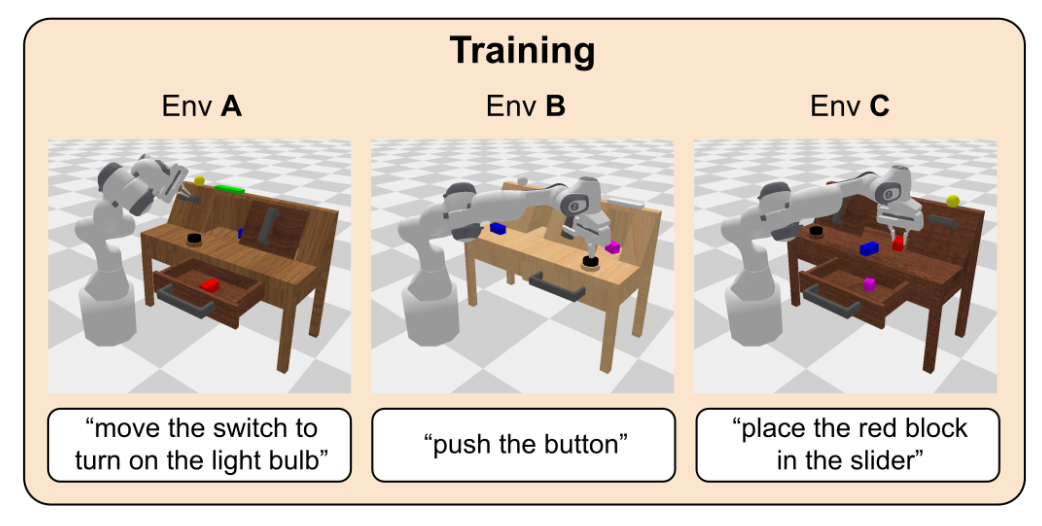
CALVIN is a PyBullet benchmark for long-horizon language-conditioned manipulation. You’ll use RLinf to PPO-fine-tune OpenPI π₀ or π₀.₅ policies on CALVIN scene-transfer suites.
Overview#
Fine-tune an OpenPI policy on CALVIN and evaluate long-horizon subtask completion.
π₀ · π₀.₅
PPO
D→D · ABC→D · ABCD→D
1 node · 8 GPUs
run_embodiment.sh → watch env/success_once.Tasks#
Task |
Description |
|---|---|
CALVIN D→D |
Train and evaluate in scene D with |
CALVIN ABC→D |
Train in scenes A/B/C and evaluate in scene D with |
CALVIN ABCD→D |
Train in scenes A/B/C/D and evaluate in scene D with |
Observation and Action#
Field |
Specification |
|---|---|
Observation |
Third-person RGB, wrist-camera RGB, and robot proprioception. |
Action |
7-dim continuous action: 3D end-effector position + 3D rotation + gripper. |
Reward |
Sparse 0/1 subtask-completion reward. |
Prompt |
Natural-language instruction for the current CALVIN subtask. |
Note
RLinf patches the CALVIN scene A, B, and C YAML files to correct settings from the upstream repository. See the upstream CALVIN issue for context.
Installation#
First, clone the RLinf repository:
# Mainland China users can use a mirror for faster cloning:
# git clone https://gh-proxy.com/github.com/RLinf/RLinf.git
git clone https://github.com/RLinf/RLinf.git
cd RLinf
Then set up the dependencies with one of the two methods below — a prebuilt
Docker image (recommended) or a custom environment. The general setup
(prerequisites, GPU drivers, the in-image switch_env helper, mirrors, and
troubleshooting) is documented once in Installation;
the commands in this recipe only differ in the Docker image tag and the
--env value.
Docker image
docker run -it --rm --gpus all \
   --shm-size 32g \
   --network host \
   --name rlinf \
   -v .:/workspace/RLinf \
   rlinf/rlinf:agentic-rlinf0.4-calvin

# For mainland China users:
# infinigence-ai-registry.cn-beijing.cr.aliyuncs.com/rlinf/rlinf:agentic-rlinf0.4-calvin
Switch to the OpenPI virtual environment inside the image:
source switch_env openpi
Custom environment
Install CALVIN with the OpenPI dependencies:
# Mainland China users can add --use-mirror.
bash requirements/install.sh embodied --model openpi --env calvin
source .venv/bin/activate
Download the Model#
Download the checkpoint for the OpenPI model you plan to fine-tune.
OpenPI π₀
cd /path/to/save/model

git lfs install
git clone https://huggingface.co/RLinf/RLinf-Pi0-CALVIN-ABC-D-SFT

# Or use huggingface-hub:
# export HF_ENDPOINT=https://hf-mirror.com
pip install huggingface-hub
hf download RLinf/RLinf-Pi0-CALVIN-ABC-D-SFT --local-dir RLinf-Pi0-CALVIN-ABC-D-SFT
OpenPI π₀.₅
cd /path/to/save/model

git lfs install
git clone https://huggingface.co/RLinf/RLinf-Pi05-CALVIN-ABC-D-SFT

# Or use huggingface-hub:
# export HF_ENDPOINT=https://hf-mirror.com
pip install huggingface-hub
hf download RLinf/RLinf-Pi05-CALVIN-ABC-D-SFT --local-dir RLinf-Pi05-CALVIN-ABC-D-SFT
After downloading, point your config YAML at the checkpoint — set the same path for both the rollout and the actor model:
rollout:
   model:
      model_path: /path/to/downloaded-checkpoint
actor:
   model:
      model_path: /path/to/downloaded-checkpoint
Run It#
Pick one config and launch training:
Recipe |
Config |
Command suffix |
|---|---|---|
π₀, D→D |
|
|
π₀.₅, D→D |
|
|
π₀.₅, ABC→D |
|
|
π₀.₅, ABCD→D |
|
|
bash examples/embodiment/run_embodiment.sh calvin_d_d_ppo_openpi_pi05
What this does:
Starts the embodied training entrypoint with the selected Hydra config.
Creates Ray workers for the actor, rollout, and CALVIN env components.
Runs PPO rollouts, computes sparse subtask rewards, and updates the OpenPI policy.
For standalone evaluation, use the unified Evaluation CLI with config fallback and the same suffix, for
example calvin_d_d_ppo_openpi_pi05.
Note
The CALVIN configs colocate actor,env,rollout: all by default. Tune
cluster.component_placement, env.train.total_num_envs, and
actor.global_batch_size for your GPU memory budget.
Visualization and Results#
Launch TensorBoard from the RLinf repo root:
tensorboard --logdir ../results --port 6006
The key signal is env/success_once. For every logged metric, see
Training metrics.
Enable video in the env config when you want rollout videos:
video_cfg:
  save_video: True
  info_on_video: True
  video_base_dir: ${runner.logger.log_path}/video/train
Enable W&B or SwanLab by adding logger backends:
runner:
  logger:
    logger_backends: ["tensorboard", "wandb"]  # or swanlab
Method |
Training |
Avg. Subtasks |
Len-1 |
Len-2 |
Len-3 |
Len-4 |
Len-5 |
|---|---|---|---|---|---|---|---|
π₀ |
SFT |
3.766 |
0.947 |
0.849 |
0.743 |
0.652 |
0.575 |
π₀ |
Flow SDE |
3.944 |
0.964 |
0.880 |
0.775 |
0.708 |
0.617 |
π₀ |
Flow Noise |
3.919 |
0.969 |
0.888 |
0.780 |
0.683 |
0.599 |
π₀.₅ |
SFT |
3.838 |
0.927 |
0.843 |
0.767 |
0.688 |
0.613 |
π₀.₅ |
Flow SDE |
4.717 |
0.997 |
0.982 |
0.958 |
0.910 |
0.870 |
π₀.₅ |
Flow Noise |
4.652 |
0.996 |
0.976 |
0.939 |
0.896 |
0.845 |