
RL with PolaRiS Simulation Platform#
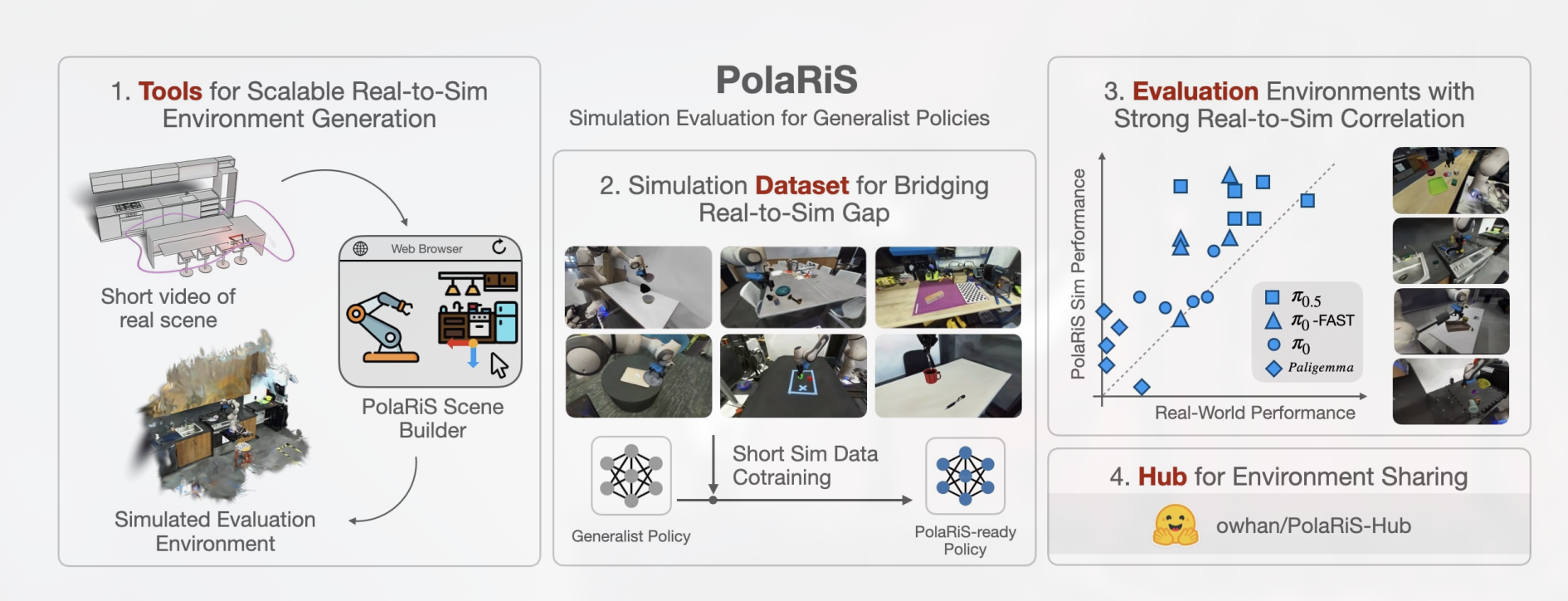
PolaRiS is an Isaac Sim robotics benchmark with Gaussian Splatting rendering for desktop manipulation. You’ll use RLinf to PPO-fine-tune OpenPI π₀ or π₀.₅ policies on DROID-style PolaRiS tasks.
Overview#
Fine-tune an OpenPI policy on PolaRiS with two RGB views, proprioception, and chunked 8-dim actions.
π₀ · π₀.₅
PPO
6 DROID desktop tasks
1 node · 1 GPU
run_embodiment.sh → watch env/success_once.Tasks#
Task |
Description |
Env Config |
|---|---|---|
|
Put the tape into the container. |
|
|
Use the yellow sponge to scrub the blue-handle frying pan. |
|
|
Place and stack blocks on the green tray. |
|
|
Put all foods in the bowl. |
|
|
Put the latte art cup on top of the cutting board. |
|
|
Put the scissors into the large container. |
|
Observation and Action#
Field |
Specification |
|---|---|
Observation |
External RGB camera and wrist RGB camera at 224×224 plus 8-dim robot state. |
Action |
8-dim continuous action: 7 joint velocities plus gripper position. |
Reward |
Task-completion reward from the PolaRiS environment. |
Prompt |
The task description in |
Installation#
First, clone the RLinf repository:
# Mainland China users can use a mirror for faster cloning:
# git clone https://gh-proxy.com/github.com/RLinf/RLinf.git
git clone https://github.com/RLinf/RLinf.git
cd RLinf
Then set up the dependencies with one of the two methods below — a prebuilt
Docker image (recommended) or a custom environment. The general setup
(prerequisites, GPU drivers, the in-image switch_env helper, mirrors, and
troubleshooting) is documented once in Installation;
the commands in this recipe only differ in the Docker image tag and the
--env value.
Docker image
docker run -it --rm --gpus all \
   --shm-size 32g \
   --network host \
   --name rlinf \
   -v .:/workspace/RLinf \
   rlinf/rlinf:agentic-rlinf0.4-polaris

# For mainland China users:
# infinigence-ai-registry.cn-beijing.cr.aliyuncs.com/rlinf/rlinf:agentic-rlinf0.4-polaris
Switch to the OpenPI virtual environment inside the image:
source switch_env openpi
Custom environment
Install PolaRiS with OpenPI dependencies:
# Mainland China users can add --use-mirror.
bash requirements/install.sh embodied --model openpi --env polaris
source .venv/bin/activate
Download Isaac Sim#
Download Isaac Sim 5.1.0 and initialize its shell environment:
mkdir -p isaac_sim
cd isaac_sim
wget https://download.isaacsim.omniverse.nvidia.com/isaac-sim-standalone-5.1.0-linux-x86_64.zip
unzip isaac-sim-standalone-5.1.0-linux-x86_64.zip
rm isaac-sim-standalone-5.1.0-linux-x86_64.zip
source ./setup_conda_env.sh
Warning
Run source ./setup_conda_env.sh in every new terminal before launching PolaRiS.
Download the Datasets#
Download the evaluation scenes and initial conditions:
# export HF_ENDPOINT=https://hf-mirror.com
hf download owhan/PolaRiS-Hub --repo-type=dataset --local-dir ./PolaRiS-Hub
export POLARIS_DATA_PATH=/path/to/PolaRiS-Hub
Optionally download co-training demonstrations:
hf download owhan/PolaRiS-datasets --repo-type=dataset --local-dir ./PolaRiS-datasets
Download the Model#
Download the checkpoint for the OpenPI model you plan to fine-tune.
OpenPI π₀.₅
cd /path/to/save/model

git lfs install
git clone https://huggingface.co/RLinf/RLinf-Pi05-Polaris-droid_jointpos

# Or use huggingface-hub:
# export HF_ENDPOINT=https://hf-mirror.com
pip install huggingface-hub
hf download RLinf/RLinf-Pi05-Polaris-droid_jointpos --local-dir RLinf-Pi05-Polaris-droid_jointpos
OpenPI π₀
cd /path/to/save/model

git lfs install
git clone https://huggingface.co/RLinf/RLinf-Pi0-Polaris-droid_jointpos

# Or use huggingface-hub:
# export HF_ENDPOINT=https://hf-mirror.com
pip install huggingface-hub
hf download RLinf/RLinf-Pi0-Polaris-droid_jointpos --local-dir RLinf-Pi0-Polaris-droid_jointpos
After downloading, point your config YAML at the checkpoint — set the same path for both the rollout and the actor model:
rollout:
   model:
      model_path: /path/to/downloaded-checkpoint
actor:
   model:
      model_path: /path/to/downloaded-checkpoint
Run It#
Pick one training config and launch from a terminal where Isaac Sim is initialized:
Recipe |
Config |
Command suffix |
|---|---|---|
π₀.₅ + PPO |
|
|
π₀ + PPO |
|
|
source /path/to/isaac_sim/setup_conda_env.sh
export POLARIS_DATA_PATH=/path/to/PolaRiS-Hub

bash examples/embodiment/run_embodiment.sh polaris_tapeintocontainer_ppo_openpi_pi05
bash examples/embodiment/run_embodiment.sh polaris_tapeintocontainer_ppo_openpi
What this does:
Starts the embodied training entrypoint with the selected Hydra config.
Creates Ray workers for the actor, rollout, and PolaRiS env components.
Runs PPO with chunked OpenPI actions and Gaussian Splatting-rendered observations.
Run standalone evaluation through the PolaRiS evaluation guide.
It owns POLARIS_DATA_PATH, the available eval configs
(polaris_tapeintocontainer_openpi_pi05_eval and polaris_movelattecup_openpi_eval),
and result interpretation.
Note
Training configs default to polaris_droid_tapeintocontainer. To switch tasks,
change the Hydra env defaults to another polaris_droid_* env config and keep
POLARIS_DATA_PATH pointed at PolaRiS-Hub.
A few PolaRiS-specific fields are worth knowing when tuning the action/rendering pipeline:
Key |
Meaning |
|---|---|
|
Frequency of high-quality Gaussian-Splatting rendering. Within an action chunk,
high-quality rendering runs every |
|
Number of action steps the model generates at a time (e.g. |
|
Number of camera images fed to the policy (e.g. |
|
OpenPI config / data format selector (e.g. |
Visualization and Results#
Launch TensorBoard from the RLinf repo root:
tensorboard --logdir ../results --port 6006
The key signal is env/success_once. For every logged metric, see
Training metrics.
Enable evaluation videos in the env config when needed:
env:
  eval:
    video_cfg:
      save_video: True
      video_base_dir: ${runner.logger.log_path}/video/eval