RL on StarVLA Models#
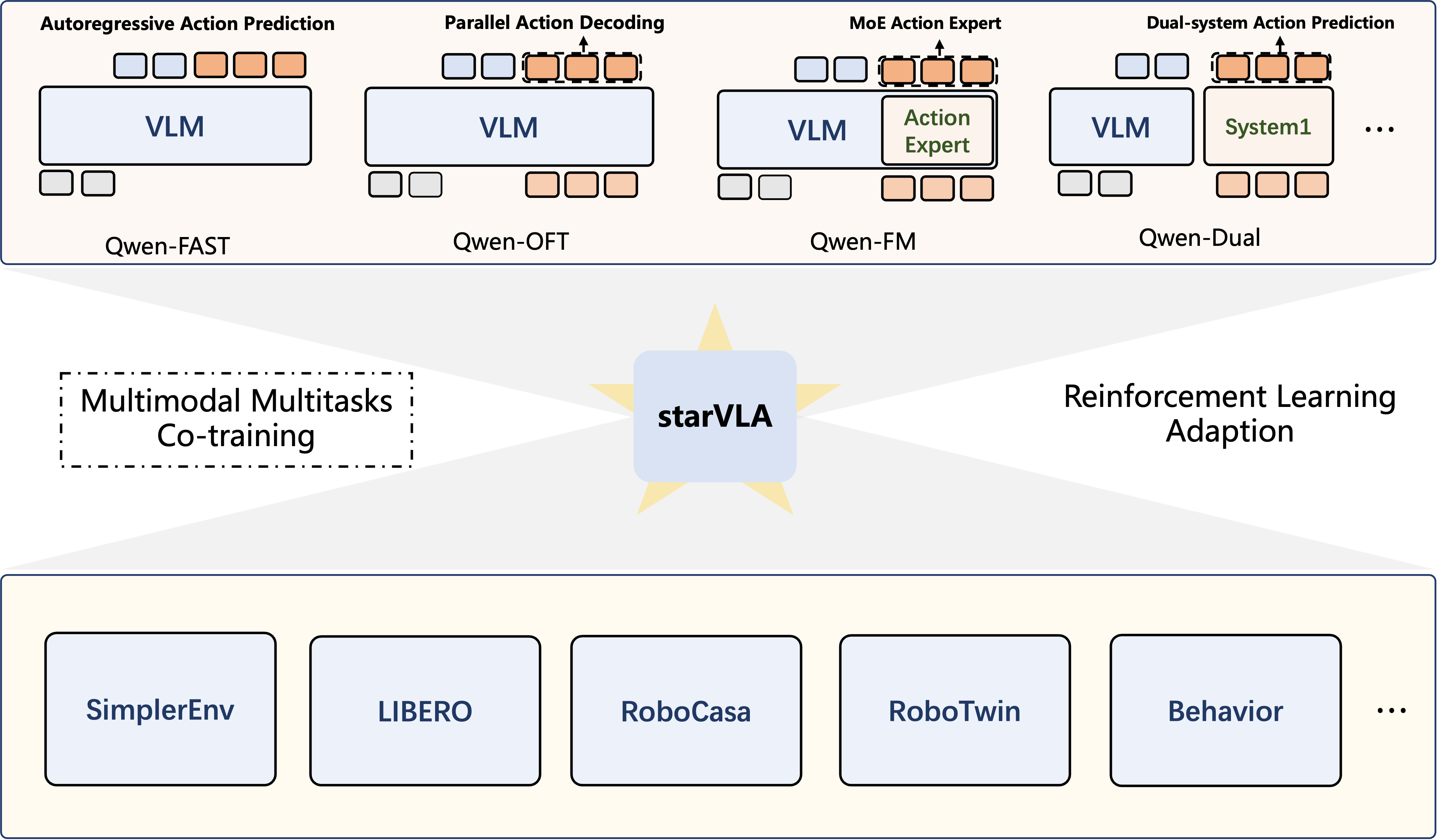
StarVLA: a modular VLM backbone + action head.#
Run RL fine-tuning for StarVLA in RLinf. StarVLA is an open-source Vision-Language-Action toolkit that composes a VLM backbone with an action head in a modular way; this example uses the QwenOFT setup and trains it on LIBERO with GRPO.
Overview#
Fine-tune StarVLA (QwenOFT) on LIBERO Spatial with GRPO.
LIBERO
GRPO
LIBERO Spatial
1 node · NVIDIA CUDA · Huawei Ascend CANN (QwenOFT + LIBERO)
run_embodiment.sh → watch env/success_once.Tasks#
Select the model page by matching the environment, task family, and config or checkpoint artifact.
Environment |
Task / Suite |
Config / Weights |
Focus |
|---|---|---|---|
LIBERO |
LIBERO-Spatial |
|
GRPO fine-tuning for StarVLA in LIBERO. |
Observation and Action#
Field |
Description |
|---|---|
Observation |
LIBERO image observations and robot state formatted for StarVLA. |
Action |
Continuous robot control commands generated through the StarVLA policy API. |
Reward |
LIBERO task success or shaped reward used by GRPO. |
Prompt |
Natural-language LIBERO task instruction. |
Interface Conventions#
In the RLinf StarVLA wrapper, env_obs is a batch-first dict (dimension 0 is batch size B).
Required fields:
main_images: main-view RGB,torch.uint8, shape[B, H, W, 3].states: proprio/state tensor,torch.float32, shape[B, D_state].task_descriptions: natural-language descriptions,list[str]with lengthB.
Optional fields:
wrist_images: wrist-view RGB,torch.uint8, shape[B, H, W, 3].extra_view_images: additional RGB views, recommended shape[B, V, H, W, 3]whereVis the number of extra views. A single extra view may also be provided as[B, H, W, 3]and is treated asV=1.
In default LIBERO usage, states is commonly end-effector position (x, y, z) (3-D),
end-effector axis-angle (rx, ry, rz) (3-D), and gripper state (originally 2-D), so
D_state is often 3 + 3 + 2 = 8. If a checkpoint expects 7-D state, the wrapper
compresses the 2-D gripper state into [x, y, z, rx, ry, rz, g_mean] where
g_mean = 0.5 * (g0 + g1).
StarVLA inference outputs chunked actions [B, T, D_action] with
T = actor.model.num_action_chunks (planning horizon) and
D_action = actor.model.action_dim (commonly 7 on LIBERO). Rollout follows a
receding-horizon strategy: each forward pass predicts T actions, the environment
executes the first N steps (1 <= N <= T), then replans.
Installation#
For NVIDIA CUDA, use either option below. For Huawei Ascend CANN, follow Run on Different Hardware Backends.
First, clone the RLinf repository:
# Mainland China users can use a mirror for faster cloning:
# git clone https://gh-proxy.com/github.com/RLinf/RLinf.git
git clone https://github.com/RLinf/RLinf.git
cd RLinf
Then set up the dependencies with one of the two methods below — a prebuilt
Docker image (recommended) or a custom environment. The general setup
(prerequisites, GPU drivers, the in-image switch_env helper, mirrors, and
troubleshooting) is documented once in Installation;
the commands in this recipe only differ in the Docker image tag and the
--env value.
Option 1: Docker image — image tag agentic-rlinf0.4-maniskill_libero:
docker run -it --rm --gpus all \
   --shm-size 20g \
   --network host \
   --name rlinf \
   -v .:/workspace/RLinf \
   rlinf/rlinf:agentic-rlinf0.4-maniskill_libero
   # Mainland China mirror: infinigence-ai-registry.cn-beijing.cr.aliyuncs.com/rlinf/rlinf:agentic-rlinf0.4-maniskill_libero

# Inside the container, switch to the StarVLA virtual environment:
source switch_env starvla
Option 2: Custom environment — install bundle --env maniskill_libero:
# Add --use-mirror for faster downloads in mainland China.
bash requirements/install.sh embodied --model starvla --env maniskill_libero
source .venv/bin/activate
Download the Model#
Download the StarVLA checkpoint and the base VLM:
# Method 1: git clone
git lfs install
git clone https://huggingface.co/StarVLA/Qwen2.5-VL-OFT-LIBERO-4in1
git clone https://huggingface.co/Qwen/Qwen2.5-VL-3B-Instruct

# Method 2: huggingface-hub (set HF_ENDPOINT=https://hf-mirror.com in mainland China)
uv pip install huggingface-hub
hf download StarVLA/Qwen2.5-VL-OFT-LIBERO-4in1 --local-dir ./Qwen2.5-VL-OFT-LIBERO-4in1
hf download Qwen/Qwen2.5-VL-3B-Instruct --local-dir ./Qwen2.5-VL-3B-Instruct
Note
After download, update Qwen2.5-VL-OFT-LIBERO-4in1/config.yaml so
framework.qwenvl.base_vlm points to your local Qwen2.5-VL-3B-Instruct path.
Run It#
1. Configuration
StarVLA + GRPO + LIBERO Spatial uses
examples/embodiment/config/libero_spatial_grpo_starvla.yaml. Point the model paths at
your download and set the action interface:
defaults:
   - env/libero_spatial@env.train
   - env/libero_spatial@env.eval

rollout:
  model:
    model_path: "/path/to/model"

actor:
  model:
    model_path: "/path/to/model"
    action_dim: 7
    num_action_chunks: 8
    action_stats_source: "minmax"
    starvla:
      framework_name: "QwenOFT"
      expected_action_dim: ${actor.model.action_dim}
      expected_num_action_chunks: ${actor.model.num_action_chunks}
      enable_state_input: False
2. Launch
bash examples/embodiment/run_embodiment.sh libero_spatial_grpo_starvla
For evaluation, use RLinf’s unified evaluation workflow — see the LIBERO evaluation guide.
Run on Different Hardware Backends#
NVIDIA uses the installation and launch steps above. Huawei Ascend CANN supports StarVLA (QwenOFT) training on LIBERO with GRPO. The Ascend recipe uses the same checkpoint and task configuration, with OSMesa for CPU rendering.
Huawei Ascend CANN#
The RLinf installer pins starVLA to starVLA-v1.6 and builds decord from source on aarch64.
If you reuse an upstream checkout through STARVLA_PATH, ensure that it is
also at starVLA-v1.6.
Start with the Ascend LIBERO container or a host with CANN and the NPU driver installed:
The Ascend LIBERO image exposes the host NPU drivers to the model environment. From the repository root on the host, start the container with those drivers mounted:
docker run -it --rm \
   --privileged \
   --ipc=host \
   --shm-size 20g \
   --network host \
   -v /usr/local/dcmi:/usr/local/dcmi \
   -v /usr/local/Ascend/driver:/usr/local/Ascend/driver \
   -v /etc/ascend_install.info:/etc/ascend_install.info \
   -v /var/log/npu:/usr/slog \
   -v /usr/local/sbin/npu-smi:/usr/local/sbin/npu-smi \
   -v /sys/fs/cgroup:/sys/fs/cgroup:ro \
   -v "$PWD":/workspace/RLinf \
   -w /workspace/RLinf \
   rlinf/rlinf:agentic-rlinf0.4-maniskill_libero-cann9.1.1 bash
This image builds on CANN 9.1.1 for 910B and carries every ManiSkill and LIBERO
model environment. The tag above carries both an arm64 and an amd64 build, so
Docker pulls the one matching the host; the -arm64 and -amd64 tags name
a single architecture. The earlier LIBERO-only
image remains available as agentic-rlinf0.3-libero-cann9.0. For downloads
from mainland China, the image is also available under
infinigence-ai-registry.cn-beijing.cr.aliyuncs.com/rlinf/rlinf with the same
tag. To expose specific NPUs, replace --privileged with the following device
arguments, adding a /dev/davinciN entry for each NPU you will use:
--device=/dev/davinci_manager
--device=/dev/devmm_svm
--device=/dev/hisi_hdc
--device=/dev/davinci0
To build the image from your checkout, run this on the host and substitute
rlinf-maniskill_libero-cann9 for the image in the command above:
DOCKER_BUILDKIT=1 docker build -f docker/Dockerfile \
   --build-arg PLATFORM=ascend \
   --build-arg CANN_VER=9.1.1-910b \
   --build-arg UBUNTU_VER=22.04 \
   --build-arg BUILD_TARGET=embodied-maniskill_libero \
   -t rlinf-maniskill_libero-cann9 .
CANN_VER includes the hardware suffix in the Ascend base-image tag.
The Dockerfile also accepts ASCEND_BASE_IMAGE to select a different full
base-image reference.
Create a StarVLA environment from the RLinf checkout inside the container, or run the same command directly on the Ascend host:
bash requirements/install.sh --platform ascend embodied --model starvla --env libero
source .venv/bin/activate
Add --use-mirror for downloads from mainland China. The installer installs
the matching torch-npu package and skips CUDA flash-attention.
Download the StarVLA checkpoint and Qwen2.5-VL base model as described above.
Set framework.qwenvl.base_vlm in the checkpoint’s config.yaml to the
local base-model path, and set both actor.model.model_path and
rollout.model.model_path in
examples/embodiment/config/libero_spatial_grpo_starvla.yaml to the local
StarVLA checkpoint directory.
Enable software rendering in the active environment:
Use CPU rendering for LIBERO on AMD, Huawei Ascend, and Moore Threads. Set both variables in the active model environment before launching a run:
export MUJOCO_GL=osmesa
export PYOPENGL_PLATFORM=osmesa
export ROBOT_PLATFORM=LIBERO
run_embodiment.sh preserves these values. The installer includes the
libosmesa6 system library through requirements/sys_deps.sh.
Warning
Set both rendering variables when launching Python directly as well. Software rendering uses CPU resources; adjust environment counts to the host’s capacity before scaling up rollouts.
The default recipe uses one node and places actor, rollout, and environment
workers on all available devices. Adjust cluster.component_placement,
actor.micro_batch_size, actor.global_batch_size, and the training and
evaluation total_num_envs for your NPU count and memory. Then launch
LIBERO Spatial training:
bash examples/embodiment/run_embodiment.sh libero_spatial_grpo_starvla
Visualization and Results#
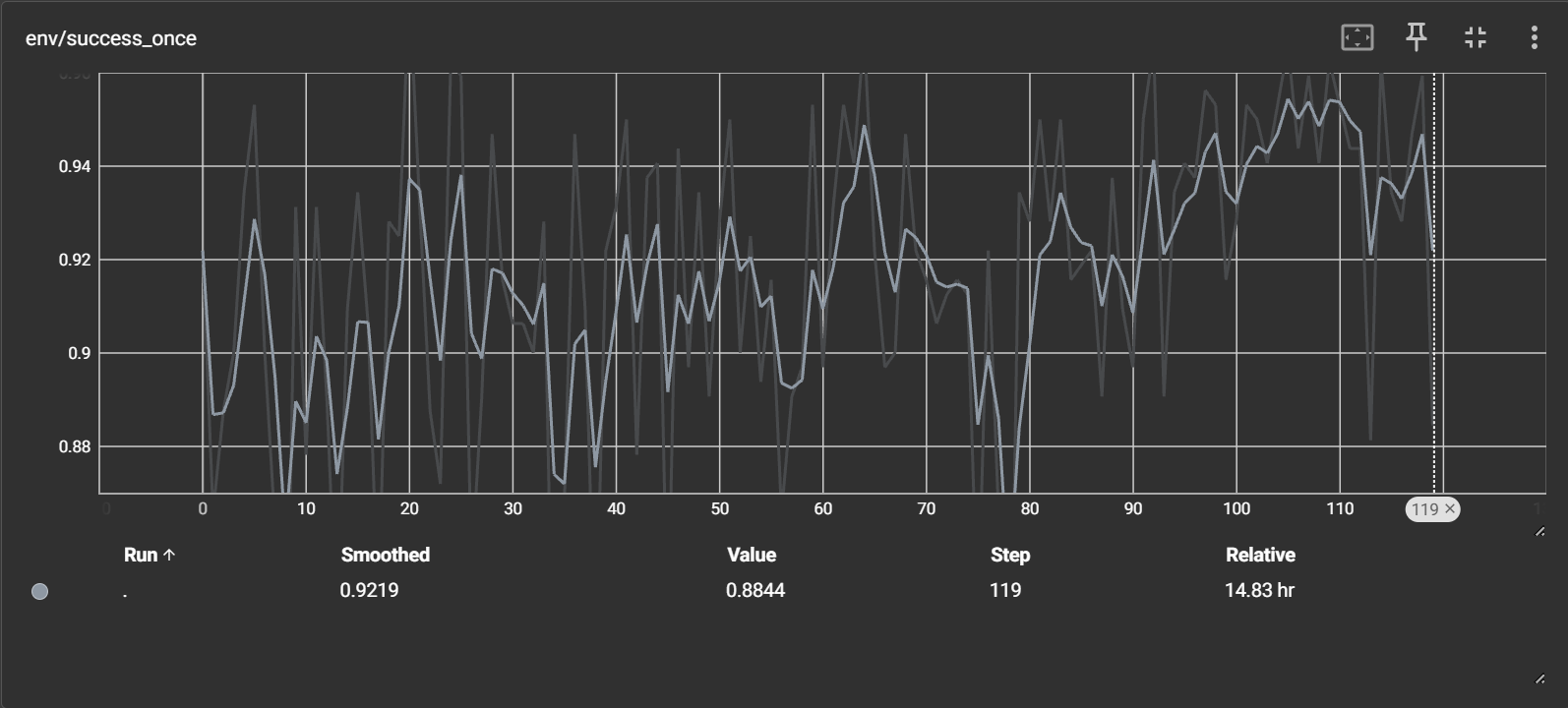
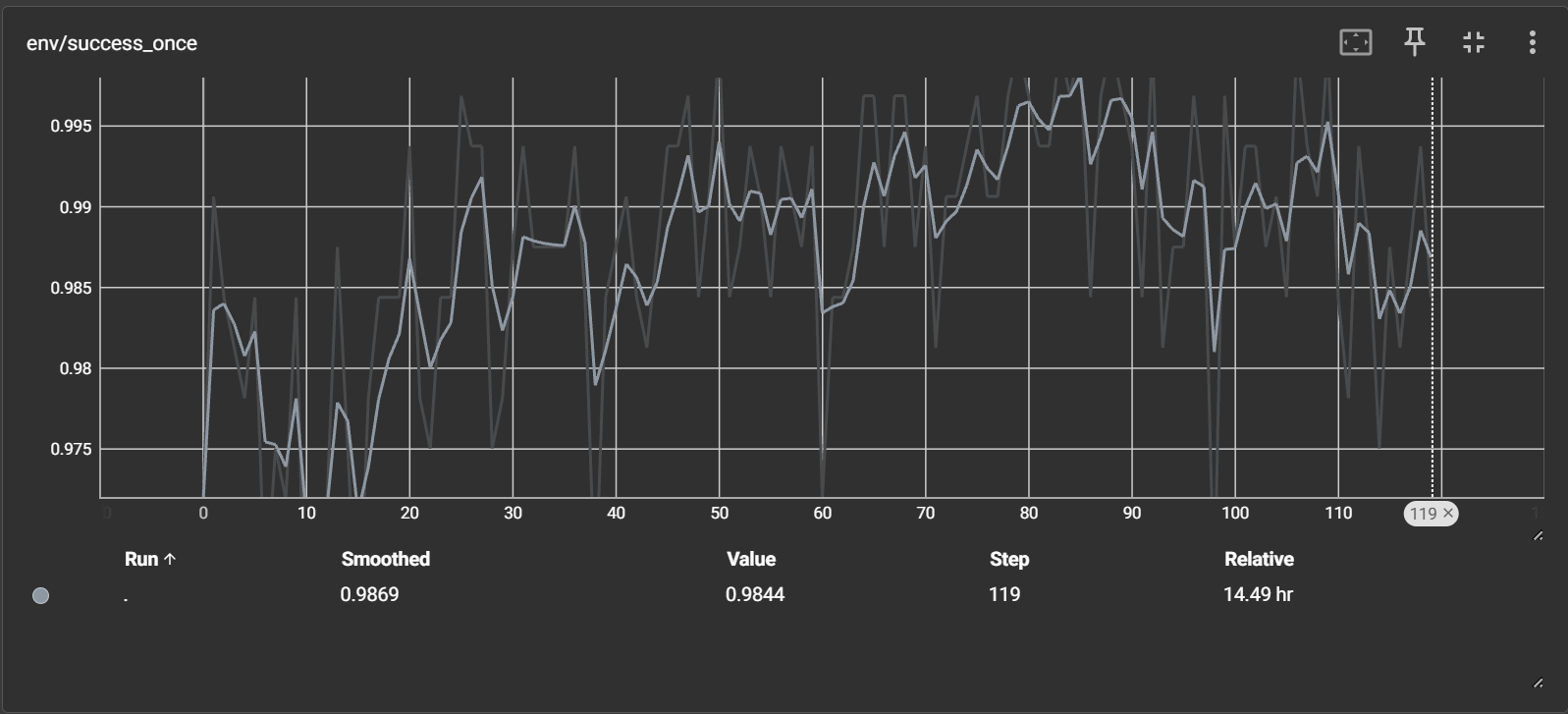
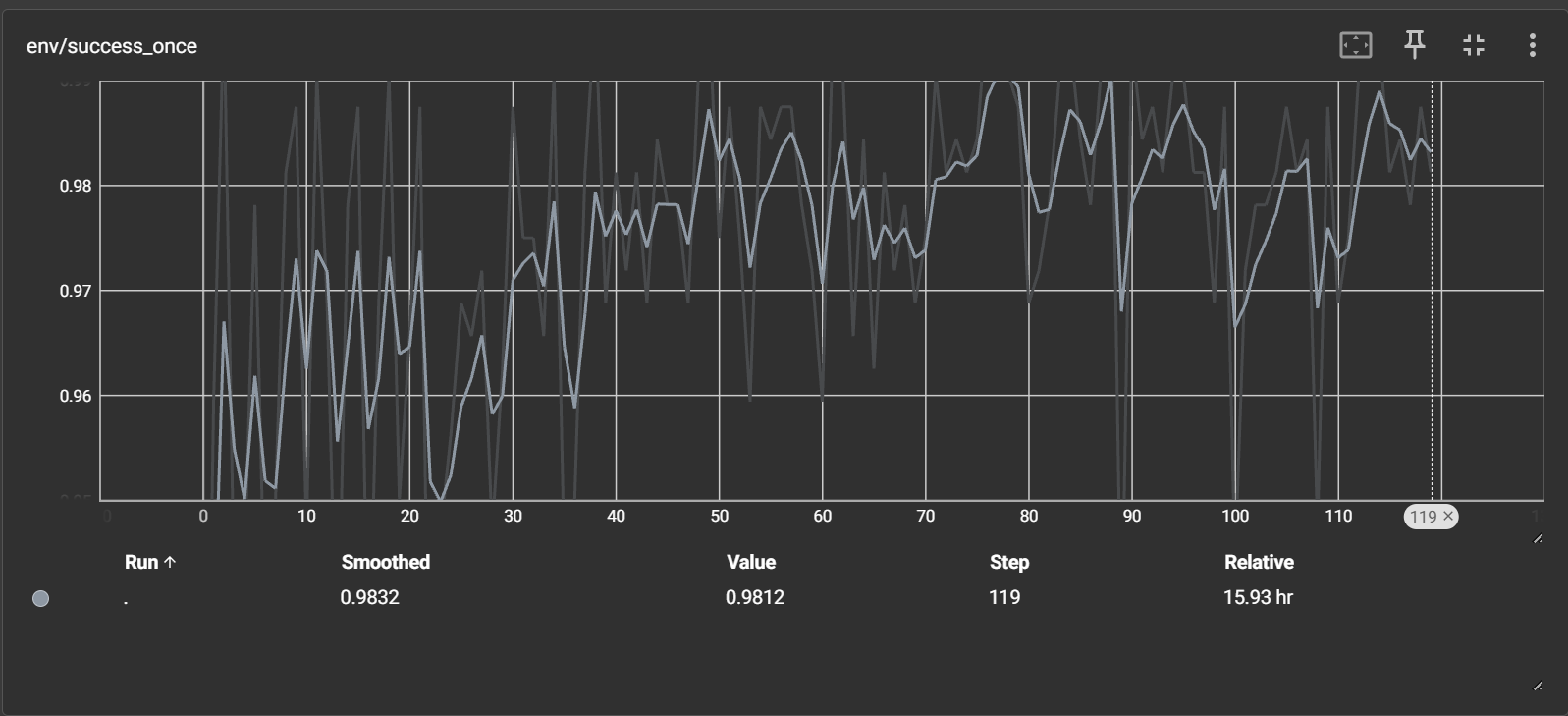
Watch ``env/success_once`` for the task success rate. For every logged metric, see Training metrics.
Reference curves (using the model from LIBERO_BASELIEN_FORJINHUI_10K_QWENOFT):