
Using Dexterous Hand with Franka#
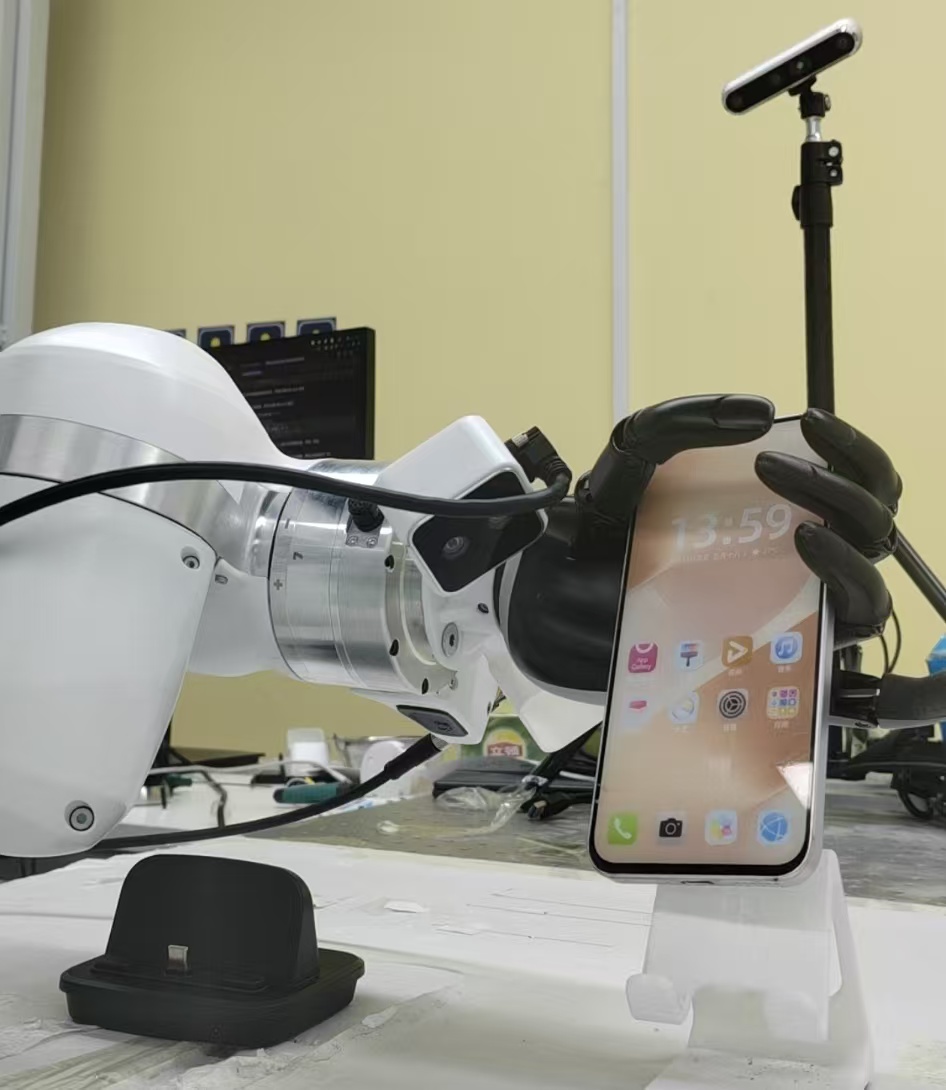
Franka arm paired with a Ruiyan five-finger dexterous hand for real-world manipulation.#
Adapt the Franka real-world workflow to a Ruiyan five-finger dexterous hand. You’ll keep the same cluster and reward-model flow, then change the end effector, teleoperation input, action layout, and dex-hand configs.
Overview#
Run the Franka real-world recipe with a dexterous hand end effector.
CNN policy · reward model
SAC/RLPD · reward-model assist
Dexterous pick-and-place
Franka · Ruiyan dex hand · glove
Tasks#
Task |
Config / entry point |
Description |
|---|---|---|
Collection |
|
Collect dexterous-hand demonstrations. |
Training |
|
Train a CNN policy with dex-hand actions. |
Reward model |
Franka reward-model workflow |
Reuse the reward-model path for dexterous manipulation. |
Observation and Action#
Field |
Description |
|---|---|
Observation |
Franka camera frames plus dex-hand/glove state when configured. |
Action |
Arm action plus dexterous-hand joint or command vector. |
Reward |
Task completion or reward-model prediction. |
Prompt |
Task text from the real-world env config. |
Installation#
Install the base Franka dependencies from Real-World RL with Franka, then install the dexterous-hand runtime in the workflow below.
Teleoperation#
Dexterous-hand teleoperation uses:
SpaceMouse for 6-D arm motion
a data glove for 6-D finger control
the SpaceMouse left button to enable relative glove control
Reward Model#
The reward-model path is the same as the Franka real-world reward-model workflow described in Using Reward Models with Franka.
For the dexterous-hand pick-and-place environment:
the default reward image follows
env.main_image_keymain_image_keydefaults towrist_1inexamples/embodiment/config/env/realworld_dex_pnp.yamlexamples/embodiment/config/realworld_dexpnp_rlpd_cnn_async.yamluses the reward model through therewardsection
Configurations#
Use examples/embodiment/config/realworld_collect_dexhand_data.yaml for data collection.
This config includes:
end_effector_type: "ruiyan_hand"glove settings for teleoperation
data_collectionfor raw episode export inpickleformat
Use examples/embodiment/config/realworld_dexpnp_rlpd_cnn_async.yaml for RL training.
Before running, fill in:
robot_iptarget_ee_posepolicy
model_pathreward
model.model_pathdexterous-hand serial ports in
end_effector_configandglove_config
Camera naming and crop are configured directly in override_cfg when needed.
This PR does not ship any serial-specific defaults so that other projects are
not affected. Without camera_names, default names follow the
camera_serials list order: the first serial is wrist_1, the second is
wrist_2. Serial numbers are not sorted. For example:
camera_names:
  "SERIAL1": global
  "SERIAL2": wrist_1
camera_crop_regions:
  "SERIAL1": [0.4, 0.3, 0.85, 0.7]
If you rename a camera to global, update main_image_key to global
in the task YAML as well.
Run It#
On the Franka control node, install the Franka environment:
bash requirements/install.sh embodied --env franka
The Franka environment includes
RLinf-dexterous-hands, which provides the Ruiyan dexterous-hand and data-glove drivers.Put the Franka robot into programming mode, manually move it to the task target pose, then run the script on the Franka control node to acquire the target end-effector pose:
python -m toolkits.realworld_check.test_franka_controller \
  --robot-ip <FRANKA_IP> \
  --end-effector-type ruiyan_hand \
  --hand-port /dev/ttyUSB0
After the script starts, enter
getpos_euler, record the Euler-angle pose it prints, and fill that value intotarget_ee_pose.On the Franka control node, fill in the collection-time task configuration:
robot_ip,target_ee_pose,end_effector_config,glove_config, and related settings.On the Franka control node, collect expert demos with:
bash examples/embodiment/collect_data.sh realworld_collect_dexhand_data
On the Franka control node, collect reward raw episodes with the same entrypoint. For this pass, increase
env.eval.override_cfg.success_hold_stepsand use a separate log directory.Copy the collected reward raw data from the Franka control node to the training node, or place it on shared storage in advance.
On the training node, preprocess the raw reward episodes with
examples/reward/preprocess_reward_dataset.pyas described in Using Reward Models with Franka.On the training node, train the reward model with
examples/reward/run_reward_training.sh.Before the final RL run, follow the cluster setup section in Real-World RL with Franka to start a two-node Ray cluster with the training node as head and the Franka control node as worker.
On the training node, launch RL with:
bash examples/embodiment/run_realworld_async.sh realworld_dexpnp_rlpd_cnn_async