
Reinforcement Learning Training of Search-R1#
Multi-turn RL with tool calls extends the interaction boundary of large language models (LLMs) to the real world. Reproduce the experiments from Search-R1: Training LLMs to Reason and Leverage Search Engines with Reinforcement Learning in RLinf, training LLMs to answer questions by invoking search tools.
Overview#
Use this recipe to train a search-augmented reasoning model with a local wiki retrieval server.
Qwen2.5-3B-Instruct
Multi-turn RL with search-tool calls
FAISS or Qdrant local wiki server
Reference run on 8×H100
Environment#
RLinf Environment#
RLinf environment setup follows RLinf Installation.
Local Wiki Server Environment#
We use the local retrieval server from the Search-R1 example. Install faiss via conda; details in SearchR1 and installation reference in Search-R1 & veRL-SGLang The environment is also configured via conda.
conda create -n retriever python=3.10 -y
conda activate retriever

conda install pytorch==2.4.0 torchvision==0.19.0 torchaudio==2.4.0 pytorch-cuda=12.1 -c pytorch -c nvidia -y
pip install transformers datasets pyserini huggingface_hub

# Install GPU version of faiss
conda install faiss-gpu=1.8.0 -c pytorch -c nvidia -y

pip install uvicorn fastapi
Wiki Configuration Files#
We use the local retrieval files provided by Asearcher. The downloaded files are approximately 50–60 GB in size.
conda activate retriever

save_path=/the/path/to/save
python examples/agent/searchr1/download.py --save_path $save_path
Download the e5-base-v2 embedding model from HuggingFace, and build the index
bash examples/agent/tools/search_local_server_faiss/build_index.sh
Write the paths to the previously downloaded wiki files and the index into examples/agent/searchr1/launch_local_server.sh
#!/bin/bash

set -ex

WIKI2018_WORK_DIR=$save_path

index_file=$WIKI2018_WORK_DIR/e5.index/e5_Flat.index
corpus_file=$WIKI2018_WORK_DIR/wiki_corpus.jsonl
pages_file=$WIKI2018_WORK_DIR/wiki_webpages.jsonl
retriever_name=e5
retriever_path=path/to/intfloat/e5-base-v2

python3  ./local_retrieval_server.py --index_path $index_file \
                                            --corpus_path $corpus_file \
                                            --pages_path $pages_file \
                                            --topk 3 \
                                            --retriever_name $retriever_name \
                                            --retriever_model $retriever_path \
                                            --faiss_gpu --port 8000
Run launch_local_server.sh to start the Local Wiki Server.
Wait until server IP information is printed — indicating successful startup.
(Optional) Using Qdrant as Local Wiki Server#
We also support qdrant as the wiki server as well. If you don’t want to use the qdrant, move on to the Training section.
Download the local retrieval wiki corpus files provided by ASearcher using the method mentioned in the previous section.
Download the e5-base-v2 embedding model from HuggingFace.
Download qdrant binary file and build a qdrant collection with follwing steps. First, Create a new folder and put the qdrant binary into this folder, to facilitate the subsequent storage of qdrant binary and constructed collection files.
In examples/agent/tools/search_local_server_qdrant/build_index_qdrant.sh and examples/agent/tools/search_local_server_qdrant/launch_local_server_qdrant.sh, update the file paths for WIKI2018_DIR, retriever_path, and qdrant_path according to your downloaded wiki corpus, e5-base-v2, and qdrant paths.
Use the following commands to build the qdrant wiki server collection:
# Create folder for qdrant
mkdir -p /path/to/qdrant
# Copy the binary
cp qdrant /path/to/qdrant

# Launch qdrant server
/path/to/qdrant/qdrant &

# Build qdrant collection
bash examples/agent/tools/search_local_server_qdrant/build_index_qdrant.sh
Run launch_local_server_qdrant.sh to start the Local Qdrant Wiki Server. Wait until server IP information is printed — indicating successful startup.
# Launch qdrant server
/path/to/qdrant/qdrant &

# Launch qdrant-based wiki server
bash examples/agent/tools/search_local_server_qdrant/launch_local_server_qdrant.sh
Qdrant uses the HNSW graph index algorithm by default. For details on optimizing the HNSW graph index, please refer to the Qdrant documentation.
Training on 8×H100#
Download the training dataset from HuggingFace
and write its path into examples/agent/searchr1/config/train_qwen2.5.yaml:
data:
  ……
  train_data_paths: ["/path/to/train.jsonl"]
  val_data_paths: ["/path/to/train.jsonl"]
Modify rollout.model.model_path in train_qwen2.5.yaml:
rollout:
  group_name: "RolloutGroup"

  gpu_memory_utilization: 0.8
  model:
    model_path: /path/to/model/Qwen2.5-3B-Instruct
    model_type: qwen2.5
If you use sampling_params.stop to control model stop and save training time, detokenize should be set to True.
rollout:
   ……
   distributed_executor_backend: mp   # ray or mp
   disable_log_stats: False
   detokenize: True
Since Search-R1 will re-tokenize the model output, recompute_logprobs` should be set to True.
algorithm:
   ……
   recompute_logprobs: True
   shuffle_rollout: False
Run bash examples/agent/searchr1/run_train.sh to start training.
MA-FSDP Training#
RLinf also provides an FSDP2 implementation of the Search-R1 multi-agent actor.
Use examples/agent/searchr1/config/train_qwen2.5_fsdp.yaml, set the same
model and dataset paths described above, and start it with:
bash examples/agent/searchr1/run_train.sh train_qwen2.5_fsdp
With agentloop.is_dynamic_rollout_batch: True, the entrypoint selects
MAFSDPActor for actor.training_backend: fsdp. The configuration sets
actor.pack_traj: True, which packs compatible turns from the same trajectory
before FSDP training to avoid recomputing shared prefixes. Keep it enabled for
the provided Search-R1 FSDP recipe.
Checkpoint Export and Evaluation#
Checkpoint export depends on the training backend.
For Megatron, run the following commands to convert a checkpoint into a HuggingFace model:
CKPT_PATH_MG={your_output_dir}/{exp_name}/checkpoints/global_step_xxx/actor
CKPT_PATH_HF={path/to/save/huggingface/model}
CKPT_PATH_ORIGINAL_HF={path/to/model/Qwen2.5-3B-Instruct}
CKPT_PATH_MF="${CKPT_PATH_HF}_middle_file"

python -m rlinf.utils.ckpt_convertor.megatron_convertor.convert_mg_to_middle_file \
    --load-path "${CKPT_PATH_MG}" \
    --save-path "${CKPT_PATH_MF}" \
    --model qwen_2.5_3b \
    --tp-size 1 --ep-size 1 --pp-size 1 \
    --te-ln-linear-qkv true --te-ln-linear-mlp_fc1 true \
    --te-extra-state-check-none true --use-gpu-num 0 --process-num 16

python -m rlinf.utils.ckpt_convertor.megatron_convertor.convert_middle_file_to_hf \
    --load-path "${CKPT_PATH_MF}" \
    --save-path "${CKPT_PATH_HF}" \
    --model qwen_2.5_3b \
    --use-gpu-num 0 --process-num 16

rm -rf "${CKPT_PATH_MF}"
rm -f "${CKPT_PATH_HF}"/*.done
shopt -s extglob
cp "${CKPT_PATH_ORIGINAL_HF}"/!(*model.safetensors.index.json) "${CKPT_PATH_HF}"
For FSDP, use the built-in FSDP converter rather than the Megatron commands above. Point it at the saved FSDP checkpoint and the matching resolved training configuration, then write the exported HuggingFace model to a new directory:
python -m rlinf.utils.ckpt_convertor.fsdp_convertor.convert_pt_to_hf \
    convertor.train_config_path=/path/to/config.yaml \
    convertor.ckpt_path=/path/to/checkpoints/global_step_xxx/actor/model_state_dict/full_weights.pt \
    convertor.save_path=/path/to/hf_model
config.yaml is written with the training run. The converter can also locate
it automatically when it is stored near convertor.ckpt_path. Use the exported
HuggingFace model for standalone evaluation.
Fill the converted HuggingFace model path into
examples/agent/searchr1/config/eval_qwen2.5.yaml:
rollout:
  group_name: "RolloutGroup"

  gpu_memory_utilization: 0.8
  model:
    model_path: /path/to/eval/model
    model_type: qwen2.5
Modify the evaluation dataset path:
data:
  ……
  train_data_paths: ["/path/to/eval.jsonl"]
  val_data_paths: ["/path/to/eval.jsonl"]
Run bash examples/agent/searchr1/run_eval.sh to start evaluation.
Visualization and Results#
The following shows the reward curves and training time curves.
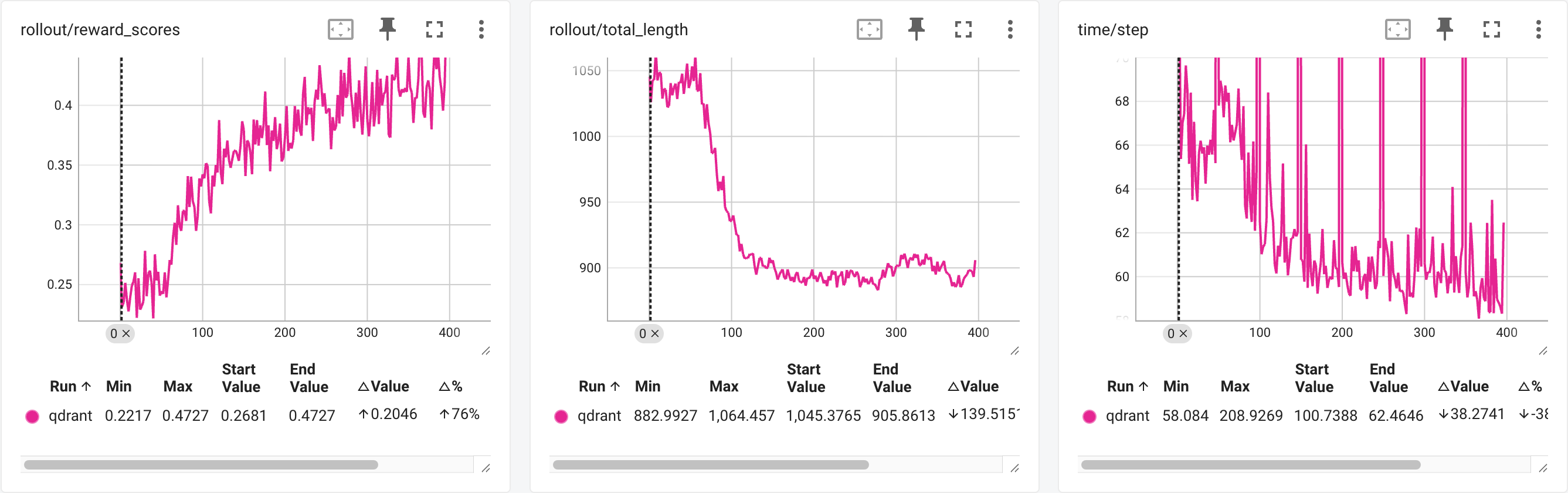
Qwen2.5-3B-Instruct in RLinf
Compared to the original performance (133s per step after response length stabilizes), we achieved a 55% speedup while maintaining consistent reward curves and evaluation results.
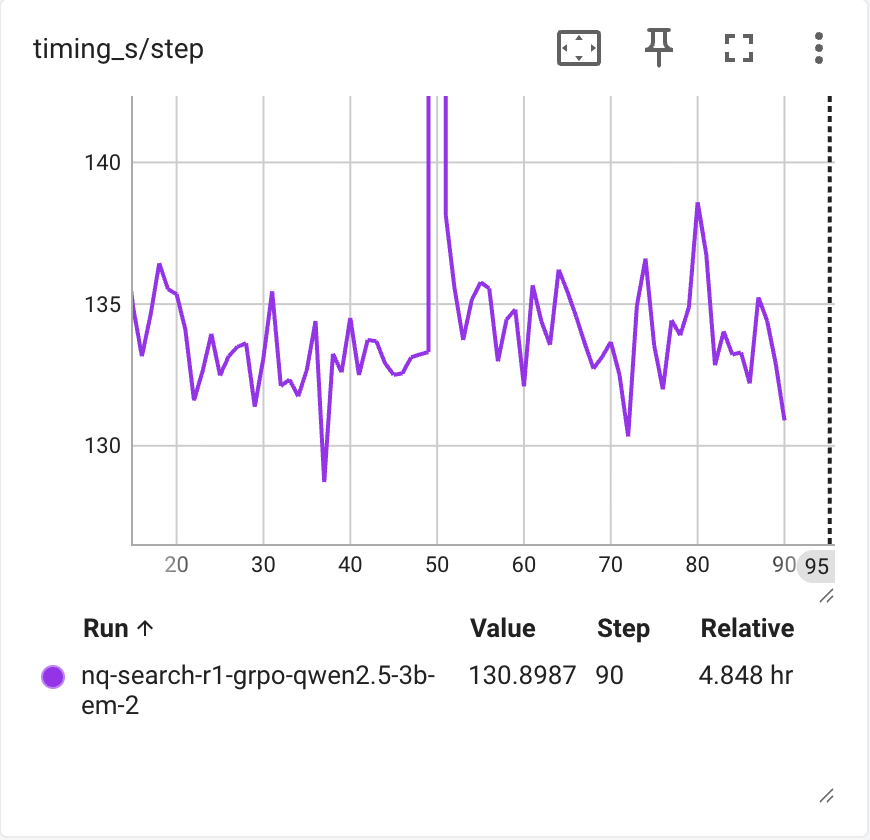
Qwen2.5-3B-Instruct in original implementation at PeterGriffinJin/Search-R1
References#
search-r1: PeterGriffinJin/Search-R1
Search-R1 & veRL-SGLang: zhaochenyang20/Awesome-ML-SYS-Tutorial
Asearcher: inclusionAI/ASearcher