
RL on Lingbot-VLA Models#
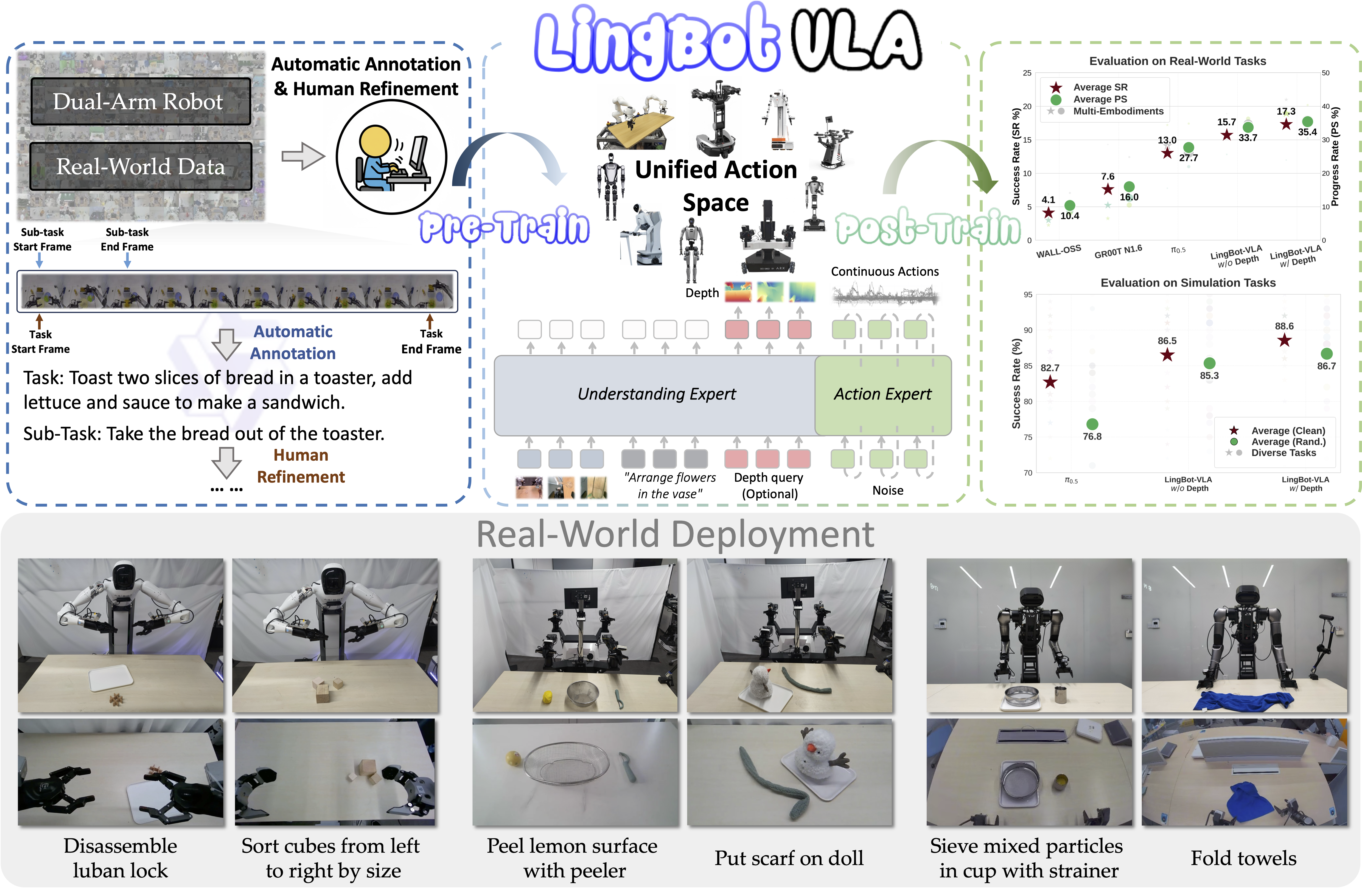
Lingbot-VLA is a Qwen2.5-VL-based vision-language-action model that autoregressively generates continuous action chunks. RLinf integrates it natively — embedded in RLinf’s Python memory space for zero-latency, tensor-level interaction — and supports full-parameter SFT and GRPO fine-tuning on the RoboTwin 2.0 simulator.
Overview#
SFT then GRPO-fine-tune Lingbot-VLA on RoboTwin 2.0 dual-arm manipulation tasks.
RoboTwin 2.0
SFT · GRPO
Click Bell · Place Shoe
1–2 nodes · 8–16 GPUs
env/success_once.Tasks#
Select the model page by matching the environment, task family, and config or checkpoint artifact.
Environment |
Task / Suite |
Config / Weights |
Focus |
|---|---|---|---|
RoboTwin |
Click Bell |
|
GRPO training with LingbotVLA on a RoboTwin manipulation task. |
RoboTwin |
Place Shoe |
|
GRPO training on a second RoboTwin task variant. |
Observation and Action#
Field |
Description |
|---|---|
Observation |
RoboTwin camera observations and robot state required by LingbotVLA. |
Action |
Continuous robot actions decoded by the LingbotVLA policy. |
Reward |
RoboTwin task success or shaped task reward. |
Prompt |
Natural-language task instruction for the RoboTwin episode. |
Installation#
1. Clone the RLinf Repository#
First, clone the RLinf repository and enter the main directory:
git clone https://github.com/RLinf/RLinf.git
cd RLinf
export RLINF_PATH=$(pwd)
2. Install Dependencies#
Option 1: Docker Image
Run embodied training based on RoboTwin using the Docker image:
docker run -it --rm --gpus all \
  --shm-size 20g \
  --network host \
  --name rlinf \
  -v .:/workspace/RLinf \
  rlinf/rlinf:agentic-rlinf0.4-robotwin
Please switch to the corresponding virtual environment via the built-in switch_env utility in the image:
source switch_env lingbotvla
Option 2: Custom Environment
Install the Lingbot-VLA native environment and RoboTwin base dependencies in one command:
bash requirements/install.sh embodied --model lingbotvla --env robotwin --use-mirror
source .venv/bin/activate
RoboTwin Repository Clone and Assets Download#
RoboTwin Assets are asset files required by the RoboTwin environment and need to be downloaded from HuggingFace.
# 1. Clone RoboTwin repository
git clone https://github.com/RoboTwin-Platform/RoboTwin.git -b RLinf_support

# 2. Download and extract Assets files
bash script/_download_assets.sh
Download the Model#
Before starting training, download the Lingbot-VLA base weights, the RoboTwin SFT checkpoint, and the Qwen backbone model from HuggingFace. For RoboTwin SFT and RL experiments, use the pinned RoboTwin SFT checkpoint revision below instead of the latest main revision.
# Method 1: Using git clone
git lfs install
git clone https://huggingface.co/robbyant/lingbot-vla-4b
git clone https://huggingface.co/robbyant/lingbot-vla-4b-posttrain-robotwin
cd lingbot-vla-4b-posttrain-robotwin
git checkout 3e0c7c476bde3daaac00f79f3741a292a299f60a
cd ..
git clone https://huggingface.co/Qwen/Qwen2.5-VL-3B-Instruct

# Method 2: Using huggingface-hub
pip install huggingface-hub
huggingface-cli download robbyant/lingbot-vla-4b --local-dir lingbot-vla-4b
huggingface-cli download robbyant/lingbot-vla-4b-posttrain-robotwin \
    --revision 3e0c7c476bde3daaac00f79f3741a292a299f60a \
    --local-dir lingbot-vla-4b-posttrain-robotwin
huggingface-cli download Qwen/Qwen2.5-VL-3B-Instruct --local-dir Qwen2.5-VL-3B-Instruct
Then set rollout.model.model_path and actor.model.model_path in the configuration to your local model path (for example, /path/to/model/lingbot-vla-4b for base weights or /path/to/model/lingbot-vla-4b-posttrain-robotwin for the pinned RoboTwin SFT checkpoint), and be sure to set the corresponding tokenizer_path to the downloaded Tokenizer path (e.g., /path/to/model/Qwen2.5-VL-3B-Instruct). Otherwise, the Rollout node will throw an error when parsing text instructions.
Run It#
Configuration Files#
RLinf supports full-parameter Supervised Fine-Tuning (SFT) and reinforcement learning alignment (GRPO) for Lingbot-VLA. Relevant configuration files are as follows:
SFT (Behavior Cloning):
examples/sft/config/robotwin_sft_lingbotvla.yamlGRPO (Reinforcement Learning):
examples/embodiment/config/robotwin_click_bell_grpo_lingbotvla.yaml
Key Config Snippets (SFT)#
The core of the SFT phase lies in specifying the offline dataset path (LeRobot Parquet format), the FSDP training backend, and the batch size.
runner:
  task_type: sft
  max_epochs: 30000

data:
  # Path to the converted LeRobot format offline dataset
  train_data_paths: "/path/to/lerobot_data"

actor:
  training_backend: "fsdp"
  micro_batch_size: 1
  global_batch_size: 8
  model:
    model_type: "lingbotvla"
    model_path: "path/to/lingbot_model"
    tokenizer_path: "/path/to/model/Qwen2.5-VL-3B-Instruct"
    precision: bf16
    num_action_chunks: 50
    action_dim: 14
Key Config Snippets (GRPO)#
The top-level file dynamically assembles the environment and model via Hydra, and directly overrides the core SDE sampling parameters required for GRPO reinforcement learning under actor.model.
Note: Because Lingbot-VLA uses the unified global normalization keys (e.g., action.arm.position) from robotwin_50.json, there is no need to configure or override unnorm_key when switching between different tasks, enabling truly smooth multi-task transfer.
rollout:
  model:
    model_type: "lingbotvla"

actor:
  model:
    model_path: "/path/to/lingbot_sft_model"
    tokenizer_path: "/path/to/model/Qwen2.5-VL-3B-Instruct"
    model_type: "lingbotvla"
    lingbotvla:
        config_path: "/path/to/lingbot-vla-4b"
    action_dim: 14
    num_action_chunks: 50
    num_steps: 10
    noise_method: "flow_sde"
    noise_level: 0.5
    action_env_dim: 14
Launch Commands#
To start training with the selected configuration, run the corresponding launch script.
Note: Since the default tasks use a dual-arm robot, please ensure you declare the robot platform as ALOHA in your terminal before executing any launch scripts. Otherwise, the environment will fail to load the action space correctly:
export ROBOT_PLATFORM="ALOHA"
# Set ROBOTWIN_PATH environment variable
export ROBOTWIN_PATH=/path/to/RoboTwin
# Enter the lingbot-vla directory automatically generated by install.sh
export LINGBOT_VLA_PATH=$(python -c "import lingbotvla; import os; print(os.path.dirname(lingbotvla.__path__[0]))")
1. Launch SFT Training
Perform supervised fine-tuning using the converted offline data:
bash examples/sft/run_vla_sft.sh robotwin_sft_lingbotvla
2. Launch GRPO Training
For example, to fine-tune the SFT-trained model with the GRPO algorithm on the RoboTwin Click Bell task:
bash examples/embodiment/run_embodiment.sh robotwin_click_bell_grpo_lingbotvla
Standalone Evaluation#
Run standalone evaluation through the RoboTwin evaluation guide.
Use the Lingbot-VLA eval configs such as robotwin_click_bell_lingbotvla_eval and
robotwin_place_shoe_lingbotvla_eval; the guide owns ROBOT_PLATFORM=ALOHA,
ROBOTWIN_PATH, assets, launch commands, and result interpretation.
Visualization and Results#
Launch TensorBoard from the RLinf repo root:
tensorboard --logdir ../results --port 6006
The key signal is env/success_once. For every logged metric, see
Training metrics.
Videos are saved through the env video config:
video_cfg:
  save_video: True
  video_base_dir: ${runner.logger.log_path}/video/eval
Task |
SFT |
RLinf-GRPO |
|---|---|---|
|
||
|
||
Average |
95.31% |
98.60% |
Δ Avg. |
— |
+3.29% |

Note
Lingbot-VLA results use the demo_randomized setting. For task-level simulator
options, see the
RoboTwin configuration documentation.