
Using HG-DAgger with Franka#
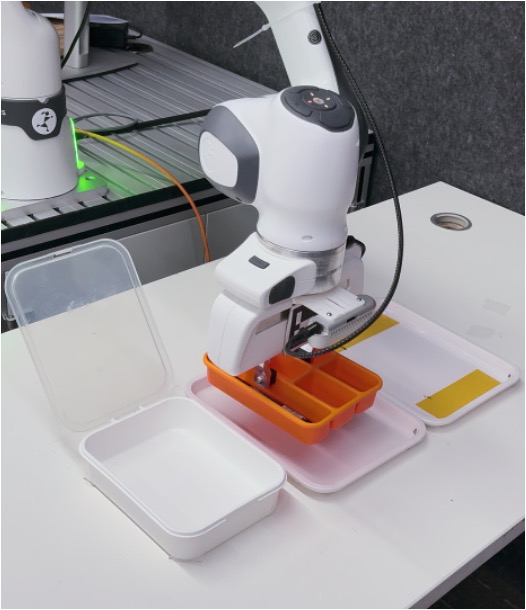
Human-Gated DAgger workflow for collecting interventions and training a Franka policy online.#
Train a real-world Franka policy with Human-Gated DAgger. You will collect intervention data, compute OpenPI normalization stats, run SFT, then launch online HG-DAgger with expert-only steps saved for training.
Overview#
Use human-gated interventions to improve a real-world Franka policy online.
OpenPI π₀ / π₀.₅
SFT · HG-DAgger
Real-world PnP
Franka · SpaceMouse/operator
Tasks#
Task |
Config / entry point |
Description |
|---|---|---|
Collection |
|
Collect real-world intervention demonstrations. |
SFT |
|
Train the student initialization. |
HG-DAgger |
|
Run online intervention training with expert-only save mode. |
Observation and Action#
Field |
Description |
|---|---|
Observation |
Franka camera frames and optional robot state. |
Action |
OpenPI action decoded to Franka real-world control. |
Reward |
Human-gated intervention signal and task outcome. |
Prompt |
Task text in OpenPI dataset/config metadata. |
Installation#
The real-world pipeline uses different environments on different nodes:
Robot / env node: Use the Franka controller environment from Real-World RL with Franka.
Training / rollout node: Use the same environment as simulation DAgger DAgger for Embodied Policies.
Robot / Env Node#
Follow the controller-node setup in Real-World RL with Franka for firmware checks, RT kernel, ROS, and Franka controller dependencies.
Option 1: Docker Image
docker run -it --rm \
   --privileged \
   --network host \
   --name rlinf \
   -v .:/workspace/RLinf \
   rlinf/rlinf:agentic-rlinf0.3-franka
   # For mainland China users, you can use the following for better download speed:
   # docker.1ms.run/rlinf/rlinf:agentic-rlinf0.3-franka
Then switch to the libfranka-compatible environment:
source switch_env franka-<libfranka_version>
Option 2: Custom Environment
# For mainland China users, you can add the `--use-mirror` flag for better download speed.
bash requirements/install.sh embodied --env franka
source .venv/bin/activate
Before ray start on the robot node, source the same ROS / Franka controller
environment described in Real-World RL with Franka.
Training / Rollout Nodes#
Use the same environment as simulator Pi0 DAgger.
Option 1: Docker Image
docker run -it --rm --gpus all \
   --shm-size 20g \
   --network host \
   --name rlinf \
   -v .:/workspace/RLinf \
   rlinf/rlinf:agentic-rlinf0.3-maniskill_libero
   # For mainland China users, you can use the following for better download speed:
   # docker.1ms.run/rlinf/rlinf:agentic-rlinf0.3-maniskill_libero
Inside the container:
source switch_env openpi
Option 2: Custom Environment
# For mainland China users, you can add the `--use-mirror` flag for better download speed.
bash requirements/install.sh embodied --model openpi --env maniskill_libero
source .venv/bin/activate
Cluster Setup#
Before launching any collection or training job, finish the Ray setup described
in Real-World RL with Franka. The training / rollout node is typically the Ray head
(RLINF_NODE_RANK=0), while the Franka controller node is the worker
(RLINF_NODE_RANK=1).
# On the training / rollout node
export RLINF_NODE_RANK=0
ray start --head --port=6379 --node-ip-address=<head_node_ip>

# On the robot / env node
export RLINF_NODE_RANK=1
ray start --address='<head_node_ip>:6379'
Ray records the current Python interpreter and environment variables at startup,
so make sure each node has sourced the correct environment before ray start.
Run It#
1. Collect Human-Guided Real-World Data#
Start from examples/embodiment/config/realworld_collect_data.yaml. For the
pick-and-place task, switch the env from peg insertion to bin relocation:
defaults:
  - env/realworld_bin_relocation@env.eval
  - override hydra/job_logging: stdout
Then fill in the robot configuration and keep LeRobot export enabled:
cluster:
  node_groups:
    - label: franka
      node_ranks: 0
      hardware:
        type: Franka
        configs:
          - robot_ip: ROBOT_IP
            node_rank: 0

env:
  eval:
    use_spacemouse: True
    override_cfg:
      target_ee_pose: [0.50, 0.00, 0.01, 3.14, 0.0, 0.0]
      success_hold_steps: 1
      camera_serials: ["CAMERA_SERIAL_1", "CAMERA_SERIAL_2"]
   data_collection:
     enabled: True
     save_dir: ${runner.logger.log_path}/collected_data
     export_format: "lerobot"
     only_success: True
     robot_type: "panda"
     fps: 10
Launch collection with your copied config:
bash examples/embodiment/collect_data.sh my_realworld_pnp_collect
During teleoperation, the same run writes:
replay-buffer trajectories under
logs/{timestamp}/demos/LeRobot data under
logs/{timestamp}/collected_data/
For the collection format, see Data Collection.
2. Compute Normalization Statistics#
Before SFT or HG-DAgger, compute OpenPI normalization stats for the collected LeRobot dataset:
export HF_LEROBOT_HOME=/path/to/lerobot_root
python toolkits/lerobot/calculate_norm_stats.py \
    --config-name pi0_realworld \
    --repo-id realworld_franka_bin_relocation
Use the same dataset root and dataset id that you will use for SFT. More OpenPI-specific dataset notes are documented in OpenPI Supervised Fine-Tuning.
3. Run OpenPI SFT#
Edit examples/sft/config/realworld_sft_openpi.yaml before launch:
data:
  train_data_paths: "/path/to/realworld-franka-bin-relocation-dataset"

actor:
  model:
    model_path: "/path/to/pi0-model"
    openpi:
      config_name: "pi0_realworld"
Then run:
bash examples/sft/run_vla_sft.sh realworld_sft_openpi
The SFT checkpoint is the student initialization for the online stage. For more OpenPI SFT details, see OpenPI Supervised Fine-Tuning.
4. Run Async HG-DAgger on the Real Robot#
Edit examples/embodiment/config/realworld_pnp_dagger_openpi.yaml to match
your cluster, cameras, target pose, and checkpoints:
cluster:
  num_nodes: 2
  node_groups:
    - label: "train"
      node_ranks: 0
    - label: franka
      node_ranks: 1
      hardware:
        type: Franka
        configs:
          - robot_ip: ROBOT_IP
            node_rank: 1

runner:
  ckpt_path: "/path/to/sft_checkpoint/full_weights.pt"

algorithm:
  dagger:
    init_beta: 1.0
    beta_schedule: "exponential"
    beta_decay: 0.99
    only_save_expert: True

env:
  train:
    override_cfg:
      target_ee_pose: [0.50, 0.00, 0.01, 3.14, 0.0, 0.0]
      camera_serials: ["CAMERA_SERIAL_1", "CAMERA_SERIAL_2"]
  eval:
    override_cfg:
      target_ee_pose: [0.50, 0.00, 0.01, 3.14, 0.0, 0.0]
      camera_serials: ["CAMERA_SERIAL_1", "CAMERA_SERIAL_2"]

rollout:
  model:
    model_path: "/path/to/pi0-model"

actor:
  model:
    model_path: "/path/to/pi0-model"
    openpi:
      config_name: "pi0_realworld"
Launch HG-DAgger from the Ray head node:
bash examples/embodiment/run_realworld_async.sh realworld_pnp_dagger_openpi
Visualization and Results#
1. TensorBoard Logs
tensorboard --logdir ./logs
2. Useful Monitoring Metrics
train/dagger/actor_loss: Supervised HG-DAgger loss on buffered intervention samples.train/replay_buffer/num_trajectories: Number of stored trajectories.train/replay_buffer/total_samples: Number of available replay samples.train/actor/lr: Learning rate.train/actor/grad_norm: Gradient norm.