
Reinforcement Learning Training for rStar2#
Multi-turn RL combined with tool invocation extends the interaction boundaries of Large Language Models (LLMs) to the real world. Reproduce the experiments from rStar2-Agent: Agentic Reasoning Technical Report in RLinf, training LLMs to answer questions by invoking code-execution tools.
Overview#
Use this recipe to reproduce rStar2-style agentic reasoning with code execution tools and Megatron training.
Qwen2.5-7B-Instruct
Multi-turn RL with tool invocation
Code Judge server and Math-Verify rewards
Reference run on 8×H100
Environment#
RLinf Environment#
For RLinf environment configuration, see RLinf Installation.
Code Judge Runtime Environment#
We use the code judge tool from the rStar2 example. For installation instructions, refer to rStar2 & veRL-SGLang
cd examples/agent/rstar2

# install code judge
sudo apt-get update -y && sudo apt-get install redis -y
git clone https://github.com/0xWJ/code-judge
pip install -r code-judge/requirements.txt
pip install -e code-judge

# install rstar2_agent requirements
pip install -r requirements.txt

cd code-judge
Code Judge Server Setup#
rStar2-Agent uses Code Judge as a tool invocation server to execute Python code generated by the model.
1. Start Redis Server
sudo apt-get update -y && sudo apt-get install redis -y
redis-server --daemonize yes --protected-mode no --bind 0.0.0.0
2. Start Code Judge Server
# Start the main server (master node only)
# Environment variables can be configured as per: https://github.com/0xWJ/code-judge/blob/main/app/config.py
# Replace $WORKSPACE and $MASTER_ADDR with your actual paths

tmux new-session -d -s server \
'cd $WORKSPACE/examples/agent/rstar2/code-judge && \
   MAX_EXECUTION_TIME=4 \
   REDIS_URI="redis://$MASTER_ADDR:6379" \
   RUN_WORKERS=0 \
   uvicorn app.main:app --host 0.0.0.0 --port 8000 --workers 16 \
   2>&1 | tee server.log'
3. Start Code Judge Workers
# Launch workers (can be deployed on multiple nodes for increased parallelism)
# Adjust MAX_WORKERS based on your CPU count per node

tmux new-session -d -s worker \
'cd $WORKSPACE/examples/agent/rstar2/code-judge && \
   MAX_EXECUTION_TIME=4 \
   REDIS_URI="redis://$MASTER_ADDR:6379" \
   MAX_WORKERS=64 \
   python run_workers.py \
   2>&1 | tee worker.log'
Reward Computation Tool#
We use Math-Verify to assist in reward computation, which needs to be installed via pip
pip install math-verify
We also use simple rules to ensure the correctness of reward calculation, which requires installing dependencies.
pip install sympy
pip install pylatexenc
Training on 8*H100#
Download the training dataset via examples/agent/rstar2/data_process/process_train_dataset.py and write the path to examples/agent/rstar2/config/rstar2-qwen2.5-7b-megatron.yaml
data:
  # ...
  train_data_paths: ["/path/to/train.jsonl"]
  val_data_paths: ["/path/to/train.jsonl"]
Modify the rollout.model.model_path path in examples/agent/rstar2/config/rstar2-qwen2.5-7b-megatron.yaml
rollout:
  group_name: "RolloutGroup"

  gpu_memory_utilization: 0.5
  model:
    model_path: /path/to/model/Qwen2.5-7B-Instruct
    model_type: qwen2.5
Since the down sample logic is not compatible with the current inference logic, recompute_logprobs should be set to False
algorithm:
   # ...
   recompute_logprobs: False
   shuffle_rollout: False
Run It#
Run examples/agent/rstar2/run_rstar2.sh to start training.
Visualization and Results#
Below shows the comparison of reward curves and response length curves between RLinf and Verl.
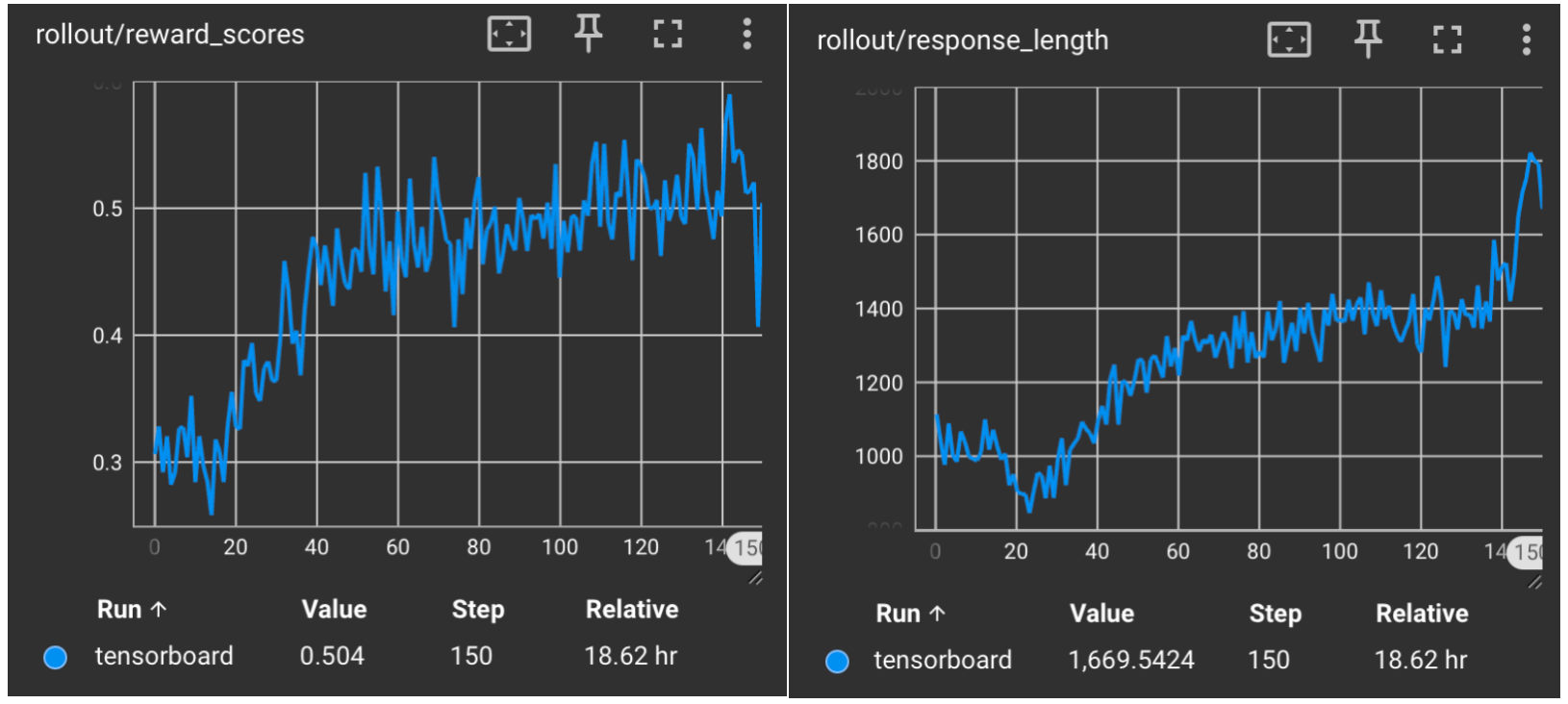
Qwen2.5-7B-Instruct in RLinf#
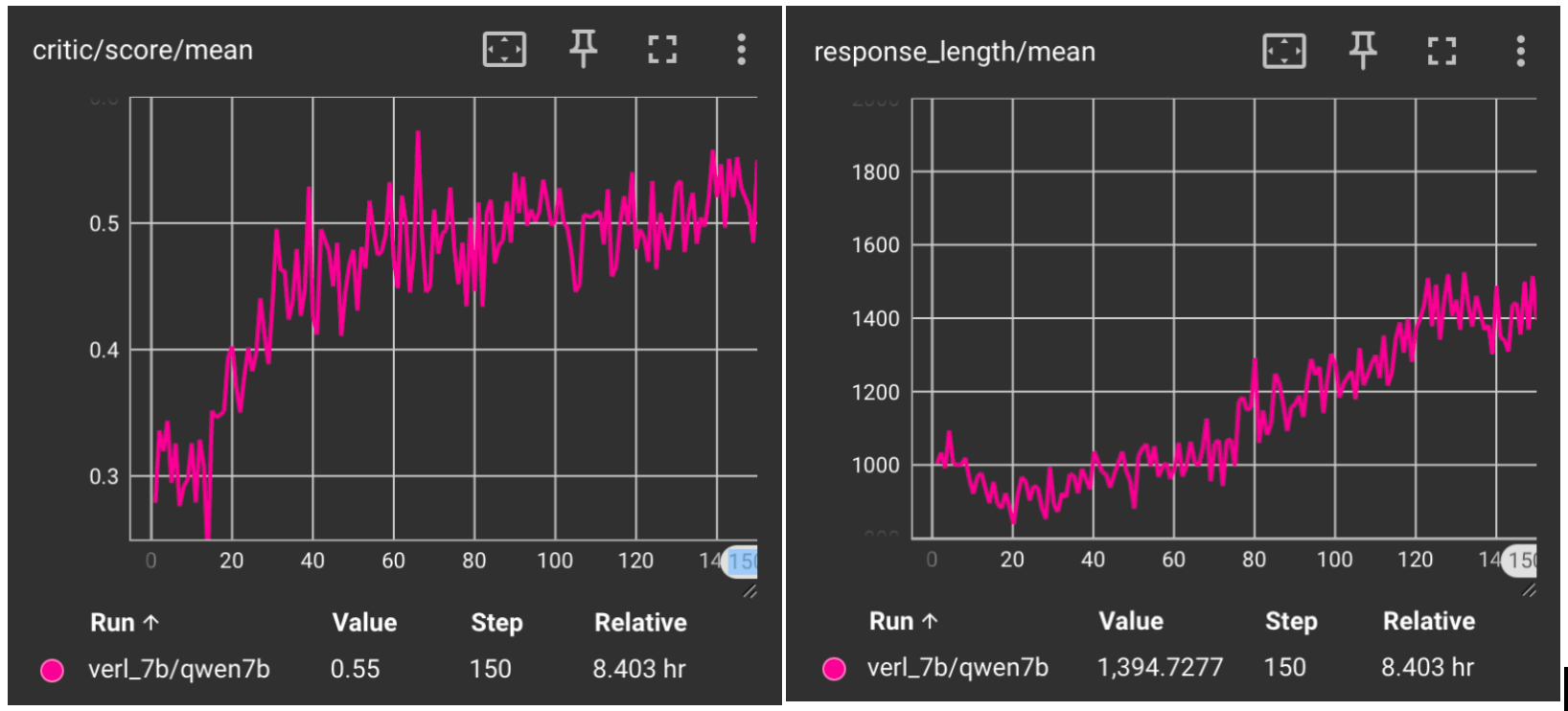
Qwen2.5-7B-Instruct in Verl#
* We retrain the model using the default settings for steps.
References#
rStar2 & veRL-SGLang: volcengine/verl#3397