
RECAP: Offline Advantage-Based Policy Optimization#
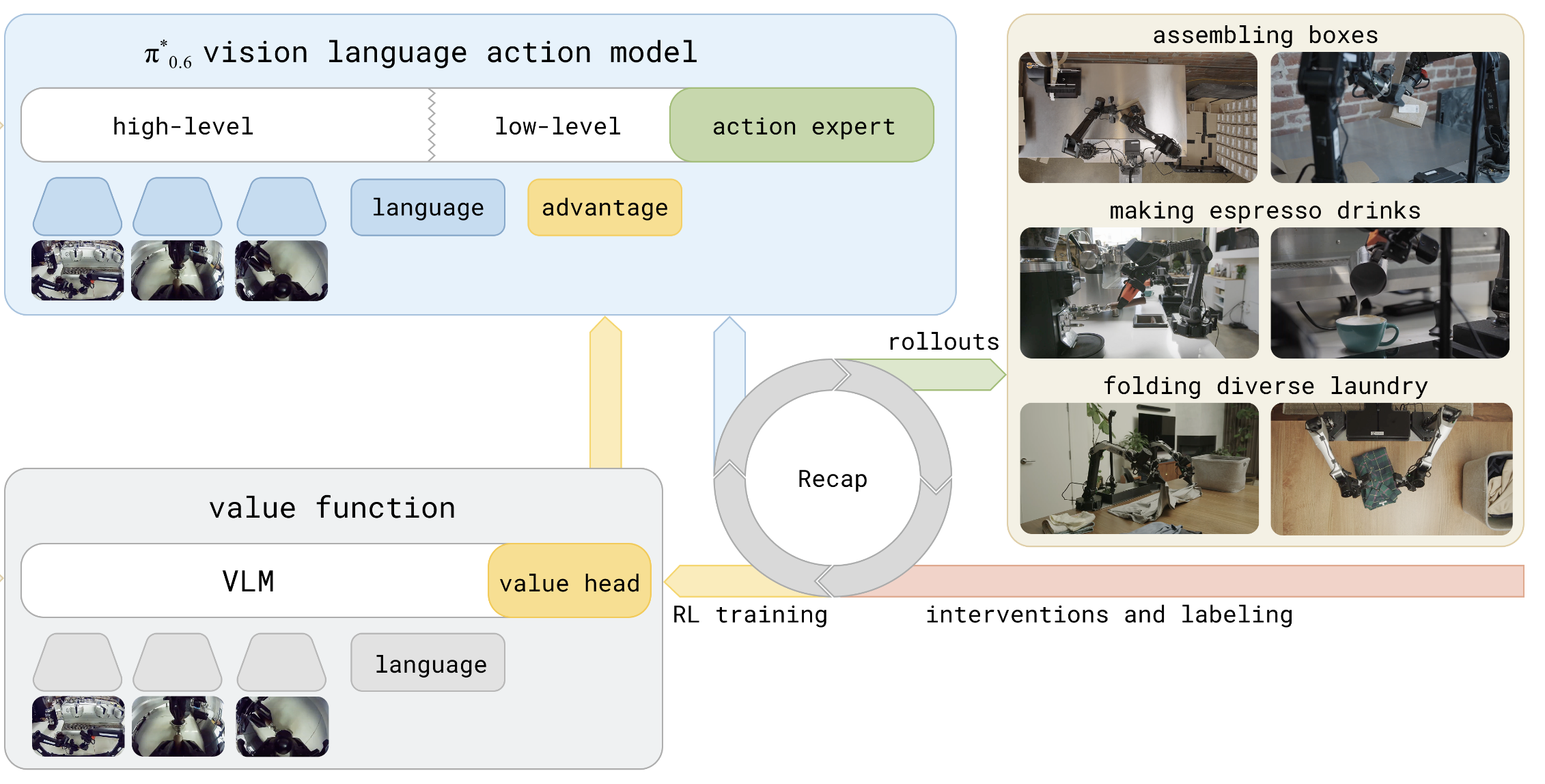
The RECAP offline pipeline.#
Run the RECAP (RL with Experience and Corrections via Advantage-conditioned Policies) pipeline in RLinf. RECAP is an offline policy optimization method that requires no online environment interaction. It computes returns from existing datasets, trains a value model, estimates advantages, and finally uses Classifier-Free Guidance (CFG) training to optimize the policy.
This pipeline is especially suited for real-robot scenarios where large-scale online sampling is impractical.
Overview#
Improve a π₀.₅ policy offline (no new rollouts) by scoring existing data with a value model and steering with classifier-free guidance.
RECAP (CFG)
π₀.₅
LeRobot datasets
Offline · 4 stages
Pipeline#
RECAP consists of four sequential stages:
┌──────────────────────┐     ┌──────────────────────┐     ┌────────────────────────┐     ┌──────────────────────┐
│  Step 1              │     │  Step 2              │     │  Step 3                │     │  Step 4              │
│  Compute Returns     │────▶│  Value Model SFT     │────▶│  Compute Advantages    │────▶│  CFG Training        │
│                      │     │                      │     │                        │     │                      │
│  Compute discounted  │     │  Train a value model │     │  Compute per-timestep  │     │  Train the policy    │
│  returns for each    │     │  to predict returns  │     │  advantages using the  │     │  with classifier-    │
│  trajectory          │     │  from observations   │     │  trained value model   │     │  free guidance       │
└──────────────────────┘     └──────────────────────┘     └────────────────────────┘     └──────────────────────┘
Core Idea
Compute Returns: For each trajectory, compute discounted returns in reverse using \(G_t = r_t + \gamma \cdot G_{t+1}\), generating sidecar files without modifying the original data.
Value Model SFT: Train a value model (VLM backbone + Value Head) to predict normalized returns from observations (images + language instructions).
Compute Advantages: Use the trained value model to compute per-timestep advantages via \(A_t = \text{normalize}(r_{t:t+N}) + \gamma^N \cdot V(o_{t+N}) - V(o_t)\), then label samples as positive/negative based on a quantile threshold.
CFG Training: Train the policy model using advantage labels — positive (high-advantage) samples serve as conditional inputs and negative (low-advantage) samples as unconditional inputs, enabling classifier-free guidance for policy optimization.
How RECAP Works#
RECAP Core Components
Return Computation
For SFT datasets (all successful trajectories): per-step reward \(r_t = -1\), terminal step \(r_T = 0\)
For rollout datasets (containing failures): failed trajectory terminal step \(r_T = r_{\text{fail}}\) (e.g., \(-300\))
Discount factor \(\gamma\) defaults to \(1.0\) (undiscounted)
Value Model
Based on SigLIP2 vision encoder + Gemma3 language model + learnable Critic Expert
Uses Categorical Value Distribution with 201 bins by default
Output range \([-1, 0]\) (normalized return space)
Advantage Estimation
N-step lookahead advantage: \(A_t = \text{normalize}(r_{t:t+N}) + \gamma^N \cdot V(o_{t+N}) - V(o_t)\)
Quantile threshold: top \(X\%\) of samples labeled as positive (default \(X = 30\))
Supports multi-GPU distributed inference
Classifier-Free Guidance (CFG) Training
Based on the OpenPI (pi0.5) policy model
positive_only_conditionalmode: only positive samples serve as conditional inputs; negative samples are always unconditionalPositive samples are randomly dropped to unconditional with probability
unconditional_prob(default \(0.1\)) for dropout regularizationAt inference time,
cfgrl_guidance_scalecontrols the guidance strength
Installation#
1. Clone RLinf Repository#
# For mainland China users, you can use the following for better download speed:
# git clone https://ghfast.top/github.com/RLinf/RLinf.git
git clone https://github.com/RLinf/RLinf.git
cd RLinf
2. Install Dependencies#
Option 1: Docker Image
docker run -it --rm --gpus all \
   --shm-size 20g \
   --network host \
   --name rlinf \
   -v .:/workspace/RLinf \
   rlinf/rlinf:agentic-rlinf0.3-maniskill_libero
   # For mainland China users, you can use the following for better download speed:
   # docker.1ms.run/rlinf/rlinf:agentic-rlinf0.3-maniskill_libero
Please switch to the OpenPI virtual environment via the built-in switch_env utility:
source switch_env openpi
Option 2: Custom Environment
# For mainland China users, you can add the `--use-mirror` flag to the install.sh command for better download speed.

bash requirements/install.sh embodied --model openpi --env maniskill_libero
source .venv/bin/activate
Download the Model#
The RECAP pipeline requires the following pretrained models:
SigLIP2-so400m: Vision encoder for Step 2 value model training
Gemma3-270M: Language model for Step 2 value model training
pi0.5 base (PyTorch): Policy model for Step 4 CFG training. Refer to openpi for obtaining model weights and converting to PyTorch format
Models for Step 2
# Download models (choose either method)
# Method 1: Using git clone
git lfs install
git clone https://huggingface.co/google/siglip2-so400m-patch14-224
git clone https://huggingface.co/google/gemma-3-270m

# Method 2: Using huggingface-hub
# For mainland China users, you can use the following for better download speed:
# export HF_ENDPOINT=https://hf-mirror.com
pip install huggingface-hub
hf download google/siglip2-so400m-patch14-224 --local-dir siglip2-so400m-patch14-224
hf download google/gemma-3-270m --local-dir gemma-3-270m
After downloading, make sure to correctly specify the model paths in the configuration files:
# Step 2 value model configuration
actor:
  model:
    siglip_path: /path/to/siglip2-so400m-patch14-224
    gemma3_path: /path/to/gemma-3-270m
    tokenizer_path: /path/to/gemma-3-270m

# Step 4 policy model configuration
actor:
  model:
    model_path: /path/to/pi05_base_pytorch
Data Preparation#
RECAP uses datasets in the LeRobot format. Datasets are categorized into two types:
SFT datasets: Successful trajectories from human demonstrations or trained policies
Rollout datasets: Trajectories collected from online interaction, containing both successes and failures
Example dataset configuration:
data:
  train_data_paths:
    - dataset_path: /path/to/sft_dataset
      type: sft                # all successful trajectories
      weight: 1.0
    - dataset_path: /path/to/rollout_dataset
      type: rollout            # contains failures
      weight: 1.0
Note
train_data_paths is a list. If you want to mix multiple datasets, you can add more items; if you want to train with only one dataset, you can also keep just a single item.
The train_data_paths should remain consistent across all steps to ensure returns, values, and advantages are computed on the same data.
Pipeline Tag System#
RECAP uses tags for data passing and version management across steps:
returns_tag: Generated by Step 1, read by Steps 2 and 3. Ensure that Step 1’s
data.tag, Step 2’sdata.tag, and Step 3’sadvantage.returns_tagare consistent.advantage_tag: Generated by Step 3, read by Step 4. Ensure that Step 3’s
advantage.tagand Step 4’sdata.advantage_tagare consistent.
Step |
Config Field |
Description |
|---|---|---|
1 |
|
Writes |
2 |
|
Reads |
3 |
|
Reads |
3 |
|
Writes |
4 |
|
Reads |
Step 1: Compute Returns#
This step computes discounted cumulative returns for each trajectory in reverse order. Results are saved as sidecar files without modifying the original data.
Configuration
The configuration file is located at examples/offline_rl/config/recap_compute_returns.yaml:
data:
  train_data_paths:
    - dataset_path: /path/to/sft_dataset
      type: sft
    - dataset_path: /path/to/rollout_dataset
      type: rollout

  gamma: 1.0              # discount factor
  failure_reward: -300.0   # terminal reward for failed trajectories
  tag: "fail300"           # output file tag
  num_workers: 128         # parallel processing threads
Key Parameters
Parameter |
Default |
Description |
|---|---|---|
|
|
Discount factor. \(1.0\) means undiscounted (simple sum of future rewards) |
|
|
Penalty for failed trajectory terminal steps. Larger magnitude increases separation between success and failure returns |
|
|
Output file tag, generates |
|
|
Number of threads for parallel parquet file processing |
Launch Command
bash examples/offline_rl/advantage_labeling/recap/process/run_compute_returns.sh recap_compute_returns
Output Files
meta/returns_{tag}.parquet: Each row containsepisode_index,frame_index,return,reward,promptmeta/stats.json: Updated with return statistics (mean, std, min, max)
Verification
python3 -c "
import json
stats = json.load(open('/path/to/dataset/meta/stats.json'))
assert 'return' in stats
print('return stats:', stats['return'])
"
Step 2: Value Model SFT#
Using the returns computed in Step 1 as supervision signals, train a value model to predict normalized returns from observations (images + language instructions).
Model Architecture
The value model consists of three components:
Vision Encoder: SigLIP2-so400m (1152-dim) — processes RGB image inputs
Language Model: Gemma3-270M (640-dim) — processes language instructions
Critic Expert: Learnable expert head that maps multimodal representations to value predictions
The output is a Categorical Value Distribution over 201 bins spanning \([-1, 0]\).
Configuration
The configuration file is located at examples/offline_rl/config/recap_value_model_sft.yaml. Key fields:
data:
  train_data_paths:
    - dataset_path: /path/to/sft_dataset
      type: sft
      weight: 1.0
      robot_type: "libero"
      model_type: "pi05"
  tag: "fail300"                     # must match Step 1 tag
  action_horizon: 10
  normalize_to_minus_one_zero: true  # normalize to [-1, 0]

  eval_data_paths:                   # optional, recommended
    - dataset_path: /path/to/eval_dataset
      max_samples: 10000
      robot_type: "libero"
      model_type: "pi05"

actor:
  micro_batch_size: 32
  global_batch_size: 256
  model:
    freeze_vlm: false         # whether to freeze VLM backbone
    value_dropout: 0.0        # Value Head dropout
  optim:
    lr: 5.0e-5               # VLM backbone learning rate
    value_lr: 1.0e-4          # Value Head learning rate
    weight_decay: 1.0e-10
    lr_warmup_steps: 500

runner:
  max_epochs: 30000
  save_interval: 3000         # checkpoint save interval
Key Parameters
Parameter |
Default |
Description |
|---|---|---|
|
|
Same tag as Step 1, used to read the corresponding |
|
|
Normalization mode. |
|
|
Freeze the vision encoder. When |
|
|
Dropout rate before the Value Head |
|
|
VLM backbone learning rate |
|
|
Value Head learning rate |
Launch Command
The training script automatically initializes the Ray cluster:
bash examples/offline_rl/advantage_labeling/recap/run_value_sft.sh recap_value_model_sft
Output
Model checkpoints saved at
logs/value_sft/{config_name}-{timestamp}/value_sft/checkpoints/TensorBoard logs
Key Metrics
train/actor/loss: Total value model training losstrain/actor/grad_norm: Gradient normeval/spearman_correlation: Spearman correlation coefficient measuring rank consistency between predictions and true returns
Note
After training, note the checkpoint path for Step 3. Checkpoints are located at:
logs/value_sft/{config_name}-{timestamp}/value_sft/checkpoints/global_step_{N}/actor/model_state_dict
Step 3: Compute Advantages#
Using the value model trained in Step 2, compute per-timestep advantage values for the dataset and label samples as positive/negative based on a quantile threshold.
Advantage Formula
where \(N\) is the lookahead steps (advantage_lookahead_step) and \(\gamma\) is the discount factor.
Configuration
The configuration file is located at examples/offline_rl/config/recap_compute_advantages.yaml:
advantage:
  value_checkpoint: /path/to/value_checkpoint
  positive_quantile: 0.3      # top 30% labeled as positive
  tag: "fail300_N10_ckpt18000_q30"
  returns_tag: "fail300"       # must match Step 1 tag
  batch_size: 1024

data:
  train_data_paths:
    - dataset_path: /path/to/sft_dataset
      robot_type: "libero"
      type: "sft"
      weight: 1.0
  advantage_lookahead_step: 10   # N-step lookahead
  gamma: 1.0
Key Parameters
Parameter |
Default |
Description |
|---|---|---|
|
required |
Path to the value model checkpoint from Step 2 |
|
|
Positive sample ratio. \(0.3\) means the top 30% by advantage value are labeled as positive |
|
|
Lookahead steps \(N\), i.e., how many future steps of rewards to consider |
|
|
Tag for reading the return file generated by Step 1 |
|
|
Output advantage file tag, generates |
Launch Command
Supports multi-GPU distributed inference:
bash examples/offline_rl/advantage_labeling/recap/process/run_compute_advantages.sh recap_compute_advantages
Output Files
meta/advantages_{tag}.parquet: Containsadvantage(boolean),advantage_continuous(float), and other columnsUpdated
mixture_config.yaml: Records global threshold and normalization statistics
Verification
python3 -c "
import pandas as pd
df = pd.read_parquet('/path/to/dataset/meta/advantages_fail300_N10_ckpt18000_q30.parquet')
print(f'samples={len(df)}, columns={list(df.columns)}')
print(df[['advantage_continuous']].describe())
"
Step 4: CFG Training#
Using the advantage labels from Step 3, train the OpenPI policy model with classifier-free guidance.
Training Mechanism
Positive samples (
advantage=True): Serve as conditional inputsNegative samples (
advantage=False): Always serve as unconditional inputsWhen
positive_only_conditionalis enabled, positive samples are randomly dropped to unconditional with probabilityunconditional_probfor regularizationAt inference time, the guidance scale
cfgrl_guidance_scaleamplifies the difference between conditional and unconditional predictions, steering the model toward high-advantage actions
Configuration
The configuration file is located at examples/offline_rl/config/cfg_rl_openpi.yaml:
data:
  advantage_tag: "fail300_N10_ckpt18000_q30"   # must match Step 3 advantage.tag
  balance_dataset_weights: true
  train_data_paths:
    - dataset_path: /path/to/sft_dataset
      type: sft
      weight: 1.0
    - dataset_path: /path/to/rollout_dataset
      type: rollout
      weight: 1.0

actor:
  micro_batch_size: 32
  global_batch_size: 512
  model:
    model_path: /path/to/pi05_base_pytorch
    openpi:
      config_name: "pi05_libero"
      positive_only_conditional: true
      unconditional_prob: 0.1
      cfgrl_guidance_scale: 1.0
  optim:
    lr: 1.0e-5
    lr_scheduler: cosine
    lr_warmup_steps: 5000
    total_training_steps: 30000
Key Parameters
Parameter |
Default |
Description |
|---|---|---|
|
|
Matches Step 3’s |
|
|
Only positive samples serve as conditional inputs. When |
|
|
Probability of dropping samples to unconditional. When |
|
|
Guidance scale at inference. Higher values favor high-advantage actions more strongly |
|
|
Data transform config. Use |
|
|
Balance sampling weights by dataset size |
Launch Command
bash examples/offline_rl/policy_optimization/cfg_rl/run_cfg_rl.sh cfg_rl_openpi
Key Metrics
train/actor/loss: Policy training losstrain/actor/grad_norm: Gradient norm
Visualize Advantages#
After Step 3, use examples/offline_rl/advantage_labeling/recap/process/visualize_advantage_dataset.py to analyze the advantage distribution,
including advantage histograms, value prediction distributions, per-episode positive rates, and episode replay videos with advantage annotations.
Basic Usage
Generate distribution plots and episode videos:
python examples/offline_rl/advantage_labeling/recap/process/visualize_advantage_dataset.py \
    --dataset /path/to/your/dataset \
    --output outputs/advantage_viz \
    --tag "fail300_N10_ckpt18000_q30" \
    --num-episodes 10
Distribution plot only (no videos):
python examples/offline_rl/advantage_labeling/recap/process/visualize_advantage_dataset.py \
    --dataset /path/to/your/dataset \
    --output outputs/advantage_viz \
    --tag "fail300_N10_ckpt18000_q30" \
    --no-video
Visualize specific episodes:
python examples/offline_rl/advantage_labeling/recap/process/visualize_advantage_dataset.py \
    --dataset /path/to/your/dataset \
    --output outputs/advantage_viz \
    --tag "fail300_N10_ckpt18000_q30" \
    --episodes 0 5 10 20
Key Parameters
Parameter |
Default |
Description |
|---|---|---|
|
required |
Path to LeRobot dataset |
|
|
Output directory |
|
|
Advantage file tag, reads |
|
|
Number of episodes to visualize ( |
|
|
Specific episode indices to visualize |
|
|
Skip video generation, output static plots only |
|
auto-detected |
Advantage threshold. When not set, automatically inferred from |
Output Contents
advantage_distribution.png: 6-subplot comprehensive statistics panel (advantage histogram, value distribution, scatter plot, per-episode positive rate, per-episode advantage mean, statistics summary)episode_{N}_summary.png: Key frames + value/advantage time series for each episode (frames above threshold highlighted with green border)episode_{N}.mp4: Per-frame replay video with advantage annotations
Run It#
Follow the numbered RECAP stages above to generate returns, train the value model, compute advantages, and train the CFG policy.
Visualization and Results#
For metric definitions, see Training metrics.
TensorBoard Logging
tensorboard --logdir ./logs --port 6006
The RECAP pipeline generates two subdirectories under logs/:
logs/value_sft/: Value model training logs (Step 2)logs/cfg_sft/: CFG policy training logs (Step 4)
Train Log Tool Integration
runner:
  logger:
    log_path: "../results"
    project_name: rlinf
    experiment_name: "recap_experiment"
    logger_backends: ["tensorboard"]   # also supports wandb, swanlab
Dataset#
We provide a reproduced experiment on the LIBERO-10 benchmark (Task 0) to demonstrate the RECAP pipeline.
SFT data: Expert demonstration data from LIBERO-10 (successful trajectories)
Rollout data: 4,096 trajectories collected by a few-shot π0.5 policy on Task 0, containing both successful and failed episodes
Eval data: A held-out set collected by the same few-shot π0.5 policy, used in Step 2 to monitor value model overfitting
Note
This tutorial intentionally uses a few-shot π0.5 policy with a moderate initial success rate so that RECAP’s offline improvement can be observed in a compact Task 0 example. The baseline below is scoped to this reproduced setup; it is not intended to represent the general π0.5 SFT performance on the full LIBERO benchmark.
The dataset is available here.
RECAP Results#
After one iteration of the RECAP pipeline on LIBERO-10 Task 0, the success rate improves from 48.8% (the few-shot SFT baseline in this tutorial setup) to 66.5% (RECAP), an absolute improvement of 17.7%.
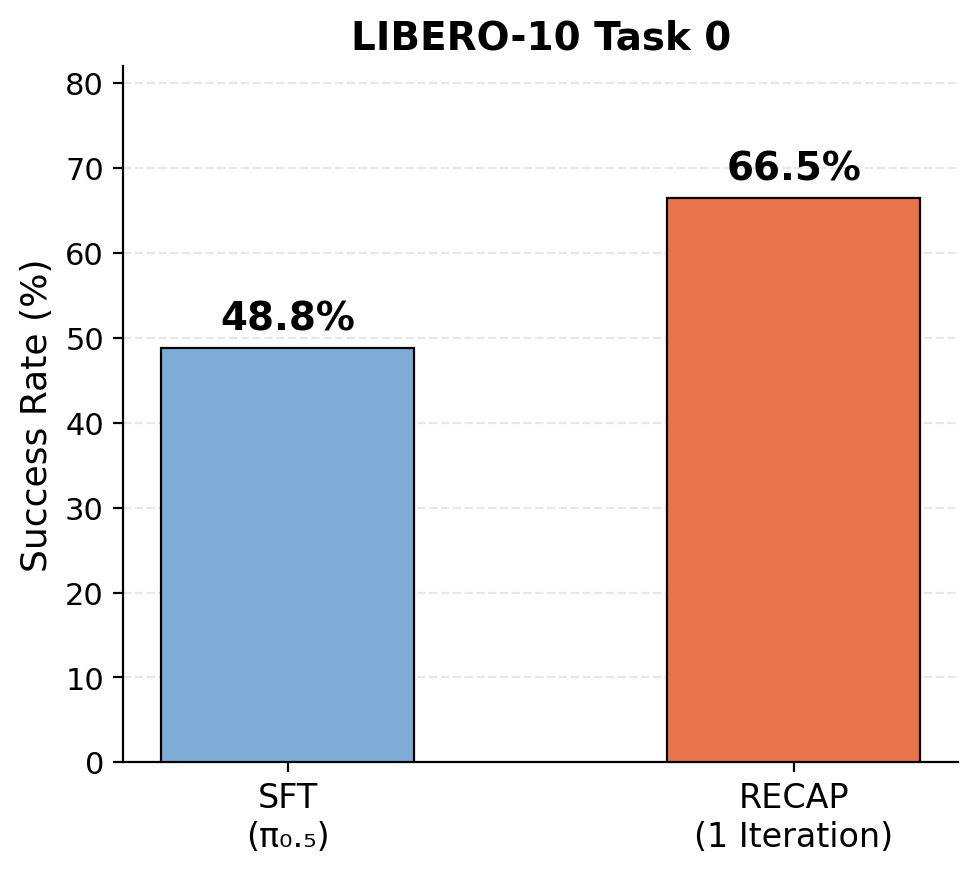
RECAP results on LIBERO-10 Task 0
Advanced Usage#
Threshold Relabeling#
To adjust the quantile threshold (e.g., from 30% to 20%) without rerunning the full Step 3,
use relabel_advantages.py for threshold-only relabeling:
cd examples/offline_rl/advantage_labeling/recap/process
python relabel_advantages.py \
    --dataset_paths /path/to/sft_dataset /path/to/rollout_dataset \
    --source_tag "fail300_N10_ckpt18000_q30" \
    --new_tag "fail300_N10_ckpt18000_q20" \
    --positive_quantile 0.2
You can also use --dataset_root to specify a root directory containing multiple datasets, with --advantage_lookahead_step to recompute advantages:
python relabel_advantages.py \
    --dataset_root /path/to/dataset_root \
    --advantage_lookahead_step 20 \
    --positive_quantile 0.3
This script reads existing continuous advantage values (advantage_continuous), updates only the threshold and boolean labels, avoiding redundant GPU inference.
Iterative Optimization#
RECAP supports iterative optimization: use the policy trained in Step 4 to collect new data, then restart from Step 1. Use different tags for each iteration to track results:
Iter 1: tag="fail300"          → Train Value Model → tag="fail300_N10_ckpt18000_q30"     → CFG Training
Iter 2: tag="fail300_iter2"    → Train Value Model → tag="fail300_iter2_N10_ckpt6000_q20" → CFG Training
File Structure#
examples/offline_rl/
├── config/                                  # shared production configs
│   ├── recap_compute_returns.yaml           # Step 1
│   ├── recap_value_model_sft.yaml           # Step 2
│   ├── recap_compute_advantages.yaml        # Step 3
│   ├── cfg_rl_openpi.yaml                   # Step 4
│   └── model/
│       └── recap_value_model.yaml           # value model architecture defaults
├── advantage_labeling/
│   └── recap/
│       ├── train_value.py                    # Step 2: value model training
│       ├── run_value_sft.sh                  # Step 2 launch script
│       └── process/
│           ├── compute_returns.py            # Step 1: returns logic + Hydra entry
│           ├── compute_advantages.py         # Step 3: advantage logic + Hydra entry
│           ├── relabel_advantages.py         # threshold relabeling (CPU)
│           ├── visualize_advantage_dataset.py    # advantage visualization
│           ├── run_compute_returns.sh        # Step 1 launch script
│           └── run_compute_advantages.sh     # Step 3 launch script
└── policy_optimization/
    └── cfg_rl/
        ├── train_cfg.py                      # Step 4: CFG policy training
        └── run_cfg_rl.sh                     # Step 4 launch script

rlinf/
├── models/embodiment/value_model/recap/     # value critic, config, checkpoint utils
├── data/datasets/recap/                     # value_dataset.py, cfg_model.py, ...
└── data/process/                            # shared, model-agnostic (RECAP + STEAM)
    ├── advantage.py                          # quantile threshold + boolean label
    ├── distributed.py                        # sharded-inference helpers
    └── mixture_config.py                     # meta/mixture_config.yaml tag I/O