
Dual Franka PICO Collection and DAgger#
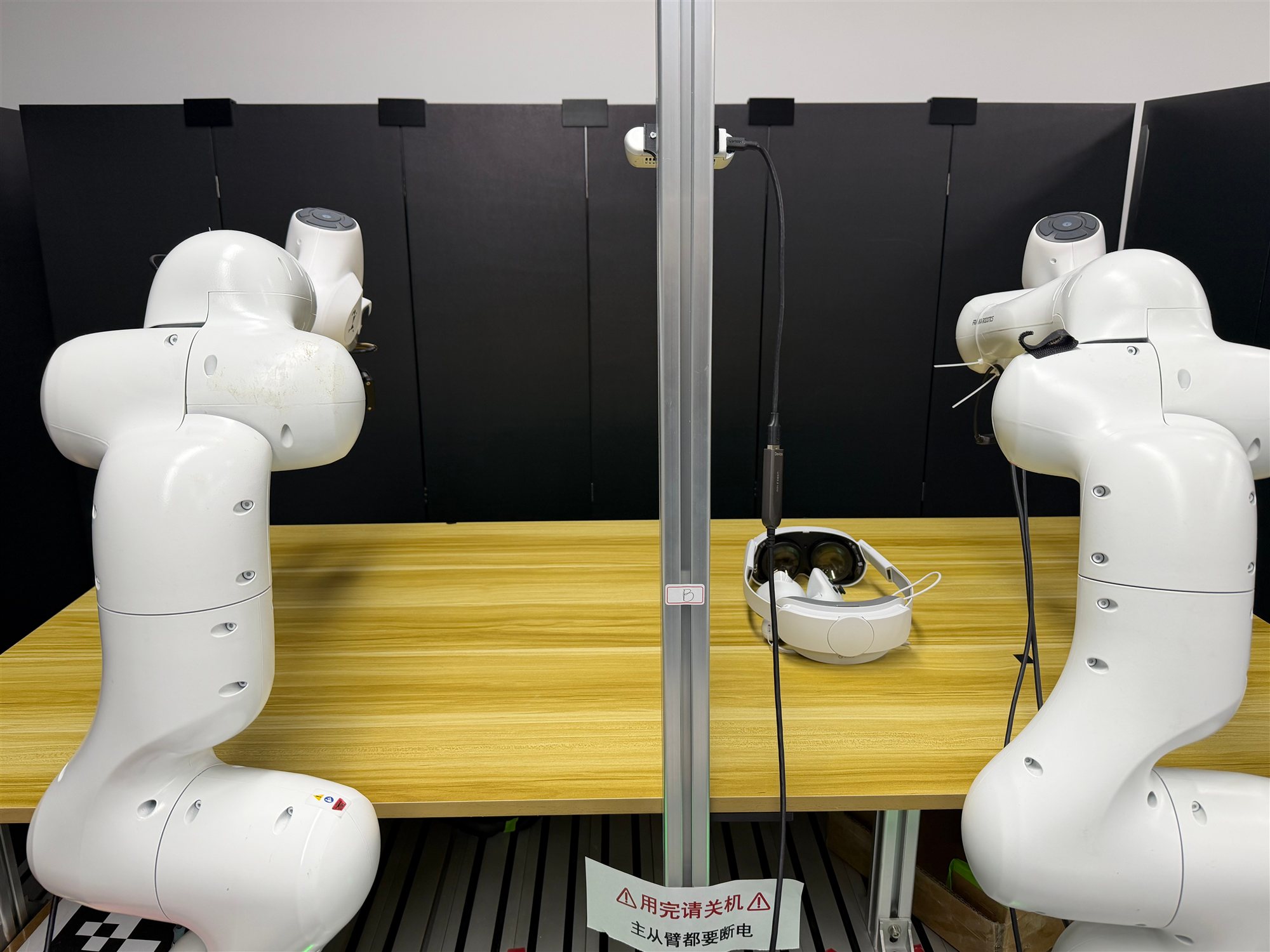
Collect dual-Franka teleoperation data with VR / PICO.#
This guide explains how to use PICO to collect demonstrations in the dual-Franka TCP-rot6d environment, then run online Human-Gated DAgger with PICO human interventions. For dual-arm hardware, real-time kernel, and camera checks, start with Using Dual Franka; for the PICO / XRoboToolkit data publishing pipeline, see Real-World Franka with VR Teleoperation; for the single-arm HG-DAgger workflow, see Using HG-DAgger with Franka.
Overview#
Use the left and right PICO controllers to control the two Franka arms. First collect tcp_rot6d LeRobot data, then prepare the OpenPI π₀.₅ student checkpoint by following Using Dual Franka, and finally launch online HG-DAgger on the real robot.
OpenPI π₀.₅
SFT · HG-DAgger
Dual-arm manipulation
2× Franka · PICO · 3 cameras
Tasks#
Task |
Config / entry point |
Description |
|---|---|---|
PICO stream |
|
Publish headset, controller, and button data from PICO / XRoboToolkit. |
Collection |
|
Collect tcp_rot6d LeRobot data with two-hand PICO teleoperation. |
HG-DAgger |
|
Let the policy act autonomously with per-arm PICO intervention, archive complete successful trajectories, and train on fully intervened action chunks. |
Observation and Action#
Field |
Description |
|---|---|
Observation |
Left wrist, right wrist, and global camera views plus dual-arm TCP / gripper state. |
Action |
Dual-arm tcp_rot6d: |
Reward |
Success / failure labels from the foot pedal. |
Prompt |
|
Installation and Node Layout#
Software Environment#
Robot Nodes#
Run the robot-node installation on every node that directly communicates with
a Franka. Choose LIBFRANKA_VERSION from the official Franka compatibility
matrix; avoid
libfranka 0.18.0.
git clone https://github.com/RLinf/RLinf.git
cd RLinf

export LIBFRANKA_VERSION=0.15.0       # replace with your compatible version
bash requirements/install.sh embodied --env franka-franky --use-mirror
source .venv/bin/activate
The franka-franky environment installs the franka extra, including
pyzmq for the PICO consumer side. See Real-World Franka with VR Teleoperation for the PICO headset,
XRoboToolkit PC Service, and vr_data_publisher setup and validation.
Inference Node#
Run the OpenPI environment on the GPU inference node used by the online DAgger actor / rollout components:
git clone https://github.com/RLinf/RLinf.git
cd RLinf
bash requirements/install.sh embodied --model openpi --env maniskill_libero
source .venv/bin/activate
Ray Node Layout#
The collection config uses two Franka nodes:
Rank |
Role |
Notes |
|---|---|---|
|
Left-arm control, env worker, three cameras, PICO consumer |
Requires the foot pedal and access to the PICO ZeroMQ address. |
|
Right-arm control |
Only needs the right-arm Franka / Robotiq control path. |
The online DAgger config uses three nodes:
Rank |
Role |
Notes |
|---|---|---|
|
inference / rollout / actor |
Usually the GPU node running OpenPI. |
|
Left-arm control, env worker, three cameras, PICO consumer |
Requires the foot pedal and access to the PICO ZeroMQ address. |
|
Right-arm control |
Only needs the right-arm Franka / Robotiq control path. |
Warning
Ray captures the Python interpreter and environment variables at
ray start time. Before starting Ray, finish setting
source .venv/bin/activate, PYTHONPATH, RLINF_NODE_RANK,
RLINF_KEYBOARD_DEVICE, and the ROS / Franka environment variables.
Cluster Setup#
Before running the experiment, set up the Ray cluster correctly.
Warning
This step is critical. Small configuration mistakes can lead to missing dependencies or failure to control the robot.
RLinf uses Ray for distributed execution. When you run ray start on a node,
Ray records the current Python interpreter path and environment variables; all
processes that Ray launches on that node inherit the same environment.
RLinf provides ray_utils/realworld/setup_before_ray.sh to help set a
consistent environment before starting Ray on each node. Modify it for your
setup and source it on every node.
The script usually handles:
Sourcing the correct virtual environment when using a custom installation.
Loading the runtime environment required by Franka, Robotiq, and cameras on Franka controller nodes.
Setting RLinf environment variables on all nodes:
export PYTHONPATH=<path_to_your_RLinf_repo>:$PYTHONPATH
export RLINF_NODE_RANK=<node_rank_of_this_node>
export RLINF_COMM_NET_DEVICES=<network_device_for_communication> # optional if there is only one NIC
RLINF_NODE_RANK should be set to 0 ~ N-1 across the N nodes in the
cluster. It uniquely identifies each node in the config. The PICO consumer /
env worker node also needs the foot-pedal device exported before ray start:
export RLINF_KEYBOARD_DEVICE=/dev/input/eventXX
For collection, N=2: rank 0 is left arm / env / PICO consumer, and
rank 1 is right arm. For DAgger, N=3: rank 0 is OpenPI inference /
actor, rank 1 is left arm / env / PICO consumer, and rank 2 is right
arm.
After the environment is ready, start Ray on each node:
<head_node_ip_address> must be reachable by all other cluster nodes.
# On the head node (node rank 0)
ray start --head --port=6379 --node-ip-address=<head_node_ip_address>

# On worker nodes (node rank 1 ~ N-1)
ray start --address='<head_node_ip_address>:6379'
Use ray status to check that the cluster started correctly.
Configuration#
Main Config Files#
Config |
Purpose |
|---|---|
|
PICO dual-arm tcp_rot6d data collection. |
|
Online HG-DAgger with PICO human intervention. |
|
Default real-world dual-arm TCP-rot6d environment config. |
Hardware Placeholders#
Replace the following fields in the collection and DAgger configs:
LEFT_ROBOT_IP/RIGHT_ROBOT_IP: FCI IPs for the left and right arms.BASE_CAMERA_SERIAL,LEFT_CAMERA_SERIAL,RIGHT_CAMERA_SERIAL: RealSense / Lumos camera serials or stable/dev/v4l/by-idpaths.base_camera_type,left_camera_type,right_camera_type: camera types, usuallyrealsense,lumos,lumos.left_gripper_type/right_gripper_type: left and right gripper types.LEFT_GRIPPER_CONNECTION/RIGHT_GRIPPER_CONNECTION: stable/dev/serial/by-idpaths for the left and right gripper adapters.left_controller_node_rank/right_controller_node_rank: ranks of the left and right arm controller nodes. The collection config usually uses0/1; the three-node DAgger config usually uses1/2.node_rank: rank of the env / PICO consumer node that owns the DualFranka hardware config. The collection config usually uses0; the three-node DAgger config usually uses1.TASK_DESCRIPTION: task text used by collection and DAgger. It should match the task text used to train the checkpoint.joint_reset_qpos: set from first-frame joint means in the collected data, or from a safe home pose.target_ee_poseandee_pose_limit_min/max: re-check for your workspace.
PICO Config#
The collection config uses env.eval.pico.zmq_addr; the DAgger config uses
env.train.pico.zmq_addr. This address must match the publisher bind address.
The ZeroMQ stream is subscribed by the env worker / PICO intervention node. In
this guide’s config, that is the rank 0 left-arm controller node during
collection, and the rank 1 left-arm controller node during DAgger.
For dual-arm PICO teleoperation, set pico.hand to "dual" so the left
and right PICO controllers bind to the left and right robot arms.
env:
  train:
    smooth_intervene: True
    use_spacemouse: False
    use_pico: True
    pico:
      zmq_addr: "tcp://<vr_publisher_ip>:<port>"
      hand: "dual"
      control_trigger: "grip"
      calibration:
        button: "trigger"
If the publisher and env worker run on the same machine, use
ipc:///tmp/vr_data.ipc. If they run on different machines, bind the
publisher to tcp://0.0.0.0:<port> and set the RLinf consumer to
tcp://<vr_publisher_ip>:<port>. Do not use 0.0.0.0 as the consumer
address.
Default controller semantics:
left grip  -> intervene on the left arm
right grip -> intervene on the right arm
left X/Y   -> close / open left gripper
right A/B  -> close / open right gripper
trigger    -> recalibrate the operator base from the current headset heading
hold_current_when_inactive differs between collection and DAgger:
Collection uses
True: an inactive arm holds the current TCP, which is suitable for pure teleoperation collection.DAgger uses
False: an inactive arm retains its rollout action. When eithergripis held, only that arm’s action is replaced by the corresponding PICO action, while the other arm retains its rollout action.
Dual-arm DAgger composes intervention records per arm. For example, when only
the left arm is being intervened on, the 20D action that is executed and written
to intervene_action is:
[left-arm PICO 10D action, right-arm rollout 10D action]
The reverse applies when only the right arm is being intervened on. Replacing
either arm sets intervene_flag=True; no intervention record is produced only
when neither arm is being intervened on. The online LeRobot collector still
stores the complete successful episode. With only_save_expert: True, the
sampler uses intervene_flag to expose only action chunks whose non-padded
frames are all human corrections.
Start the PICO Data Stream#
Start the XRoboToolkit PC Service on the PICO publisher machine, then start the VR data publisher. The concrete installation paths are described in Real-World Franka with VR Teleoperation.
cd /opt/apps/roboticsservice
bash runService.sh
cd /path/to/pico_software/XRoboToolkit-Teleop-Sample-Python
source .venv/bin/activate
cd /path/to/pico_software
python -m vr_data_publisher --config configs/vr_bridge.yaml
On the node running the env worker, verify that PICO data is reachable:
cd /path/to/RLinf
source .venv/bin/activate
export PYTHONPATH=$PWD:${PYTHONPATH:-}
python toolkits/realworld_check/test_pico_data.py \
    --zmq-addr tcp://<vr_publisher_ip>:<port>
Only continue to real-robot collection or DAgger after the output refreshes
continuously and grip, trigger, A/B, and X/Y change as expected.
Collect PICO Demonstrations#
Run Collection#
After the left and right Franka arms, Robotiq grippers, cameras, foot pedal, PICO data stream, and collection Ray cluster are ready, run this on the head node:
bash examples/embodiment/collect_data.sh realworld_dual_franka_collect_data_pico
Foot-pedal keys:
a: start recording; pressing it again while recording aborts the current buffer and discards it.b: incrementsegment_idfor subtask boundaries.c: mark success, write the LeRobot shard, and end the current episode.
PICO operation:
Wear the headset and face the front of the workspace.
Pull
triggerto calibrate the PICO base.Hold left / right
gripto intervene on the left / right arm.Use
X/Yfor the left gripper andA/Bfor the right gripper.When one hand releases
grip, the corresponding arm holds the current TCP.
The collection script writes under logs/<timestamp>/:
replay-buffer trajectories:
demos/LeRobot data:
collected_data/rank_0/id_0/; later shards areid_1,id_2
PICO dual-arm collection already uses the realworld_dual_franka_tcp_rot6d
environment, so the actions are already tcp_rot6d. You do not need to run the
backfill_tcp_rot6d.py step used by the GELLO joint-data workflow.
Note
data_collection.resume: True only resumes under the same save_dir.
collect_data.sh creates a new logs/<timestamp> directory by default.
To append across runs, set data_collection.save_dir to a fixed path.
Prepare the Checkpoint#
Online DAgger requires a deployable OpenPI checkpoint. For data organization, normalization stats, SFT, and checkpoint directory preparation, follow the SFT and deployment-checkpoint sections in Using Dual Franka.
When using data collected from this page, the data already comes from the
realworld_dual_franka_tcp_rot6d environment, so do not run the GELLO
joint-data backfill_tcp_rot6d.py step again.
After the checkpoint is ready, set the following in
examples/embodiment/config/realworld_dual_franka_dagger_openpi.yaml:
rollout:
  model:
    model_path: /path/to/deploy/global_step_<N>

actor:
  model:
    openpi_data:
      repo_id: <repo_id>/tcp_rot6d_v1
Run Online HG-DAgger#
Check Key DAgger Settings#
Before launch, confirm these fields:
algorithm:
  dagger:
    only_save_expert: True
    online_lerobot:
      enabled: True
      only_success: True
      robot_type: "dual_FR3"
      fps: 10
      finalize_interval: 1
      data_path: ${runner.logger.log_path}/online_lerobot
      rolling_lerobot_window_size: 50000
      min_frames: 1
      lerobot_num_workers: 0

env:
  train:
    smooth_intervene: True
    use_spacemouse: False
    use_pico: True
    keyboard_reward_wrapper: eval_control
    pico:
      zmq_addr: "tcp://<vr_publisher_ip>:<port>"
      hand: "dual"
      hold_current_when_inactive: False
  eval:
    use_spacemouse: False
    use_pico: False
online_lerobot.enabled: True enables the online LeRobot data path. The env worker collects rollouts by episode and sends episodes that satisfy the configured filters to the actor; the actor adds them to RollingLeRobotDataset for training, so online training no longer uses the trajectory replay buffer.
smooth_intervene: True removes action-chunk boundary stalls while PICO is active. If the final frame of a chunk is human-controlled, the env worker skips the next policy inference and executes a shape-compatible dummy chunk instead. PICO actions still override active arms, while inactive frames hold the measured TCP pose. Normal model inference resumes after the final chunk frame is no longer intervened or the episode ends. This mode is PICO-only (use_pico: True, use_spacemouse: False) and currently requires one environment per env-worker pipeline stage.
only_success: True discards failed rollouts and keeps only successful episodes. only_save_expert: True still archives each complete successful episode, but training only samples chunk starts where every non-padded frame in the action chunk has intervene_flag=True. Because a dual-arm frame is marked as an intervention when either arm is replaced, such a chunk may combine one arm’s PICO action with the other arm’s rollout action. Every successful episode is archived immediately under ${runner.logger.log_path}/online_lerobot/rank_0/id_<N>/. env.eval.use_pico: False means evaluation uses the policy alone, without human intervention.
The real-world DAgger config intentionally omits beta-related fields because it does not configure rollout.expert_model. Beta only controls action mixing between a model expert and the student; human intervention here is determined by the PICO intervention wrapper.
Run DAgger#
After the DAgger Ray cluster is running, start online training on the head node:
bash examples/embodiment/run_realworld_async.sh realworld_dual_franka_dagger_openpi
During the run:
a: start one policy rollout from idle.left / right
grip: intervene on the corresponding arm; the other arm continues executing the policy action if it is not being intervened on.b: mark failure and end the current rollout.c: mark success and end the current rollout.
After each episode, the env resets and waits for a again. During policy
execution, hold grip only when you need to correct the policy, then release
it to let the policy continue. Holding either grip combines that arm’s PICO
action with the other arm’s rollout action into a complete 20D
info["intervene_action"]. After a successful termination, the complete
episode is sent in memory to the actor and written as an online LeRobot shard;
failed episodes are discarded. The actor retains the complete physical archive
but exposes only fully intervention-labeled chunks to training.
Monitoring#
Start TensorBoard:
tensorboard --logdir ./logs
Recommended metrics:
train/dagger/actor_loss: supervised loss on expert-only action chunks.train/lerobot_dataset/total_episodes: number of successful episodes received by the actor.train/lerobot_dataset/physical_frames: number of received LeRobot physical frames.train/lerobot_dataset/logical_samples: number of expert-valid trainable chunk starts in the rolling window.train/lerobot_dataset/num_sub_datasets: number of currently loaded LeRobot shards.train/actor/lrandtrain/actor/grad_norm: training stability.
During collection and online DAgger, inspect logs/<timestamp>/run_embodiment.log
to confirm the successful episode count and the LeRobot write path. Online
DAgger shards are stored under
logs/<timestamp>-realworld_dual_franka_dagger_openpi/online_lerobot/rank_0/.
Troubleshooting#
- DAgger waits too long and does not start
This is expected behavior for
keyboard_reward_wrapper: eval_control. If DAgger waits for a long time after launch, press the foot pedal mapped to keyboardato start the rollout.